 0
0
 0
0
Bringing Snowflake Cortex Code into JetBrains DataGrip with ACP: A few weeks ago a new acronym started showing up in the Snowflake AI world: ACP — Agent Client Protocol. I already knew Snowflake Cortex Code (CoCo). I had even used it inside VS Code through Snowflake’s official extension. So my first reaction was confusion:
If Cortex Code already works in VS Code, why do I need ACP at all?
And behind that came a second question:
Where does ACP actually fit? What problem is it solving?
I picked JetBrains DataGrip, plugged Snowflake Cortex Code into it as an external AI agent over ACP, and watched what happened. Here is what I learned.
This post walks through what I learned.
First: What exactly is ACP?
ACP stands for Agent Client Protocol.
The simplest way I found to understand it is this:
ACP provides a standard way for an IDE or editor to communicate with an AI coding agent.
In our example:
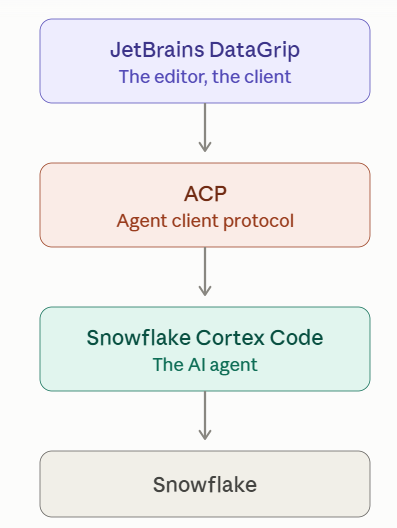
DataGrip is the client/editor. Snowflake Cortex Code is the AI agent. ACP is the communication layer between them. That is really the core idea.
Why do we need ACP?
Snowflake already provides an excellent Cortex Code experience in VS Code. So if you are using VS Code, you may not need ACP at all.
But developers don’t all use the same IDE. Some developers work with JetBrains products such as:
DataGrip
IntelliJ IDEA
PyCharmThe question then becomes:
How can Snowflake make Cortex Code available inside those development environments without creating a completely separate custom integration for every IDE?
This is where ACP becomes useful. Instead of building something like:
CoCo → custom DataGrip integration

CoCo → custom IntelliJ integration

CoCo → custom Zed integration

CoCo → custom Neovim integration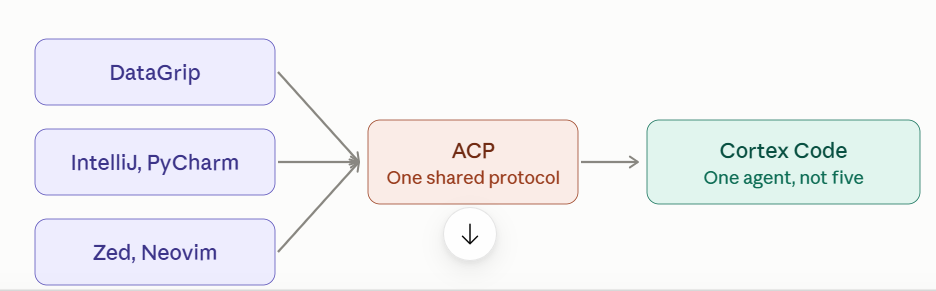
What problem does ACP solve?
Imagine that I am a Snowflake developer using DataGrip every day.
My SQL files are already there. My project is already there. My development workflow is already there.
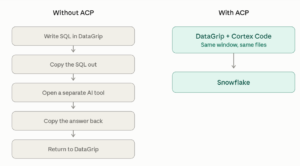
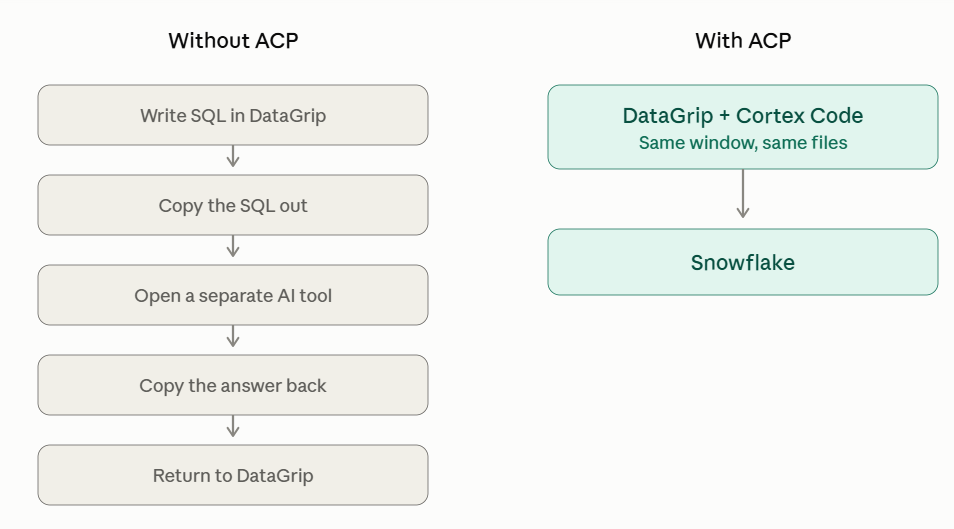
Without an integration, I may need to move between tools:
What are we building in this experiment?
For this hands-on exercise, I wanted to keep the use case deliberately simple.
The goal was:
Use Snowflake Cortex Code directly inside JetBrains DataGrip through ACP.
The architecture we implemented was:
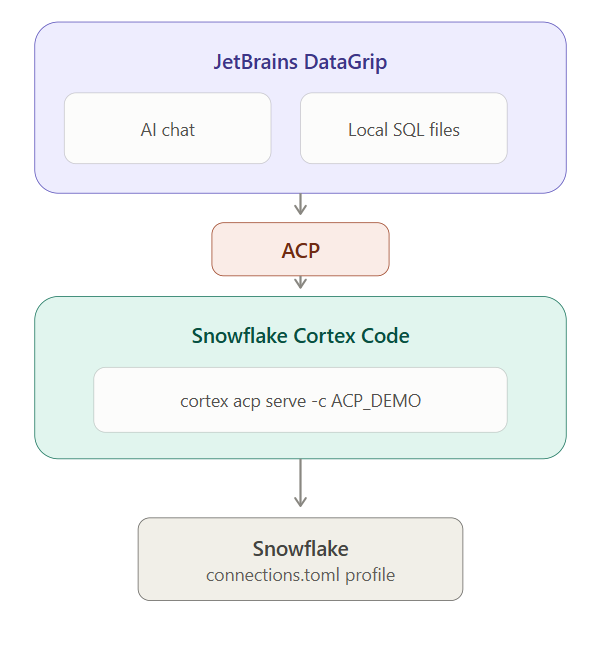
Step 1: Install DataGrip
I started with JetBrains DataGrip. JetBrains is the company. DataGrip is the IDE.
I did not need to install every JetBrains product. I only needed DataGrip for this experiment.
Step 2: Open AI Chat and add a custom agent
Inside DataGrip, I opened:
AI ChatAdd Custom Agent~/.jetbrains/acp.json{
"default_mcp_settings": {}
}Step 3: Install Snowflake Cortex Code CLI
Next, I installed Cortex Code CLI on Windows.
From PowerShell:
irm https://ai.snowflake.com/static/cc-scripts/install.ps1 | iexcortex --versionCortex Code v1.1.60Step 4: Configure the Snowflake connection
Cortex Code needs its own Snowflake connection.
The configuration is stored in:
C:\Users\<user>\.snowflake\connections.toml[ACP_DEMO]
account = "<snowflake-account>"
user = "<login-name>"
authenticator = "externalbrowser"
warehouse = "CI_WH"
role = "<role>"
database = "MCP_DEMO_DB"
schema = "ANALYTICS"Step 5: Configure Cortex Code as an ACP agent
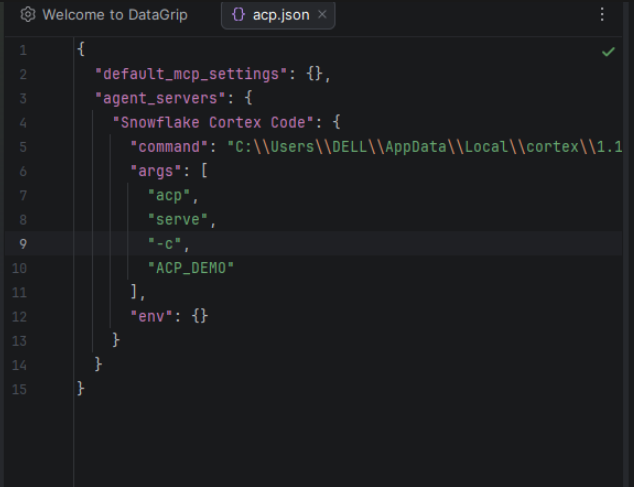
Now came the actual ACP configuration.
Inside:
~/.jetbrains/acp.json{ "default_mcp_settings": {},
"agent_servers": {
"Snowflake Cortex Code": {
"command": "C:\\Users\\<user>\\AppData\\Local\\cortex\\<version>\\cortex.exe",
"args": [
"acp",
"serve",
"-c",
"ACP_DEMO"
],
"env": {}
}
}
}cortex.exe
+
acp serve
+
ACP_DEMOStart Snowflake Cortex Code, run it as an ACP agent, and use my
ACP_DEMOSnowflake connection.
And then something interesting happened
When I returned to the DataGrip AI Chat agent selector, I could see:
Claude Agent
Codex
GitHub Copilot
Junie
✓ Snowflake Cortex Code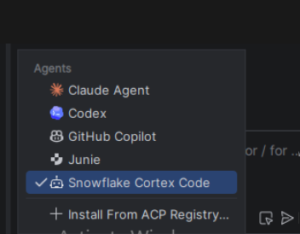
This was the moment the architecture became real.
Cortex Code was now available as an AI agent inside DataGrip.
First test: Can DataGrip really reach Snowflake through CoCo?
I kept the first test deliberately simple.
I asked:
Show me my current Snowflake user, role, warehouse, database and schema. Do not create or modify any Snowflake objects.
Cortex Code invoked Snowflake and returned:
User       SMITTAL
Role       ACCOUNTADMIN
Warehouse  CI_WH
Database   MCP_DEMO_DB
Schema     ANALYTICS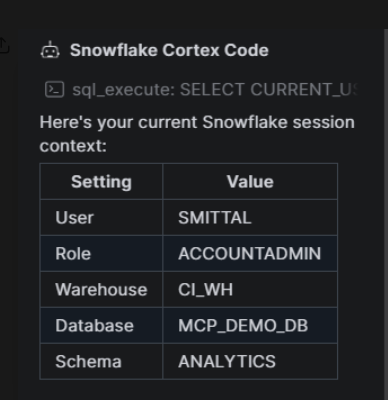
Second test: Can Cortex Code understand my local SQL file?
This, for me, was an even more useful demonstration.
I created a simple local file in DataGrip:
test_query.sqlSELECT *
FROM SNOWFLAKE.ACCOUNT_USAGE.QUERY_HISTORY
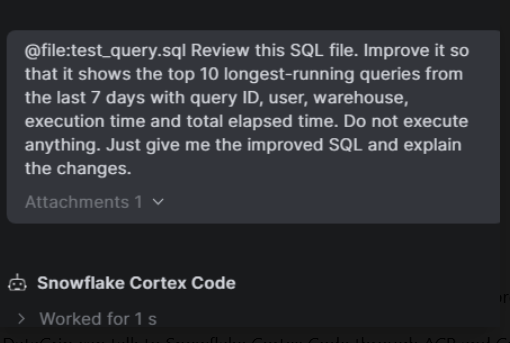
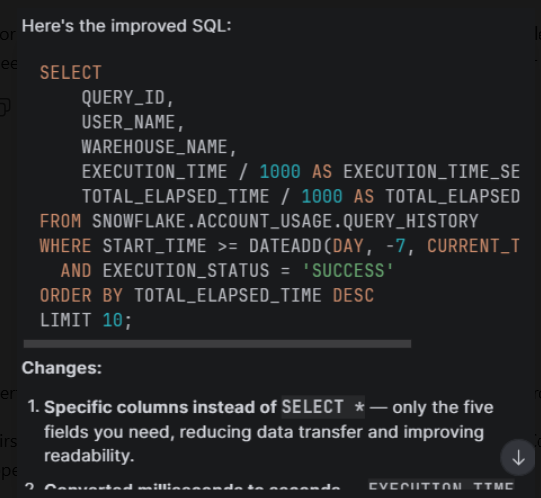
WHERE START_TIME >= DATEADD(DAY, -7, CURRENT_TIMESTAMP());@file:test_query.sqlReview this SQL file. Improve it so that it shows the top 10 longest-running queries from the last 7 days with query ID, user, warehouse, execution time and total elapsed time. Do not execute anything. Just give me the improved SQL and explain the changes.
Cortex Code understood the attached SQL file and suggested an improved version using specific columns instead of SELECT *, sorting by elapsed time, limiting the result and making the query easier to analyze.
So what does ACP give a Snowflake developer?
After implementing it myself, I would summarize the benefit like this:
ACP allows me to bring Snowflake Cortex Code into an ACP-compatible development environment rather than forcing me to move my development workflow to a different tool.
I can stay inside DataGrip, give Cortex Code my local SQL context, ask Snowflake-aware questions, and let the agent work with the environment where I am already developing.
Final thoughts
After implementing it, the concept became much simpler.
ACP is not another Snowflake AI model.
It is not replacing Cortex Code.
And it is not replacing the IDE.
It is the standardized communication layer that allows an ACP-compatible development environment to host and interact with an external AI agent such as Snowflake Cortex Code.
For Snowflake developers who already use VS Code, Snowflake’s native integration may be the easiest path.