 0
 0
Data Quality using Metadata: Consider a Snowflake environment containing 100 tables, each requiring five data quality checks.That represents 500 quality rule associations. While Snowflake simplifies defining and attaching individual DMFs, maintaining those associations, tracking execution, and consolidating results can require additional operational logic.
A traditional implementation might involve repeatedly writing statements such as:
ALTER TABLE CUSTOMER ADD DATA METRIC FUNCTION SNOWFLAKE.CORE.NULL_COUNT ON (C_PHONE);
This approach works, but what happens when:
- New tables are onboarded?
- Business rules change?
- Different tables require different validations?
- A team needs to execute checks immediately after a data load?
- Developers want centralized visibility into quality results?
The real challenge is building a consistent and reusable process to manage them.
How Snowflake Data Metric Functions work
A Data Metric Function (DMF) is a Snowflake-native function that measures one characteristic of your data and returns a number.
Built-in DMFs live in SNOWFLAKE.CORE and cover the common checks:
NULL_COUNT— NULL values in a columnDUPLICATE_COUNT— duplicate values in a columnACCEPTED_VALUES— values that violate an allowed-values expression
Custom DMFs encode business rules. Example: customers whose balance exceeds a threshold.
CREATE OR REPLACE DATA METRIC FUNCTION CHECK_HIGH_ACCTBAL (
    T TABLE(C_ACCTBAL NUMBER)
)
RETURNS NUMBER
AS $$
    SELECT COUNT(*) FROM T WHERE C_ACCTBAL > 9000
$$;
The native lifecycle has three moves:
- Attach —
ALTER TABLE ... ADD DATA METRIC FUNCTION ... ON (col) - Schedule —
ALTER TABLE ... SET DATA_METRIC_SCHEDULE = '...'(one schedule per table) - Measure — on schedule, or by invoking the DMF directly in a
SELECT
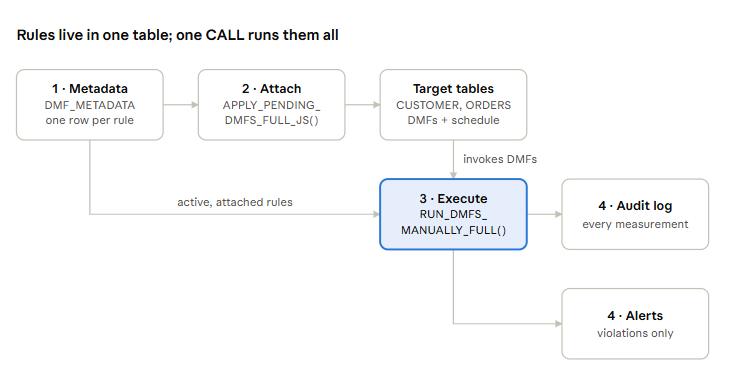
The idea: metadata is the control plane
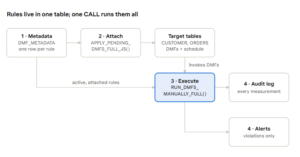
One row in DMF_METADATA = one data quality rule. The procedures hold the logic; the table holds the intent.
The solution contains four logical layers.
Configuration layer: The metadata table stores quality rules and their operational status.
Attachment layer: A JavaScript stored procedure applies pending DMF associations to target tables.
Execution layer: A second procedure evaluates active rules on demand.
Monitoring layer: Audit and alert tables capture quality measurements and violations.
Technical Implementation
Now let’s look at the actual framework components and how they work together.
Step 1 – Create the Metadata Control Table
This is the foundation of the solution.
Instead of maintaining rule definitions inside multiple scripts, we store their configuration centrally.
CREATE OR REPLACE TABLE DMF_METADATA (
    RULE_NAME STRING,
    TABLE_NAME STRING,
    COLUMN_NAME STRING,
    DMF_NAME STRING,
    DMF_TYPE STRING,
    MODE_OF_DMF STRING,
    DMF_APPLIED_FLAG STRING DEFAULT 'N',
    ATTACHED_AT TIMESTAMP,
    MEASUREMENT_TIME TIMESTAMP,
    ACTIVE_FLAG STRING DEFAULT 'Y',
    UNSET_AT TIMESTAMP,
    UNSET_BY STRING,
    DMF_SCHEDULE STRING,
    SCHEDULE_APPLIED_FLAG STRING DEFAULT 'N',
    SCHEDULE_ATTACHED_AT TIMESTAMP,
    DMF_ARGS STRING
);
Some important columns are:
RULE_NAME: Business-friendly description.TABLE_NAMEandCOLUMN_NAME: Target of the quality check.DMF_NAME: Name of the built-in or custom DMF.DMF_TYPE: Distinguishes built-in functions from custom functions.ACTIVE_FLAG: Determines whether a rule is eligible for processing.DMF_APPLIED_FLAG: Indicates whether the framework successfully attached the rule.DMF_ARGS: Stores additional arguments for functions such asACCEPTED_VALUES.MEASUREMENT_TIME: Stores the latest successful measurement timestamp.
Why is this important?
Because these columns allow the stored procedures to discover their work from metadata rather than requiring new execution code for every configured rule.
Step 2 — Register Data Quality Rules
Once the metadata table is created, we can register quality rules as configuration records.
For example:
INSERT INTO DMF_METADATA
(
    RULE_NAME,
    TABLE_NAME,
    COLUMN_NAME,
    DMF_NAME,
    DMF_TYPE,
    MODE_OF_DMF,
    ACTIVE_FLAG,
    DMF_SCHEDULE,
    DMF_ARGS
)
VALUES
(
    'Phone Nulls',
    'CUSTOMER',
    'C_PHONE',
    'NULL_COUNT',
    'BUILT-IN',
    'FULL',
    'Y',
    'USING CRON 0 1 1 1 * UTC',
    NULL
);
Another example uses ACCEPTED_VALUES:
INSERT INTO DMF_METADATA
(
    RULE_NAME,
    TABLE_NAME,
    COLUMN_NAME,
    DMF_NAME,
    DMF_TYPE,
    MODE_OF_DMF,
    ACTIVE_FLAG,
    DMF_SCHEDULE,
    DMF_ARGS
)
VALUES
(
    'Valid Segment Code',
    'CUSTOMER',
    'C_MKTSEGMENT',
    'ACCEPTED_VALUES',
    'BUILT-IN',
    'FULL',
    'Y',
    'USING CRON 0 1 1 1 * UTC',
    'C_MKTSEGMENT, C_MKTSEGMENT ->
       C_MKTSEGMENT IN (
         ''BUILDING'', ''FURNITURE'',
         ''AUTOMOBILE'', ''HOUSEHOLD'',
         ''MACHINERY''
       )'
);
Notice the difference.
The first rule needs only a column name.The second requires a Boolean validation expression, which we store in DMF_ARGS.
This enables the framework to support different DMF argument requirements.
At this stage, we have only registered the rules. We haven’t attached or executed them.
That’s the responsibility of our stored procedures.
Procedure 1 : APPLY_PENDING_DMFS_FULL_JS: metadata to attachments
This procedure reads active rules and makes Snowflake match the metadata: it sets the table schedule once, attaches every pending DMF, and writes the result back.
The logic in five steps:
- Select rules where
ACTIVE_FLAG = 'Y'andMODE_OF_DMF = 'FULL' - For each table not yet scheduled, run
SET DATA_METRIC_SCHEDULEonce (tracked in a JS map so it isn’t repeated per rule) - For each rule with
DMF_APPLIED_FLAG <> 'Y', build theADD DATA METRIC FUNCTIONstatement:- Built-in with
DMF_ARGS→SNOWFLAKE.CORE.<dmf> ON (<args>) - Built-in without args →
SNOWFLAKE.CORE.<dmf> ON (<col>) - Custom →
<dmf> ON (<col>)
- Built-in with
- On success, set
DMF_APPLIED_FLAG = 'Y'and stampATTACHED_AT - Return a summary: schedules applied, DMFs applied
CREATE OR REPLACE PROCEDURE APPLY_PENDING_DMFS_FULL_JS()
RETURNS STRING
LANGUAGE JAVASCRIPT
EXECUTE AS CALLER
AS
$$
var rs = snowflake.createStatement({sqlText: `
  SELECT RULE_NAME, TABLE_NAME, COLUMN_NAME, DMF_NAME, DMF_TYPE,
         DMF_SCHEDULE, SCHEDULE_APPLIED_FLAG, DMF_APPLIED_FLAG, DMF_ARGS
  FROM DMF_METADATA
  WHERE ACTIVE_FLAG = 'Y' AND MODE_OF_DMF = 'FULL'`}).execute();

var schedule_tables = {}, dmfs_applied = 0, schedules_applied = 0;

while (rs.next()) {
  var rule  = rs.getColumnValue('RULE_NAME');
  var table = rs.getColumnValue('TABLE_NAME');
  var col   = rs.getColumnValue('COLUMN_NAME');
  var dmf   = rs.getColumnValue('DMF_NAME');
  var type  = rs.getColumnValue('DMF_TYPE');
  var sched = rs.getColumnValue('DMF_SCHEDULE') || 'USING CRON 0 1 1 1 * UTC';
  var sFlag = rs.getColumnValue('SCHEDULE_APPLIED_FLAG');
  var dFlag = rs.getColumnValue('DMF_APPLIED_FLAG');
  var args  = rs.getColumnValue('DMF_ARGS');

  // 1) Schedule once per table
  if (sFlag !== 'Y' && !schedule_tables[table]) {
    try {
      snowflake.createStatement({sqlText:
        `ALTER TABLE DMF_DB.PUBLIC.${table} SET DATA_METRIC_SCHEDULE = '${sched}'`}).execute();
      snowflake.createStatement({sqlText: `
        UPDATE DMF_METADATA SET SCHEDULE_APPLIED_FLAG = 'Y',
               SCHEDULE_ATTACHED_AT = CURRENT_TIMESTAMP()
        WHERE TABLE_NAME = '${table}'`}).execute();
      schedules_applied++; schedule_tables[table] = true;
    } catch (e) {}
  }

  // 2) Attach DMF if pending
  if (dFlag !== 'Y') {
    var target = (type === 'BUILT-IN') ? `SNOWFLAKE.CORE.${dmf}` : dmf;
    var onCols = (type === 'BUILT-IN' && args) ? args : col;
    try {
      snowflake.createStatement({sqlText:
        `ALTER TABLE DMF_DB.PUBLIC.${table} ADD DATA METRIC FUNCTION ${target} ON (${onCols})`}).execute();
      snowflake.createStatement({sqlText: `
        UPDATE DMF_METADATA SET DMF_APPLIED_FLAG = 'Y', ATTACHED_AT = CURRENT_TIMESTAMP()
        WHERE TABLE_NAME = '${table}' AND COLUMN_NAME = '${col}'
          AND DMF_NAME = '${dmf}' AND RULE_NAME = '${rule}' AND ACTIVE_FLAG = 'Y'`}).execute();
      dmfs_applied++;
    } catch (e) {}
  }
}
return `Schedules applied: ${schedules_applied}. DMFs applied: ${dmfs_applied}.`;
$$;
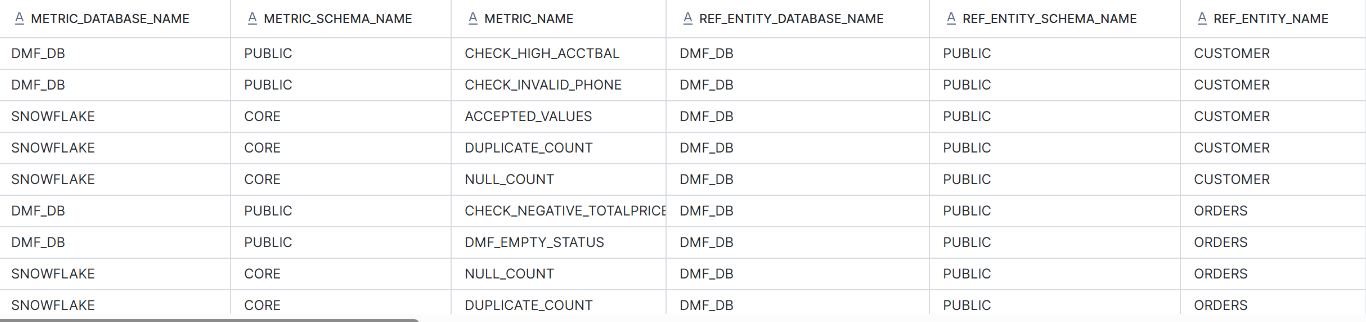
Verify against what Snowflake actually has attached, not just what the flag says:
SELECT * FROM TABLE(INFORMATION_SCHEMA.DATA_METRIC_FUNCTION_REFERENCES( REF_ENTITY_NAME => 'DMF_DB.PUBLIC.CUSTOMER', REF_ENTITY_DOMAIN => 'TABLE'));
Procedure 2 – RUN_DMFS_MANUALLY_FULL: run every active rule, now
One CALL evaluates every active, attached rule across every table, logs each result, and raises an alert for any violation.
The logic, per rule:
- Read rules where
ACTIVE_FLAG = 'Y',MODE_OF_DMF = 'FULL',DMF_APPLIED_FLAG = 'Y' - Validate table, column and DMF names against
^[A-Za-z_][A-Za-z0-9_]*$before building SQL - Pick the execution path:
- Regular built-in or custom DMF →
SELECT <dmf>(SELECT <col> FROM <table>) ACCEPTED_VALUES→SYSTEM$DATA_METRIC_SCAN, using the lambda parsed fromDMF_ARGS(after->), and count the returned violating rows
- Regular built-in or custom DMF →
- Insert the result into
DATA_QUALITY_AUDIT_LOG(always) - If the count is greater than 0, insert into
DATA_QUALITY_ALERTSwith a readable message - Stamp
MEASUREMENT_TIMEon the metadata row - Catch per-rule errors so one bad rule never stops the run
The POC uses two tables.
Data Quality Audit Log
CREATE OR REPLACE TABLE
DATA_QUALITY_AUDIT_LOG (
    TABLE_NAME STRING,
    METRIC_NAME STRING,
    RULE_NAME STRING,
    METRIC_COUNT NUMBER,
    MEASUREMENT_TIME TIMESTAMP
);
Data Quality Alerts
The second table stores detected violations.
CREATE OR REPLACE TABLE
DATA_QUALITY_ALERTS (
    TABLE_NAME STRING,
    METRIC_NAME STRING,
    RULE_NAME STRING,
    METRIC_COUNT NUMBER,
    MEASUREMENT_TIME TIMESTAMP,
    ALERT_MESSAGE STRING
);
The two execution paths, side by side:
-- Path A: direct invocation (custom + most built-ins)
SELECT DMF_DB.PUBLIC.CHECK_NEGATIVE_TOTALPRICE(
  SELECT O_TOTALPRICE FROM DMF_DB.PUBLIC.ORDERS);

-- Path B: ACCEPTED_VALUES via data metric scan
SELECT COUNT(*) FROM TABLE(SYSTEM$DATA_METRIC_SCAN(
  REF_ENTITY_NAME     => 'DMF_DB.PUBLIC.CUSTOMER',
  METRIC_NAME         => 'SNOWFLAKE.CORE.ACCEPTED_VALUES',
  ARGUMENT_NAME       => 'C_MKTSEGMENT',
  ARGUMENT_EXPRESSION => 'C_MKTSEGMENT IN (''BUILDING'',''FURNITURE'',''AUTOMOBILE'',''HOUSEHOLD'',''MACHINERY'')'));
The full procedure:
CREATE OR REPLACE PROCEDURE RUN_DMFS_MANUALLY_FULL()
RETURNS STRING
LANGUAGE JAVASCRIPT
EXECUTE AS CALLER
AS
$$
var total = 0, success = 0, alerts = 0, errors = [];

function execute(sql, binds) {
  return snowflake.createStatement({sqlText: sql, binds: binds || []}).execute();
}
function quote(v) { return "'" + String(v).replace(/'/g, "''") + "'"; }

var rules = execute(`
  SELECT RULE_NAME, TABLE_NAME, COLUMN_NAME, DMF_NAME, DMF_TYPE, DMF_ARGS
  FROM DMF_METADATA
  WHERE ACTIVE_FLAG = 'Y' AND MODE_OF_DMF = 'FULL' AND DMF_APPLIED_FLAG = 'Y'`);

while (rules.next()) {
  var rule = rules.getColumnValue(1), table = rules.getColumnValue(2),
      col  = rules.getColumnValue(3), dmf   = rules.getColumnValue(4),
      type = rules.getColumnValue(5), args  = rules.getColumnValue(6);
  total++;
  try {
    var validName = /^[A-Za-z_][A-Za-z0-9_]*$/;
    if (!validName.test(table) || !validName.test(col) || !validName.test(dmf))
      throw new Error('Invalid object identifier');

    var fullTable = 'DMF_DB.PUBLIC.' + table;
    var fullDMF   = type === 'BUILT-IN' ? 'SNOWFLAKE.CORE.' + dmf : 'DMF_DB.PUBLIC.' + dmf;
    var sql;

    if (dmf === 'ACCEPTED_VALUES' && type === 'BUILT-IN') {
      var arrow = args ? args.indexOf('->') : -1;
      if (arrow < 0) throw new Error('Missing ACCEPTED_VALUES expression');
      var expression = args.substring(arrow + 2).trim();
      sql = `SELECT COUNT(*) FROM TABLE(SYSTEM$DATA_METRIC_SCAN(
               REF_ENTITY_NAME => ${quote(fullTable)},
               METRIC_NAME => 'SNOWFLAKE.CORE.ACCEPTED_VALUES',
               ARGUMENT_NAME => ${quote(col)},
               ARGUMENT_EXPRESSION => ${quote(expression)}))`;
    } else {
      sql = `SELECT ${fullDMF}(SELECT ${col} FROM ${fullTable})`;
    }

    var r = execute(sql); r.next();
    var count = r.getColumnValue(1);
    if (count === null) throw new Error('DMF returned NULL');

    execute(`INSERT INTO DATA_QUALITY_AUDIT_LOG
             (TABLE_NAME, METRIC_NAME, RULE_NAME, METRIC_COUNT, MEASUREMENT_TIME)
             VALUES (?, ?, ?, ?, CURRENT_TIMESTAMP())`, [table, dmf, rule, count]);

    if (count > 0) {
      var msg = 'Data quality issue: ' + count + ' issue(s) for rule "' + rule + '" on table ' + table;
      execute(`INSERT INTO DATA_QUALITY_ALERTS
               (TABLE_NAME, METRIC_NAME, RULE_NAME, METRIC_COUNT, MEASUREMENT_TIME, ALERT_MESSAGE)
               VALUES (?, ?, ?, ?, CURRENT_TIMESTAMP(), ?)`, [table, dmf, rule, count, msg]);
      alerts++;
    }

    execute(`UPDATE DMF_METADATA SET MEASUREMENT_TIME = CURRENT_TIMESTAMP()
             WHERE TABLE_NAME = ? AND COLUMN_NAME = ? AND DMF_NAME = ?
               AND RULE_NAME = ? AND ACTIVE_FLAG = 'Y'`, [table, col, dmf, rule]);
    success++;
  } catch (err) {
    errors.push(rule + ': ' + err.message);
  }
}
return 'Rules: ' + total + ' | Successful: ' + success + ' | Alerts: ' + alerts +
       ' | Failed: ' + errors.length + (errors.length ? '\nErrors:\n' + errors.join('\n') : '');
$$;
After Execution:
What the run produced
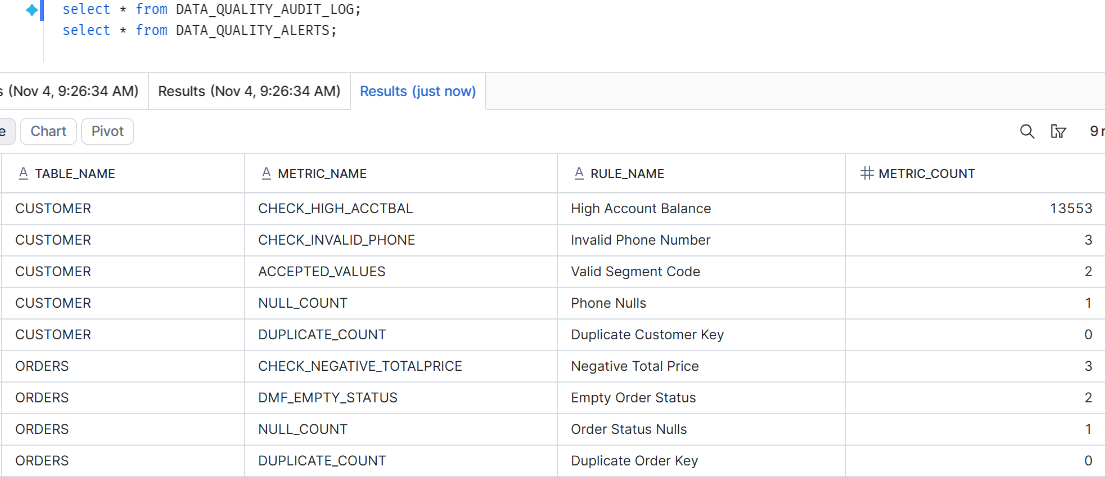
One CALL RUN_DMFS_MANUALLY_FULL(); ran all 9 active rules across 2 tables. It wrote 9 rows to the audit log and raised 7 alerts, with no per-table scripts.
Audit log: every rule, every result
- All 9 rules have a row, including the two that found nothing (
DUPLICATE_COUNT= 0 on both tables). - A zero is evidence too: it proves the check ran and passed, which is what an auditor asks for.
MEASUREMENT_TIMEwas stamped back on each metadata row, so the control table shows when each rule last ran.
Alerts: only what needs attention
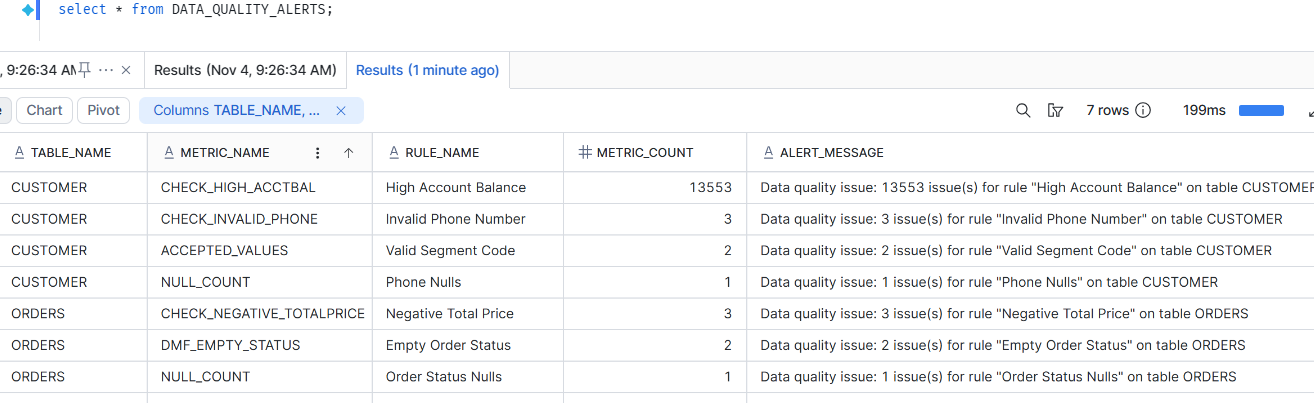
- 7 of 9 rules returned a count above 0, and only those reached
DATA_QUALITY_ALERTS. - Each alert has a readable message, e.g. “3 issue(s) for rule ‘Invalid Phone Number’ on table CUSTOMER”, so nobody has to decode metric names.
- The 2 clean duplicate-key rules stayed out of the alert table: no noise.
A note on the schedule: the POC attaches an intentionally rare annual cron (USING CRON 0 1 1 1 * UTC) so the framework, not the scheduler, drives execution. Directly invocable DMFs don’t need a schedule to run manually; the schedule is a design choice for the attachment workflow, not a Snowflake prerequisite.
The key differentiator: managing DMFs as metadata
Snowflake handles the measurement. This framework manages the measurement.
Snowflake already gives you strong data quality building blocks: built-in and custom DMFs, scheduling, expectations and monitoring. This framework does not replace any of them. It adds the operational layer around them that Snowflake leaves to you.
| Capability | Snowflake native | What the framework adds |
|---|---|---|
| Rule configuration | ALTER TABLE per table |
One INSERT into DMF_METADATA |
| Rule inventory | Query references table by table | One table for the whole account |
| Intent vs reality | Attached state only | ACTIVE_FLAG (intent) beside DMF_APPLIED_FLAG (reality) |
| Attachment | Manual, per rule | Idempotent: only pending rules are attached |
| On-demand execution | Invoke each DMF separately | One CALL runs every active rule |
Custom, built-in, ACCEPTED_VALUES |
Different invocation paths | One router, one error model |
| Results | Per-table event history | Central audit log + alerts table |
| Extensibility | New script per rule | New row reuses existing logic |
Final Thoughts
This POC wasn’t about showing what DMFs can do. It was about managing them consistently as they grow.
The design combines native DMFs, one metadata table, dynamic attachment, on-demand execution, and a shared audit and alert layer. It runs 9 rules on 2 tables today, and the same logic extends to any supported check without new scripts.
The takeaway: don’t just automate data quality checks. Automate how they’re configured, run, and monitored.