 1
1
 0
0
Most AI document demos stop at “Can AI summarize this PDF?” Useful — but nowhere near enough for enterprise teams.Legal doesn’t just need a summary. Procurement doesn’t just need a chatbot answer. Compliance doesn’t just need confirmation a document was read. They need structured, traceable, actionable intelligence:
- Which contracts have auto-renewal clauses?
- Which contain SLA commitments or penalty exposure?
- Which involve cross-region data processing?
- Which obligations need review by Legal, Procurement, Privacy, or Compliance?
- Which clauses map to our internal control catalog?
This is where Snowflake Cortex AI becomes powerful.
In this blog, I walk through converting a SaaS contract PDF into a governed Contract Risk Control Tower using Snowflake Stage, Cortex AI_PARSE_DOCUMENT, Cortex AI_COMPLETE, Snowflake Notebook, a custom Python package (.whl), and a final risk intelligence table.
Use Case:
Use Case: Contract Risk Intelligence from a SaaS Agreement
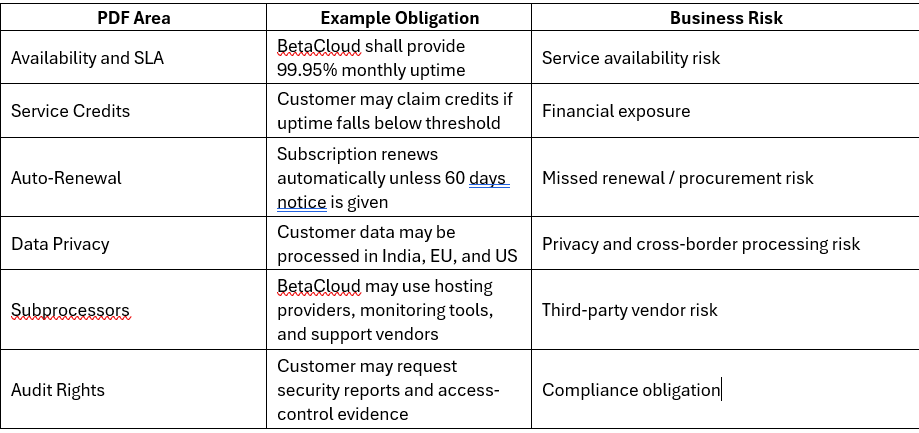
The demo uses software_subscription_sla_betacloud.pdf — a fictional SaaS agreement with BetaCloud containing realistic enterprise clauses:
service availability, service credits, auto-renewal, price escalation, data processing, subprocessors, audit evidence, termination restrictions.
What’s Inside the PDF?
Before writing code, it helps to understand the document from a business lens. The PDF contains.
What Are We Building?
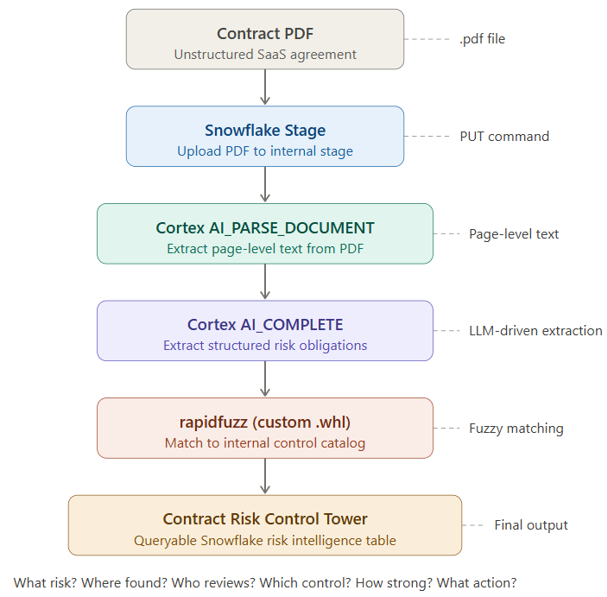
The end-to-end flow:
Why Snowflake Cortex?
Why Snowflake Cortex?
Cortex powers the intelligence layer in two ways:
- Document extraction — AI_PARSE_DOCUMENT reads the contract PDF from a Snowflake stage and extracts page-level text. No manual reading — structured page text lands directly in a Snowflake table.
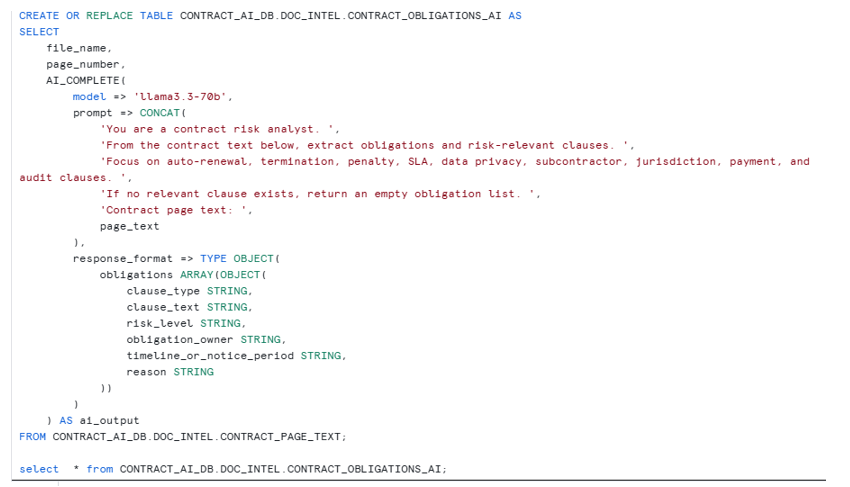
- Obligation extraction — AI_COMPLETE analyzes that text and identifies risk-relevant clauses, returning for each: clause type, clause text, AI risk level, obligation owner, timeline/notice period, and reason for risk. The result is structured contract intelligence.
Why a Custom Python Package?
Cortex extracts meaning — but enterprise systems need standard mapping, not free-form AI output.
Consider: the PDF says “subscription will renew automatically unless sixty days non-renewal notice is given” while your internal control catalog describes it as “contract automatically renews unless cancellation notice is given before expiry.” Same risk, different wording. SQL equality fails. LIKE is too weak.
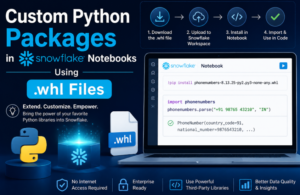
This is where rapidfuzz (installed via .whl in Snowflake Notebook) comes in — it compares extracted clauses against your control catalog and returns a similarity score.
Step 1: Create Database, Schema, and Stage
First, create a database, schema, and stage to hold the contract PDF.
CREATE OR REPLACE DATABASE CONTRACT_AI_DB;

CREATE OR REPLACE SCHEMA CONTRACT_AI_DB.DOC_INTEL;

CREATE OR REPLACE STAGE CONTRACT_AI_DB.DOC_INTEL.CONTRACT_STAGE

DIRECTORY = (ENABLE = TRUE)

ENCRYPTION = (TYPE = 'SNOWFLAKE_SSE');
Then upload the PDF: software_subscription_sla_betacloud.pdf
Verify the uploaded file:
SELECT

RELATIVE_PATH,

SIZE,

LAST_MODIFIED

FROM DIRECTORY(@CONTRACT_AI_DB.DOC_INTEL.CONTRACT_STAGE);
At this point, Snowflake knows that the PDF exists in the stage.
Step 2: Parse the PDF Using Cortex
Next, we use Cortex AI_PARSE_DOCUMENT to extract content from the PDF.
CREATE OR REPLACE TABLE CONTRACT_AI_DB.DOC_INTEL.CONTRACT_PARSED_RAW AS

SELECT

RELATIVE_PATH AS file_name,

SIZE AS file_size,

LAST_MODIFIED AS last_modified,

AI_PARSE_DOCUMENT(

TO_FILE('@CONTRACT_AI_DB.DOC_INTEL.CONTRACT_STAGE', RELATIVE_PATH),

OBJECT_CONSTRUCT(

'mode', 'LAYOUT',

'page_split', TRUE

)

) AS parsed_doc

FROM DIRECTORY(@CONTRACT_AI_DB.DOC_INTEL.CONTRACT_STAGE);
This step does three important things:
- Reads the PDF from the Snowflake stage.
- Extracts document content using Cortex.
- Stores the parsed output as JSON.
Step:
Step 3: Convert Parsed JSON into Page-Level Text
Now we flatten the parsed document into page-level rows.
CREATE OR REPLACE TABLE CONTRACT_AI_DB.DOC_INTEL.CONTRACT_PAGE_TEXT AS

SELECT

FILE_NAME,

PAGE.VALUE:index::NUMBER + 1 AS PAGE_NUMBER,

PAGE.VALUE:content::STRING AS PAGE_TEXT

FROM CONTRACT_AI_DB.DOC_INTEL.CONTRACT_PARSED_RAW,

LATERAL FLATTEN(INPUT => PARSED_DOC:pages) PAGE;
Step 4: Use Cortex to Extract Contract Obligations
Now we ask Cortex to analyze each page and extract risk-relevant obligations.
Step 5: Flatten Cortex Output into Rows
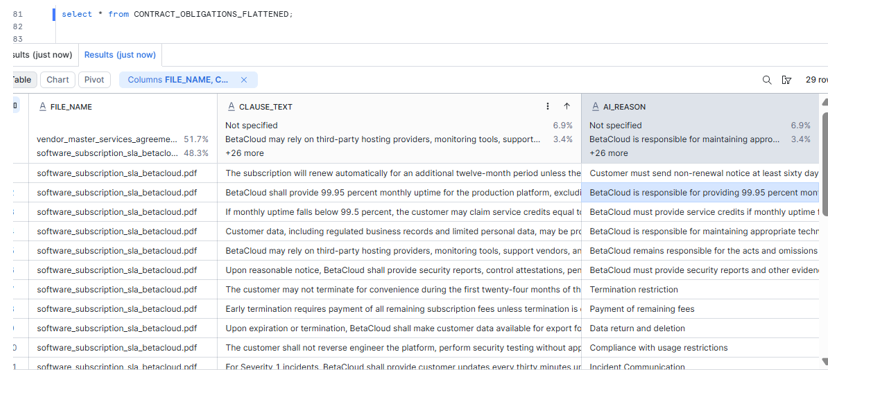
If the AI output is valid JSON array text, we flatten it into a proper table.
CREATE OR REPLACE TABLE CONTRACT_AI_DB.DOC_INTEL.CONTRACT_OBLIGATIONS_FLATTENED AS

SELECT

FILE_NAME,

PAGE_NUMBER,

VALUE:clause_type::STRING AS CLAUSE_TYPE,

VALUE:clause_text::STRING AS CLAUSE_TEXT,

VALUE:ai_risk_level::STRING AS AI_RISK_LEVEL,

VALUE:obligation_owner::STRING AS OBLIGATION_OWNER,

VALUE:timeline_or_notice_period::STRING AS TIMELINE_OR_NOTICE_PERIOD,

VALUE:ai_reason::STRING AS AI_REASON

FROM CONTRACT_AI_DB.DOC_INTEL.CONTRACT_OBLIGATIONS_AI_RAW,

LATERAL FLATTEN(INPUT => TRY_PARSE_JSON(AI_OUTPUT));
Step 6: Create Internal Risk Control Catalog
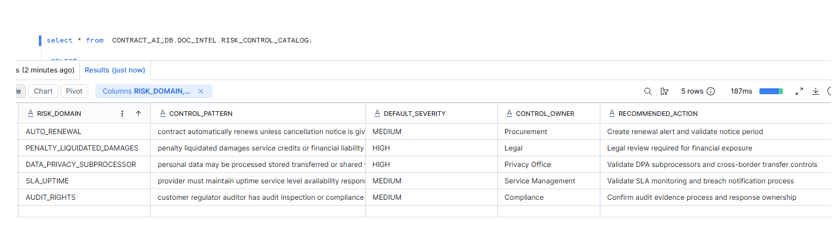
The control catalog represents the organization’s standard risk taxonomy.
This is not extracted from the PDF.
This is our enterprise reference table.
CREATE OR REPLACE TABLE CONTRACT_AI_DB.DOC_INTEL.RISK_CONTROL_CATALOG (

CONTROL_ID STRING,

RISK_DOMAIN STRING,

CONTROL_PATTERN STRING,

DEFAULT_SEVERITY STRING,

CONTROL_OWNER STRING,

RECOMMENDED_ACTION STRING

);
Step 7: Install Custom Python Package Using .whl
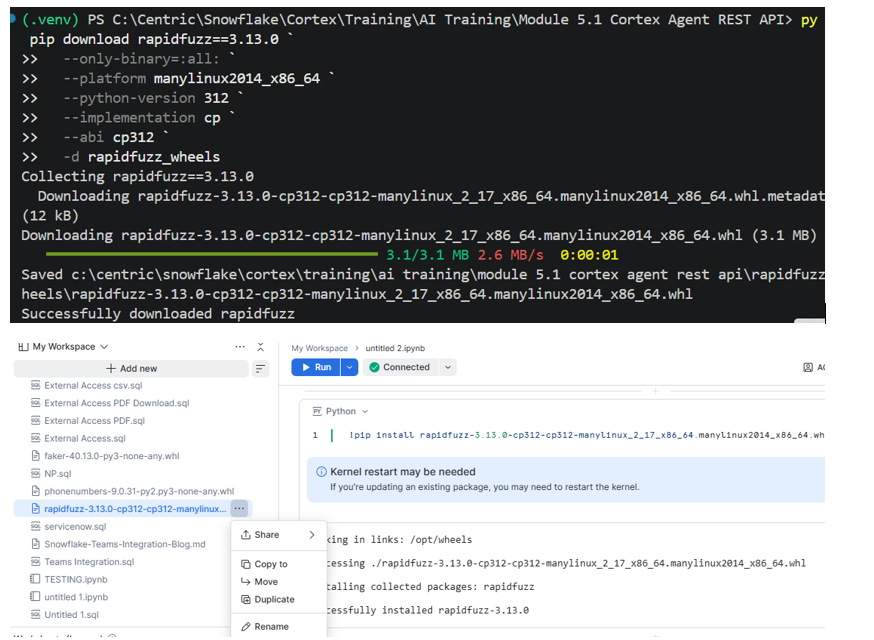
In my environment, direct package installation from PyPI was not available in Snowflake Notebook.
So I downloaded the Linux-compatible wheel file for rapidfuzz and uploaded it into the Snowflake Notebook workspace.
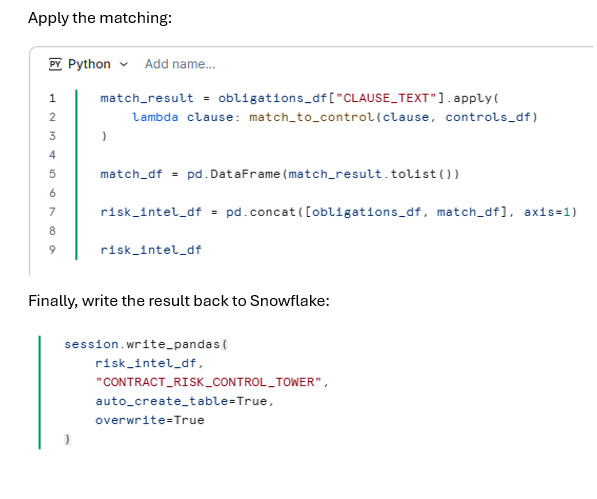
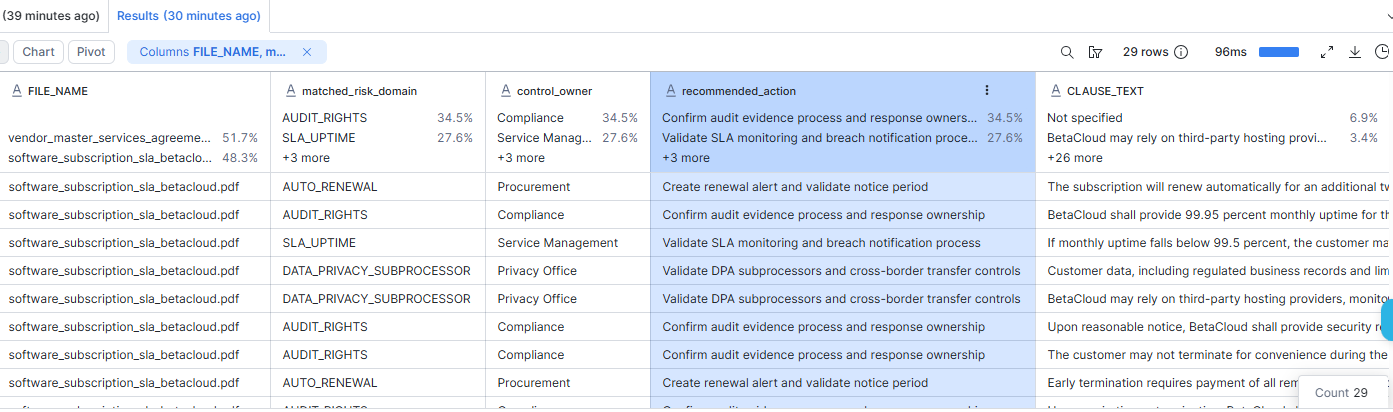
Step 8: Match Extracted Clauses with Control Catalog
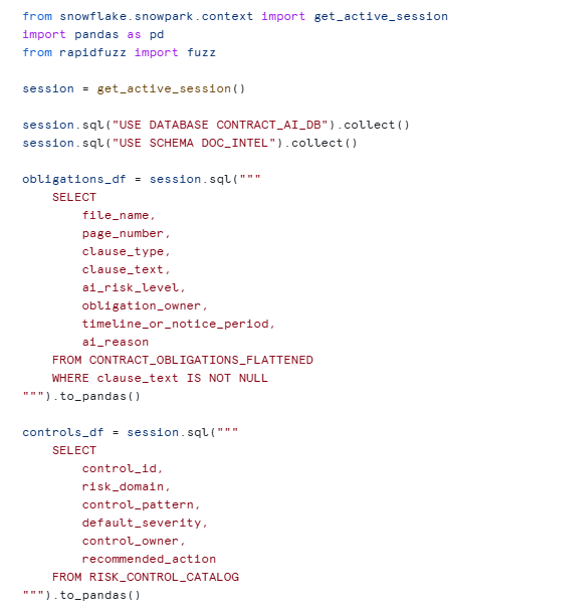
Now define the matching logic:
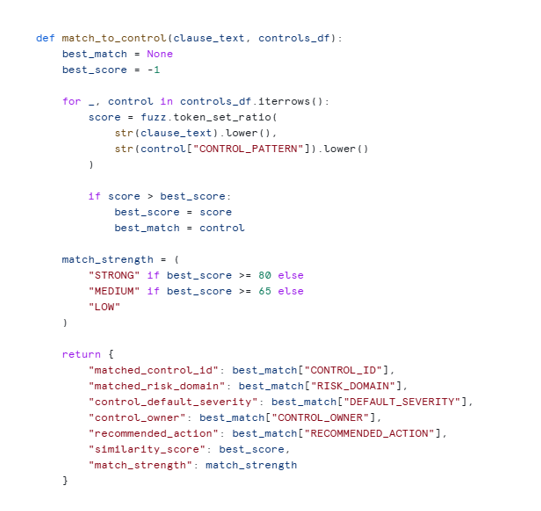
Apply the matching:
Business Value
- Legal Teams
Legal teams can quickly identify clauses related to termination, penalties, service credits, and liability.
- Procurement Teams
Procurement teams can track auto-renewal clauses, renewal notice periods, and price increase obligations.
- Privacy Teams
Privacy teams can identify contracts involving customer data, subprocessors, and cross-border processing.
- Compliance Teams
Compliance teams can track audit evidence requirements and control attestation obligations.
- Risk Teams
Risk teams can prioritize review based on AI risk level, control severity, and match confidence.