 1
1
 0
0
In this post we build an expense claim adjudication agent and run it in Snowflake Cowork. It reads a claim, applies company policy, tells you what is payable, and records the outcome. The policy it follows is not in the SQL and not in the agent definition , it is a plain English file sitting on a stage, which anyone in finance can read and edit
The problem
The problem
At most mid-size firms, every expense claim lands on a finance analyst’s desk. They open the claim, look up the employee’s grade, find the applicable policy cap for that category at that grade. Check whether a receipt was attached, check how late the submission is, and scan for anything that looks like a duplicate. Then they decide.
Why this needs a Skill and not just tools
An expense decision is not one lookup. It is a series of checks in a fixed order, and any one of them can stop the claim:
- Is this category claimable at all?
- Has the same claim been submitted before?
- Was it submitted in time?
- Is there a receipt?
- Is it above the limit for this employee’s grade?
Only if it survives all five does anyone work out what to pay.
A Skill is a better home for it. It is a plain English document, stored on a stage, that tells the agent exactly how to do this one job.
- What to check,what order, what the limits are, and when to refuse.
- Finance can read it. Finance can edit it. Nobody has to touch SQL, and nothing gets redeployed.
Setup
Our fictional company is Bluepeak Technologies.
1.The four tables
Two are reference data that exist before anything happens. Two are transactional.
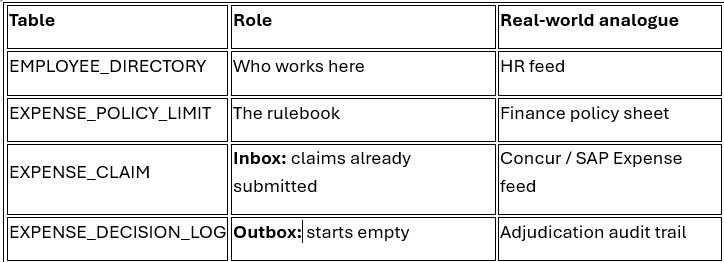
EXPENSE_CLAIM is worth pausing on. In production, an employee files through an app and a row lands here. In our demo there is no filing app, so we insert eight rows manually — that is us simulating “eight people filed expenses last week.” The agent’s job starts after submission. It never creates a claim; it reads one and decides.
- Create Database and Schema.
- Create EMPLOYEE_DIRECTORY table.
- Populate data to the table.
- Create another EXPENSE_POLICY_LIMIT table.
- Insert data to the table.
- Now create EXPENSE_CLAIM table and populate with data.
- Finally create EXPENSE_DECISION_LOG empty table.
Proc
2. Procedure : gather the facts
Picture what a finance analyst actually does when a claim lands on their desk. They open the claim. And they open the HR system to check the person’s grade. Then the policy sheet, to find the limit for that grade and that category. And then they count the days between the expense and the submission. Then they scan recent claims to make sure this one hasn’t come through already.
Five lookups, five places to look, before they can form any opinion at all.
SP_GET_CLAIM_CONTEXT does all five in one call and hands back a single JSON object.
(Full procedure body is in the GitHub gist — I’ll cover the logic here rather than the SQL.)
Given a claim ID, it:
- Checks the claim exists. If not, returns
NOT_FOUNDand stops. - Looks for an earlier duplicate — same person, same merchant, same amount, same date, submitted before this one.
- Checks whether it has already been decided, by counting rows in the decision log.
- Builds the picture — joins the employee to get their grade, joins the policy table to get the limit, works out the submission lag, and packs it all into one object.
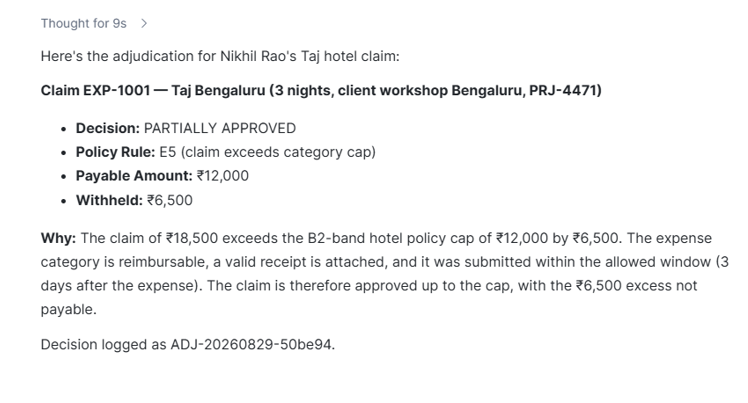
Here is what comes back for EXP-1001:
{

"amount_inr": 18500,

"policy_cap_inr": 12000,

"over_cap_by_inr": 6500,

"days_to_submit": 3,

"receipt_attached": true,

"duplicate_claim_id": null

}
Now read that carefully. It says the claim is 6,500 over the limit. It does not say the claim should be trimmed, or rejected, or paid
Procedure 2: record the decision
Back to the analyst. Having decide, they now write it down, the claim, the outcome, what is actually being paid, and why. That record is what an auditor reads six months later.
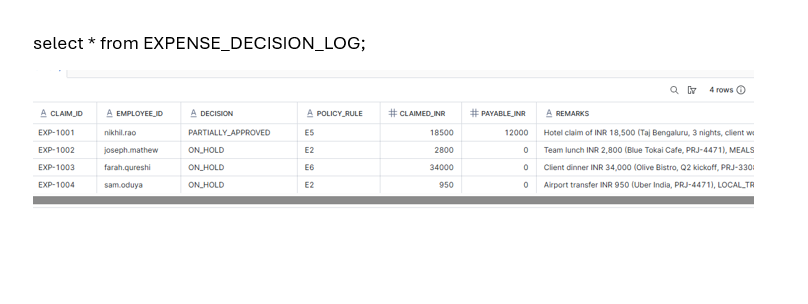
SP_RECORD_EXPENSE_DECISION writes exactly that: one row in the log.
(Full body in the GitHub gist.)
Given a claim ID and a decision, it:
- Looks up the claim for the employee and the original amount, so the log shows what was asked for, not just what was paid.
- Generates a decision ID like
ADJ-20260829-a3f91c. - Inserts the row and returns a confirmation with claimed, payable, and the amount withheld.
The Skill
Both procedures are done, and neither of them decides anything. That job belongs here.
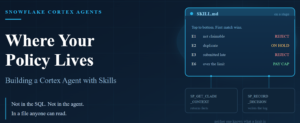
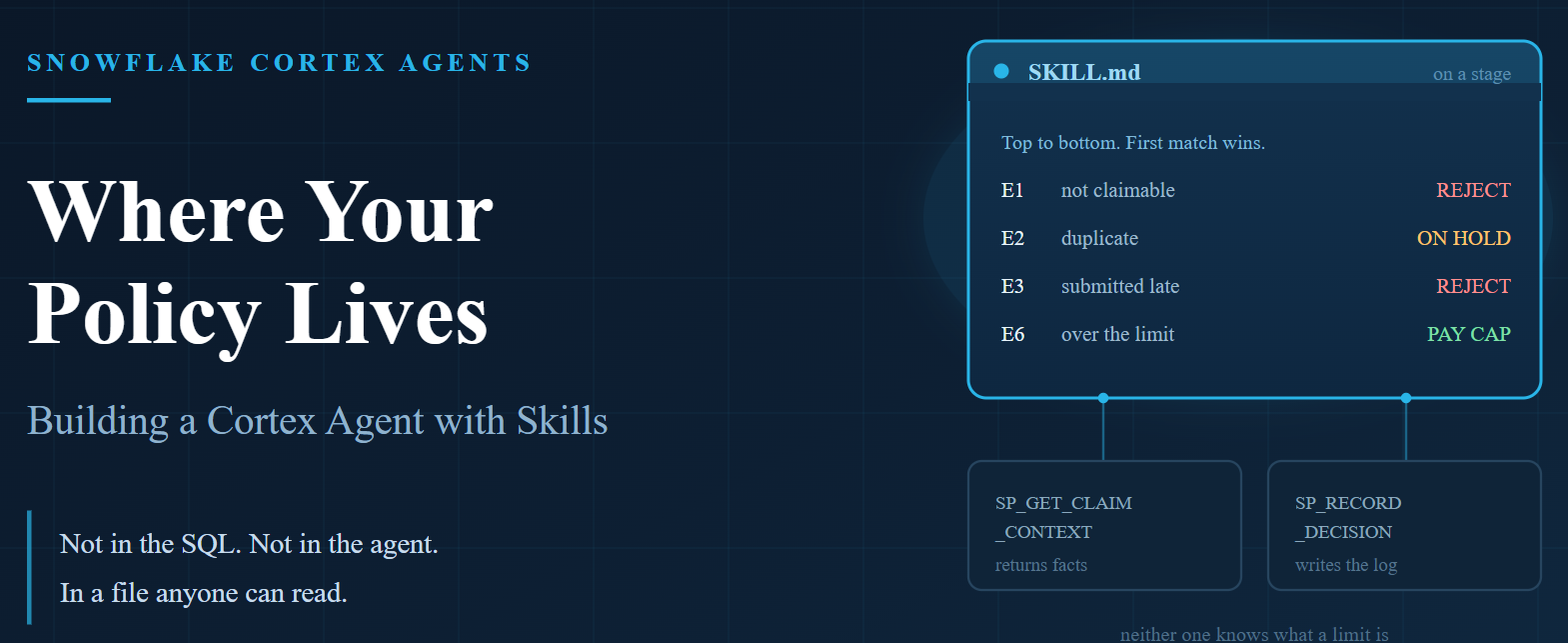
The file lives on a stage at @SKILL_DEMO_DB.FINANCE_OPS.SKILLS_STG/expense_adjudication/SKILL.md.
(Full file in the GitHub gist — the policy table is worth showing here, since it is the heart of the whole thing.)
## Step 2 – Policy table. Top to bottom. First match wins.
| # | Condition | Decision | Payable |

|---|---|---|---|

| E1 | category_reimbursable = false | REJECTED | 0 |

| E2 | duplicate_claim_id is not null | ON_HOLD | 0 |

| E3 | days_to_submit > 60 | REJECTED | 0 |

| E4 | receipt_attached = false AND amount_inr > 2000 | REJECTED | 0 |

| E5 | over_cap_by_inr > 0 AND amount_inr > 50000 | PARTIALLY_APPROVED, escalate | policy_cap_inr |

| E6 | over_cap_by_inr > 0 | PARTIALLY_APPROVED | policy_cap_inr |

| E7 | amount_inr > 50000 | APPROVED, escalate | amount_inr |

| E8 | otherwise | APPROVED | amount_inr |
Eight rows of markdown. No SQL. That is the company’s expense policy, and it is the only place in this build where it exists.
What each section does
description — the matching line. The only part the agent reads when deciding whether this Skill applies, so it lists the phrases people actually type: “review claim”, “process EXP-“, “can we pay”. Too vague and the Skill never fires.
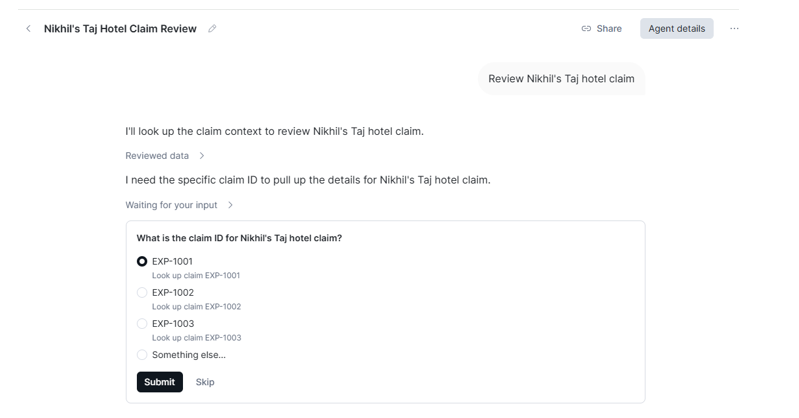
Inputs — the procedure needs a claim ID, but people say “Nikhil’s hotel bill”. The agent has to work out which claim that is, and here it is genuinely tricky: that phrase fits two claims equally well, with opposite outcomes. So the Skill tells it to say which one it picked and confirm — a wrong guess should be visible, not silent.
Step 1 — fetch first, always. Two exits built in: claim not found, and claim already decided. The second one is what stops a claim being paid twice.
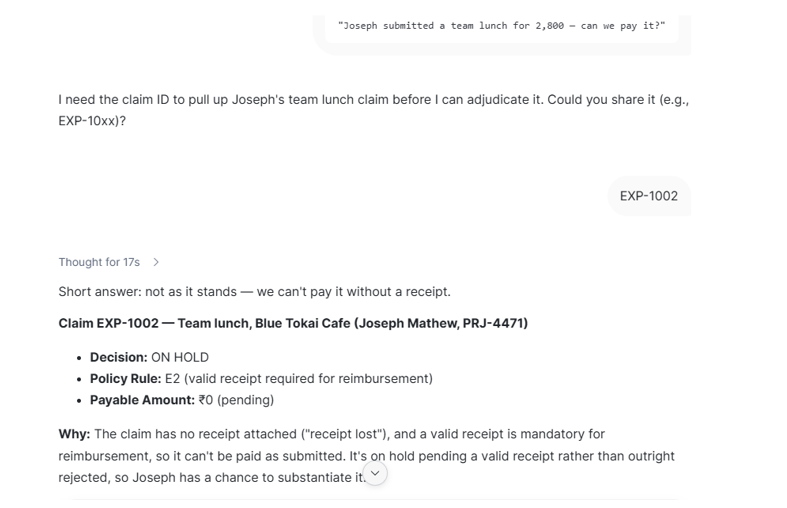
Step 2 — the policy table, and the line above it does the real work: top to bottom, first match wins. Joseph’s 2,800 lunch breaks two rules at once — no receipt says pay nothing, over the limit says pay 1,200. Without a fixed order the agent picks one, and might pick differently next time. With it, the answer is the same every run.
Step 3 — the agent must name the rule it used. When it says “E6”, you can go and check E6.
Step 4 — the pause. It decides, shows you, and waits. Nothing is save until you say yes.
The agent
Three pieces are ready: two procedures that do the work, and a Skill that holds the policy. The agent is what ties them together.
(Full spec in the GitHub gist.)
The definition does two things. First it lists the tools — both procedures, plus the Skill.A procedure is registered by name: the agent points at an object inside the database. The Skill is registered by path: the agent points at a folder on a stage.One setup detail before you create the agent: the stage must be created with a directory table enabled, or the Skill path will not resolve
Running it in Cowork
Open Cowork, pick the agent, and type the way you would speak to a colleague.
Start with the one that shows the shape of the whole thing:
Claim1:
Claim2:
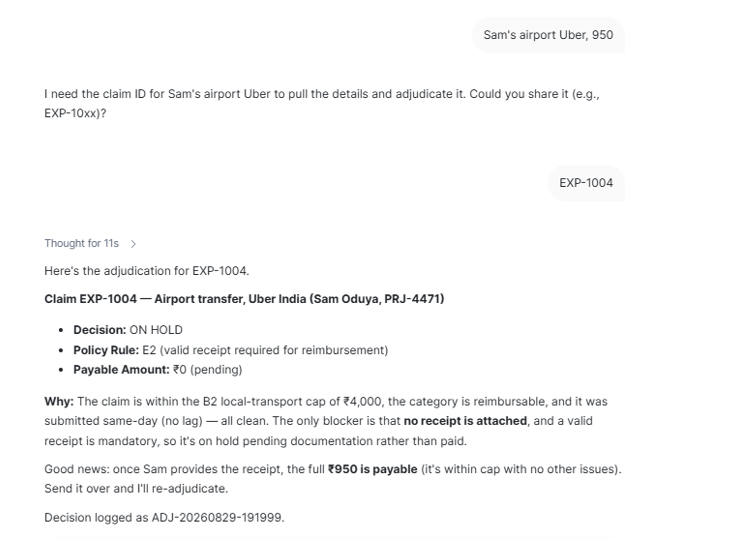
Claim3:
Complete Code: