 0
 0
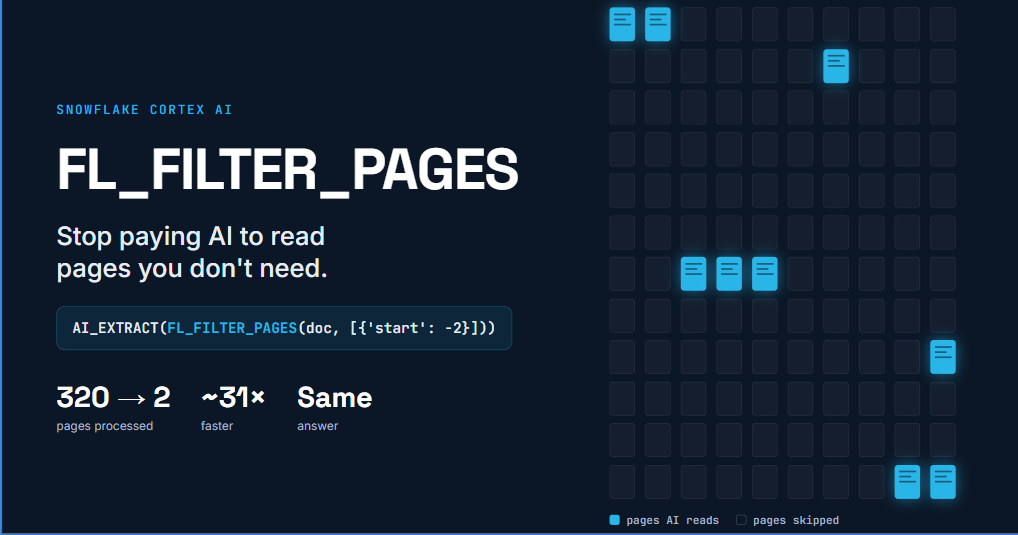
FL_FILTER_PAGES in Snowflake: Imagine you have a 320-page annual report. Your business team asks a simple question: “Who audited this company?”
The answer is sitting on the last two pages. But when we pass the PDF directly to AI_EXTRACT
This is a common challenge when working with annual reports, insurance policies, contracts, financial statements, and other large documents. We may need just one piece of information, but the AI ends up processing hundreds of pages. That means unnecessary document processing, higher costs, and longer execution times.
Wouldn’t it be better to tell AI exactly which pages matter? That’s where Snowflake’s new FL_FILTER_PAGES comes in.
1. But wait – didn’t Snowflake already support page_filter?
Yes! And this is an important distinction. Snowflake introduced the page_filterAI_PARSE_DOCUMENT
SELECT AI_PARSE_DOCUMENT(
  TO_FILE('@REPORTS_STAGE', 'report.pdf'),
  { 'mode': 'LAYOUT', 'page_filter': [{'start': 0, 'end': 2}] }
);
This already allowed us to parse only the first two pages of a PDF. So what’s genuinely new?
The earlier page_filterAI_PARSE_DOCUMENTAI_EXTRACTFL_FILTER_PAGES
SELECT AI_EXTRACT(
  file => FL_FILTER_PAGES(TO_FILE('@REPORTS_STAGE', 'report.pdf'), [{'start': -2}]),
  responseFormat => { 'auditor': 'Name of the audit firm' }
);
This introduces three practical advantages:
- Direct extraction:
AI_EXTRACT - Read from the end:
{'start': -2} - Dynamic page selection: page ranges can come from a SQL column, so different documents can have different extraction ranges.
In simple terms: page_filterFL_FILTER_PAGES
2. Let’s see the difference in action
We used a fictional company’s 320-page annual report: GreenGrid_Energy_AR_FY2025.pdf
“Who audited GreenGrid Energy?”
SELECT AI_EXTRACT(

file => TO_FILE('@REPORTS_STAGE', 'GreenGrid_Energy_AR_FY2025.pdf'),

responseFormat => {'auditor': 'Name of the audit firm that signed the report'},

config => {'page_filter': [{'start': 318, 'end': 320}]});
SQL compilation error: page_filter is not supported for AI_EXTRACT; use FL_FILTER_PAGES instead.
Before: process the entire document
SELECT AI_EXTRACT(
  file => TO_FILE('@REPORTS_STAGE', 'GreenGrid_Energy_AR_FY2025.pdf'),
  responseFormat => { 'auditor': 'Name of the audit firm that signed the report' }
) AS RESULT;
After: process only the last two pages
SELECT AI_EXTRACT(
  file => FL_FILTER_PAGES(TO_FILE('@REPORTS_STAGE', 'GreenGrid_Energy_AR_FY2025.pdf'), [{'start': -2}]),
  responseFormat => { 'auditor': 'Name of the audit firm that signed the report' }
) AS RESULT;
Both queries returned the same answer: Kingsley Moore Audit LLP.
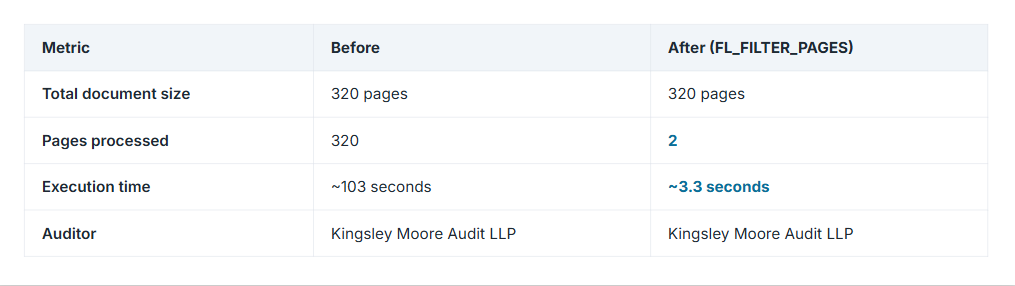
That’s approximately 31× faster, with 99.4% fewer pages processed. The original PDF hasn’t changed. We’re simply telling Snowflake which pages are relevant to our question. And because document AI processing is usage-based, processing fewer pages can also reduce costs.
3. A more realistic business scenario with four annual reports:FL_FILTER_PAGES
Imagine a financial analysis team comparing four companies. Each company publishes an annual report, but the documents vary in length:
SELECT RELATIVE_PATH AS FILE_NAME,
       ROUND(SIZE / 1024, 0) AS SIZE_KB,
       AI_PARSE_DOCUMENT(
         FL_FILTER_PAGES(TO_FILE('@REPORTS_STAGE', RELATIVE_PATH), [{'start': 0, 'end': 1}]),
         {'mode': 'OCR'}):metadata:pageCount::INT AS TOTAL_PAGES
FROM DIRECTORY(@REPORTS_STAGE);
The team wants the same facts from every report: revenue, net income, debt, ESG numbers, and the auditor’s opinion.
Here’s the catch: every report puts these sections on different pages. The income statement is on page 65 in one report and page 163 in another. So we can’t hard-code page numbers.
How would a human analyst solve this? They wouldn’t read 860 pages. They would:
- Open the table of contents.
- Note which pages they need.
- Go straight to those pages.
We’ll make Snowflake AI do exactly the same, in four simple steps.
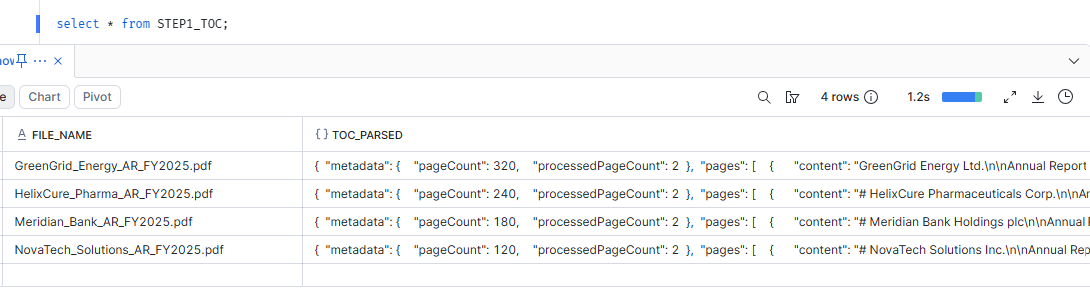
Step 1: Read the map, not the book (STEP1_TOC
STEP1_TOCCREATE OR REPLACE TABLE STEP1_TOC AS
SELECT RELATIVE_PATH AS FILE_NAME,
AI_PARSE_DOCUMENT(
FL_FILTER_PAGES(TO_FILE('@REPORTS_STAGE', RELATIVE_PATH), [{'start': 0, 'end': 2}]),
{'mode': 'LAYOUT'}) AS TOC_PARSED
FROM DIRECTORY(@REPORTS_STAGE);What it does: reads only the first 2 pages of every report, the cover and the table of contents.
Why: the table of contents is a map of the whole document. It already says things like “Consolidated Income Statement ….. 163”. The AI doesn’t need to visit page 163 to know it exists; it reads that line on page 2.
Cost: 2 pages per report, which is 8 pages instead of 860.
Step 2: Let AI find the page numbers (STEP2_SECTION_MAP
STEP2_SECTION_MAPCREATE OR REPLACE TABLE STEP2_SECTION_MAP AS
SELECT FILE_NAME,
TOC_PARSED:metadata:pageCount::INT AS TOTAL_PAGES,
AI_COMPLETE(
model => 'claude-sonnet-4-5',
prompt => 'From this annual report table of contents, return the printed start page number of each requested section. TOC:\n'
|| TOC_PARSED:pages[1]:content::STRING,
response_format => {'type':'json','schema':{'type':'object','properties':{
'ceo_letter':{'type':'integer'}, 'financial_highlights':{'type':'integer'},
'risk_factors':{'type':'integer'}, 'income_statement':{'type':'integer'},
'balance_sheet':{'type':'integer'}, 'esg_report':{'type':'integer'}},
'required':['ceo_letter','financial_highlights','risk_factors','income_statement','balance_sheet','esg_report']}}
) AS SECTION_PAGES
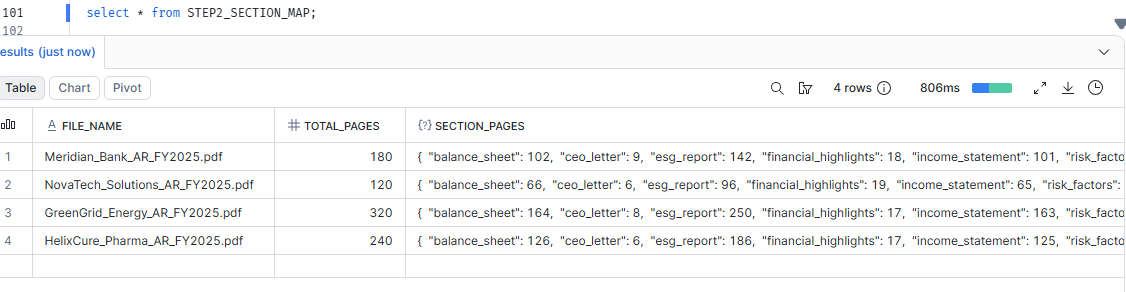
FROM STEP1_TOC;What it does: sends the table-of-contents text from Step 1 to an LLM and asks: “On which page does each of these sections start?”
Why AI and not plain SQL? Every report writes its TOC differently. An LLM reads it the way a person would, with no fragile text parsing.
Why response_format
{"financial_highlights": 17, "income_statement": 163, "balance_sheet": 164, "esg_report": 250, ...}Cost: no PDF pages at all. It’s a small text-only LLM call. (In our test, the AI found the correct pages for all 4 reports.)
Step 3: Turn page numbers into a reading list (STEP3_PAGE_PLAN
STEP3_PAGE_PLANCREATE OR REPLACE TABLE STEP3_PAGE_PLAN AS
SELECT FILE_NAME, TOTAL_PAGES, SECTION_PAGES,
ARRAY_CONSTRUCT(
OBJECT_CONSTRUCT('start', SECTION_PAGES:financial_highlights::INT - 1, 'end', SECTION_PAGES:financial_highlights::INT),
OBJECT_CONSTRUCT('start', SECTION_PAGES:income_statement::INT - 1, 'end', SECTION_PAGES:balance_sheet::INT)) AS FIN_PAGES,
ARRAY_CONSTRUCT(OBJECT_CONSTRUCT('start', SECTION_PAGES:esg_report::INT - 1, 'end', SECTION_PAGES:esg_report::INT)) AS ESG_PAGES,
ARRAY_CONSTRUCT(OBJECT_CONSTRUCT('start', -2)) AS AUDIT_PAGES
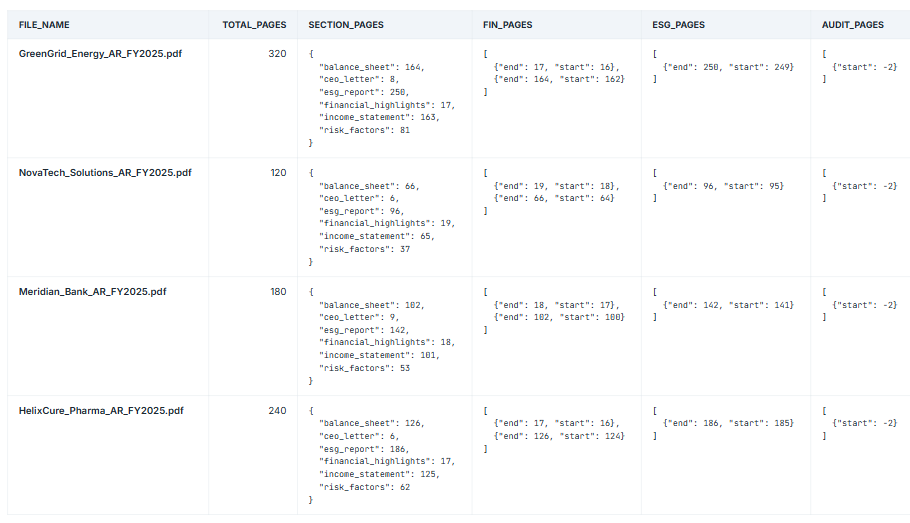
FROM STEP2_SECTION_MAP;What it does: Step 2 told us “the Income Statement is on page 163.” But FL_FILTER_PAGES{'start': 162, 'end': 164}FL_FILTER_PAGES
Two small rules:
- Counting starts at 0, like a building whose ground floor is floor 0. Printed page 163 is index 162, which is why we subtract 1.
end{'start': 162, 'end': 164}
The neat part: for the auditor, we don’t even need the TOC. {'start': -2}
Cost: zero. This is pure SQL: no AI and no PDF reading.
Step 4: Extract only what matters (STEP4_EXTRACTED
STEP4_EXTRACTEDCREATE OR REPLACE TABLE STEP4_EXTRACTED AS
WITH f AS (SELECT p.*, TO_FILE('@REPORTS_STAGE', p.FILE_NAME) AS DOC FROM STEP3_PAGE_PLAN p)
SELECT FILE_NAME, TOTAL_PAGES,
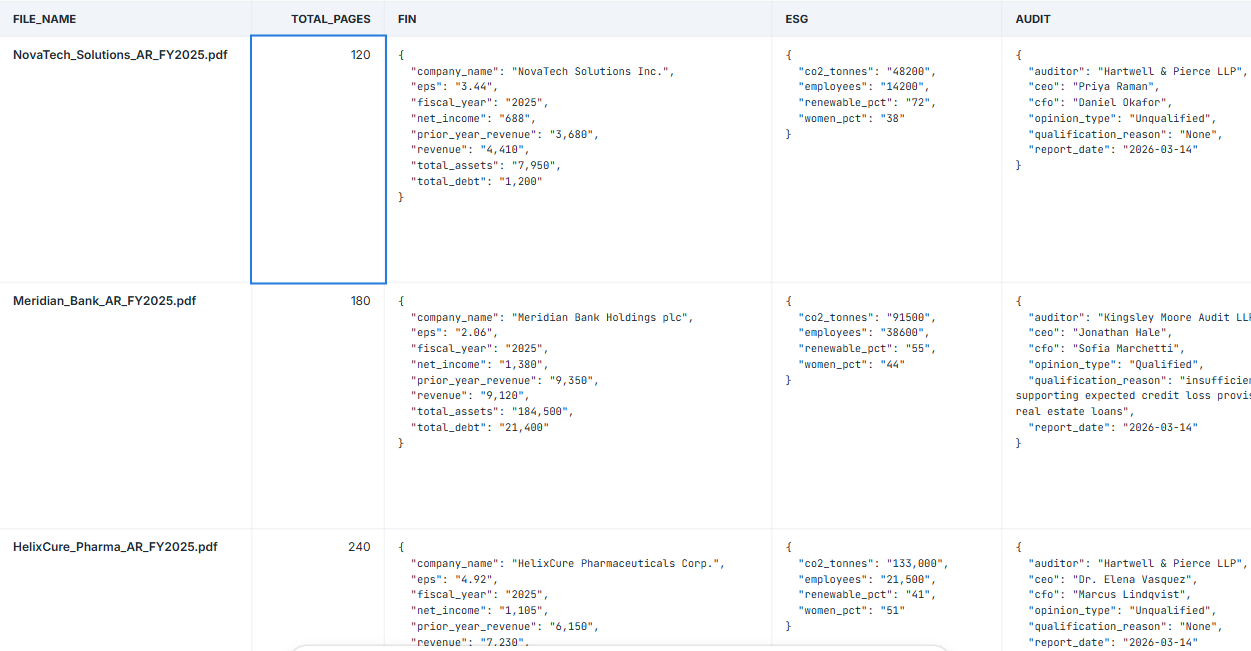
AI_EXTRACT(file => FL_FILTER_PAGES(DOC, FIN_PAGES), responseFormat => {...revenue, net_income, debt...}):response AS FIN,
AI_EXTRACT(file => FL_FILTER_PAGES(DOC, ESG_PAGES), responseFormat => {...co2, renewable_pct...}):response AS ESG,
AI_EXTRACT(file => FL_FILTER_PAGES(DOC, AUDIT_PAGES), responseFormat => {...auditor, opinion...}):response AS AUDIT
FROM f;What it does: this is where FL_FILTER_PAGESAI_EXTRACT
Why this matters: Without the reading list, you’d open every PDF, find the pages yourself, and write a separate query for each report with the page numbers typed in. That’s fine for 4 reports, but impossible for 1,000. Because the page numbers are stored in a column, one query handles every report, each reading its own pages.
That’s 4 reports and 4 hand-written queries. With 1,000 reports it’s impossible.
Because Step 3 saved each report’s pages in a column (FIN_PAGES
Before FL_FILTER_PAGESAI_EXTRACT
Cost: 6 pages per report (3 financial + 1 ESG + 2 audit).
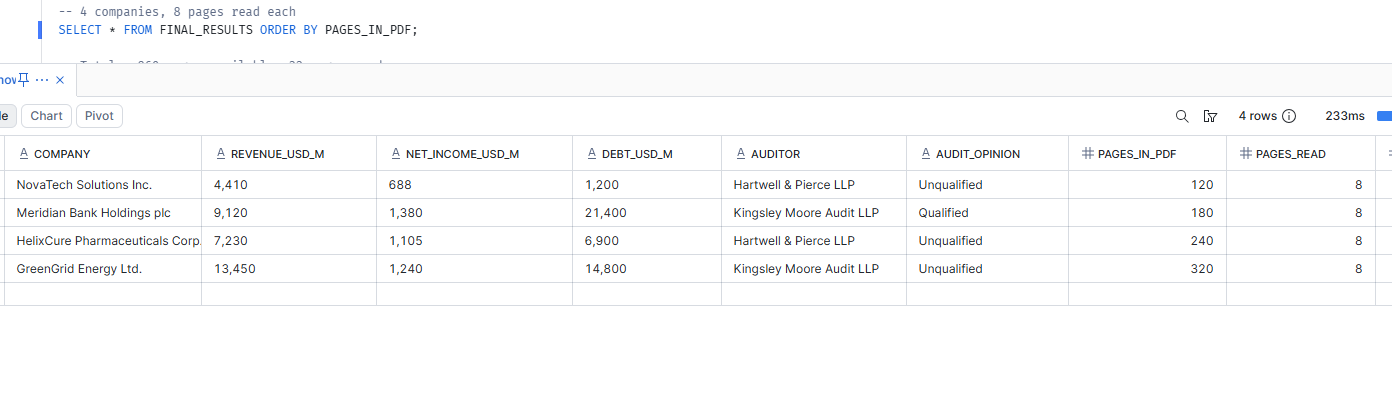
The final result (FINAL_RESULTS
FINAL_RESULTSCREATE OR REPLACE VIEW FINAL_RESULTS AS SELECT e.FIN:company_name::STRING AS COMPANY, e.FIN:revenue::STRING AS REVENUE_USD_M, e.FIN:net_income::STRING AS NET_INCOME_USD_M, e.FIN:total_debt::STRING AS DEBT_USD_M, e.AUDIT:auditor::STRING AS AUDITOR, e.AUDIT:opinion_type::STRING AS AUDIT_OPINION, e.TOTAL_PAGES AS PAGES_IN_PDF, 8 AS PAGES_READ, -- 2 TOC + 3 financials + 1 ESG + 2 audit ROUND((1 - 8 / e.TOTAL_PAGES) * 100, 1) AS PCT_SKIPPED FROM STEP4_EXTRACTED e; SELECT * FROM FINAL_RESULTS ORDER BY PAGES_IN_PDF;
Key takeaways
page_filterFL_FILTER_PAGES- FL_FILTER_PAGES: Negative indexes (
{'start': -2} - Page ranges from a column let one query read different pages from each document.
- Read the map first: use the table of contents to find where the answers live.
- Fewer pages means faster results and potentially lower cost, with the same answer.
Don’t make AI read the whole book. Give it the page number.