 0
0
 0
0
Layered Data Protection in Snowflake: In almost every organization, the most sensitive data lives in a handful of tables that lots of people need to touch. A retail bank’s CUSTOMERS table is the perfect example — and the wrong answer is to make three copies of it or bury the logic in application code. Snowflake’s answer is better: keep one copy and let policies reshape it per role, in the engine, at query time.
Three very different teams all need the same table:
- Fraud investigators need to see everything — full card numbers, balances, contact details — the moment an alert fires.
- Support agents help customers, but should only see the customers in their region, and never a full card number.
- Marketing runs campaigns across all customers, but must respect consent and should never be able to export raw card numbers.
This post shows how six Snowflake policies stack into a layered, defense-in-depth model i.e Data Protection on that one table — and exactly what each one buys you.
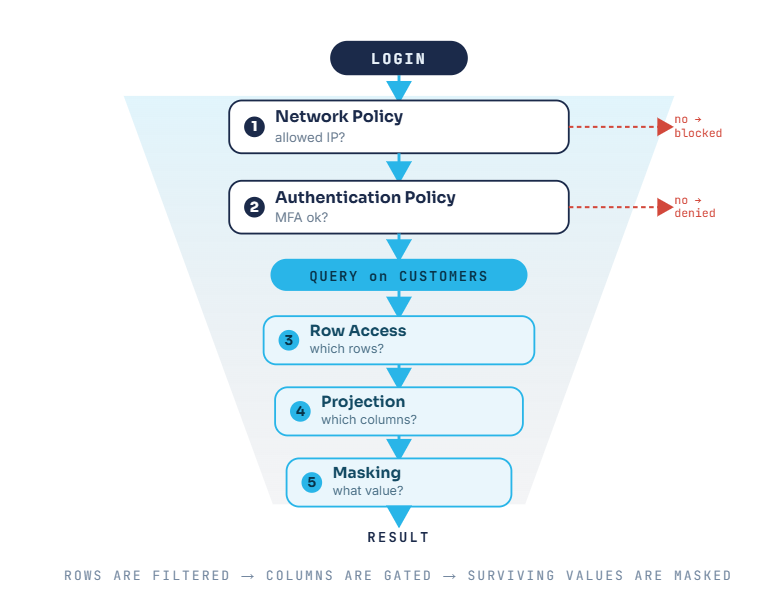
The mental model: policies fire in order
The single most important thing to understand is that these controls run in sequence — some at login, some at query time. A row you can’t see is never masked; a column you can’t project can still be counted in an aggregate.
The cast: one table, three roles:
CREATE TABLE SECUREBANK.DATA.CUSTOMERS (

CUSTOMER_ID INT,

FULL_NAME VARCHAR(100),

EMAIL VARCHAR(100),

CARD_NUMBER VARCHAR(19),

ACCOUNT_BALANCE DECIMAL(12,2),

REGION VARCHAR(20), -- drives the row access policy

MARKETING_CONSENT BOOLEAN -- drives the conditional email mask

);
Who sees what:

Technical Details
CREATE OR REPLACE NETWORK POLICY SECUREBANK_NETWORK_POLICY

ALLOWED_IP_LIST = ('203.0.113.0/24') -- corporate range

BLOCKED_IP_LIST = ('192.168.1.99')

COMMENT = 'SecureBank staff connect only from approved networks';
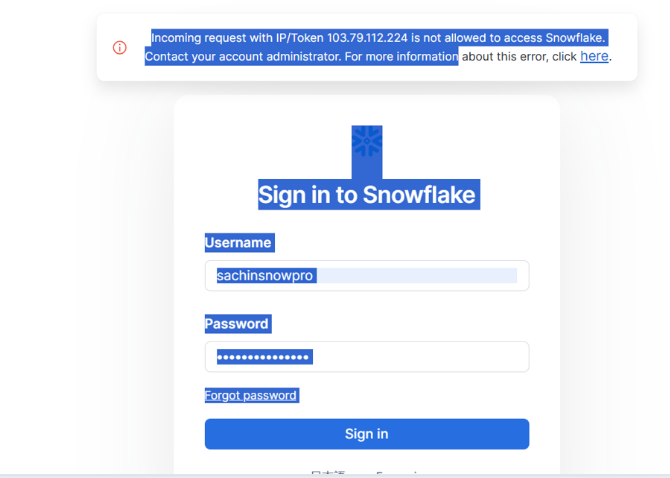
Why it matters: stolen credentials are worthless from an unapproved network. This is your first and cheapest line of defense.
Once the connection is allowed, the authentication policy protection governs how the user must authenticate — here, mandatory MFA via an authenticator app.
CREATE OR REPLACE AUTHENTICATION POLICY SECUREBANK_AUTH_POLICY

MFA_ENROLLMENT = 'REQUIRED'

MFA_POLICY = ( ALLOWED_METHODS = ('TOTP') )

CLIENT_TYPES = ('SNOWFLAKE_UI', 'DRIVERS');
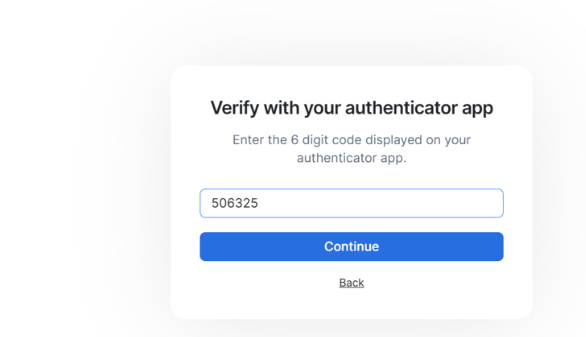
Why it matters: MFA is the single most effective control against credential-based attacks.
Policy
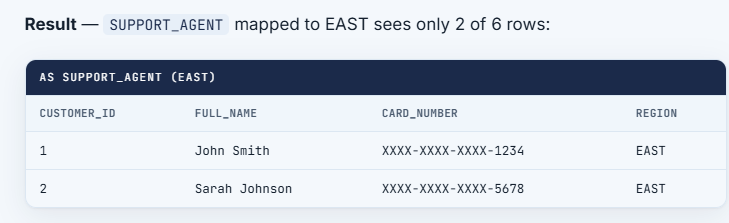
Now we’re at query time. A row access policy answers: which rows is this role allowed to see at all?
Support agents should only see customers in their assigned region, looked up from an entitlement table.
CREATE OR REPLACE ROW ACCESS POLICY REGION_ROW_POLICY

AS (REGION_ARG VARCHAR) RETURNS BOOLEAN ->

CASE

WHEN CURRENT_ROLE() IN ('ACCOUNTADMIN','FRAUD_TEAM','MARKETING') THEN TRUE

WHEN CURRENT_ROLE() = 'SUPPORT_AGENT' THEN EXISTS (

SELECT 1 FROM SECUREBANK.POLICIES.AGENT_REGIONS

WHERE USER_NAME = CURRENT_USER() AND REGION = REGION_ARG)

ELSE FALSE

END;
ALTER TABLE CUSTOMERS

ADD ROW ACCESS POLICY SECUREBANK.POLICIES.REGION_ROW_POLICY ON (REGION);
Use a correlated EXISTS against the mapping table. The IN (SELECT ...) form raises “Unsupported subquery type” inside a row access policy.
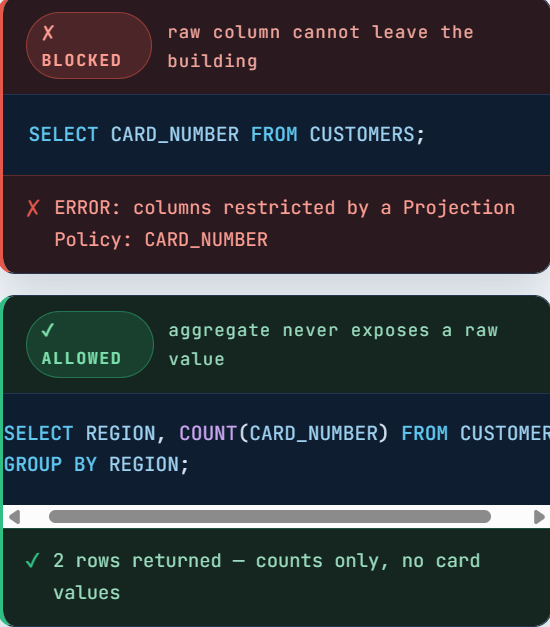
A projection policy is a lesser-known but powerful control: it decides whether a column may appear in a SELECT list at all.
Marketing can use the card column in aggregates but can never list raw values.
CREATE OR REPLACE PROJECTION POLICY CARD_PROJECTION_POLICY

AS () RETURNS PROJECTION_CONSTRAINT ->

CASE

WHEN CURRENT_ROLE() IN ('ACCOUNTADMIN','FRAUD_TEAM','SUPPORT_AGENT')

THEN PROJECTION_CONSTRAINT(ALLOW => TRUE)

ELSE PROJECTION_CONSTRAINT(ALLOW => FALSE)

END;
ALTER TABLE CUSTOMERS MODIFY COLUMN CARD_NUMBER

SET PROJECTION POLICY SECUREBANK.POLICIES.CARD_PROJECTION_POLICY;
Output: Login as Marketing:
Masking
CREATE OR REPLACE MASKING POLICY CARD_MASK AS (CARD STRING) RETURNS STRING ->

CASE

WHEN CURRENT_ROLE() IN ('ACCOUNTADMIN','FRAUD_TEAM') THEN CARD

WHEN CURRENT_ROLE() = 'SUPPORT_AGENT'

THEN 'XXXX-XXXX-XXXX-' || RIGHT(CARD, 4)

ELSE '**** CARD HIDDEN ****'

END;
ALTER TABLE CUSTOMERS MODIFY COLUMN CARD_NUMBER SET MASKING POLICY SECUREBANK.POLICIES.CARD_MASK;MARKETING_CONSENT column drives the outcome.CREATE OR REPLACE MASKING POLICY EMAIL_CONSENT_MASK
AS (EMAIL STRING, CONSENT BOOLEAN) RETURNS STRING ->
CASE
WHEN CURRENT_ROLE() IN ('ACCOUNTADMIN','FRAUD_TEAM') THEN EMAIL
WHEN CURRENT_ROLE() = 'MARKETING' AND CONSENT = TRUE THEN EMAIL
ELSE '**** NO CONSENT ****'
END;
— Attach with the TWO-argument form — this is what makes it conditional
ALTER TABLE CUSTOMERS MODIFY COLUMN EMAIL SET MASKING POLICY EMAIL_CONSENT_MASK USING (EMAIL, MARKETING_CONSENT);
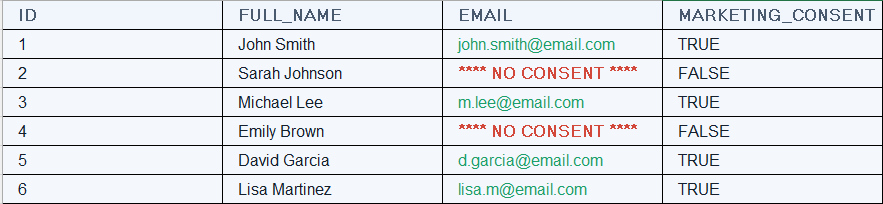
Result — as MARKETING, email appears only for customers who consented:
Why “defense in depth” is the real lesson
No single policy here is a silver bullet. Their power is in the layering — every layer assumes the one before it might fail:
- Beat the network policy? You still hit MFA.
- Authenticate as a support agent? You still only see your region.
- See a row? The card is still masked to the last four.
- Want to bulk-export cards as marketing? The column won’t even project.
- Have access to email? It’s still gated by each customer’s consent.