 0
0
 0
0
Snowflake DMF, Lineage & Cortex AI: In many reporting environments, dashboards and reports depend on Snowflake tables and views that continue to evolve over time.A new column may be added, an existing column may be renamed, or the structure of a table may change as part of normal development
For example, adding a new column that is not used anywhere downstream may have very little impact. But renaming a column that is already being used by multiple reporting views can create a much higher risk.
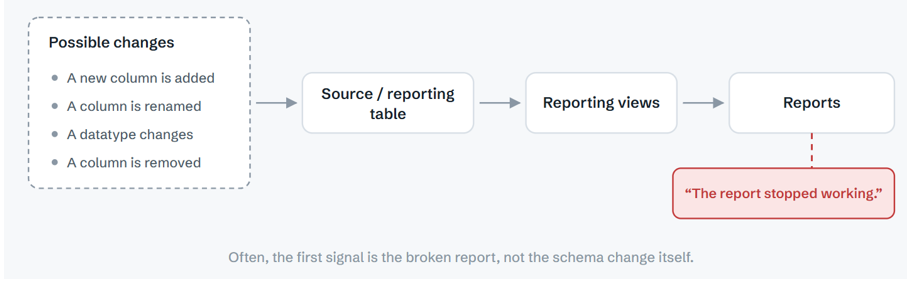
This made me think about a simple question:
discuss
Can we automatically detect a schema change, understand its downstream dependency, and use AI to explain the potential impact before it becomes a reporting issue?
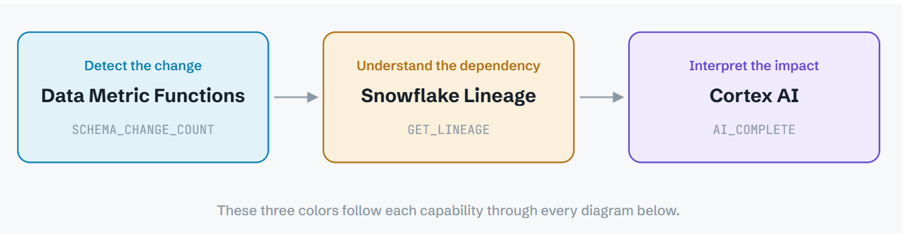
To explore this, I built a small POC in Snowflake using three capabilities:
- Data Metric Functions (DMFs) to detect schema changes
- Snowflake Lineage to identify downstream dependencies
- Cortex AI to assess the risk, explain the possible impact, and recommend the next action.
The POC
For the POC, I created a simple SALES_DATA table with two downstream reporting views.
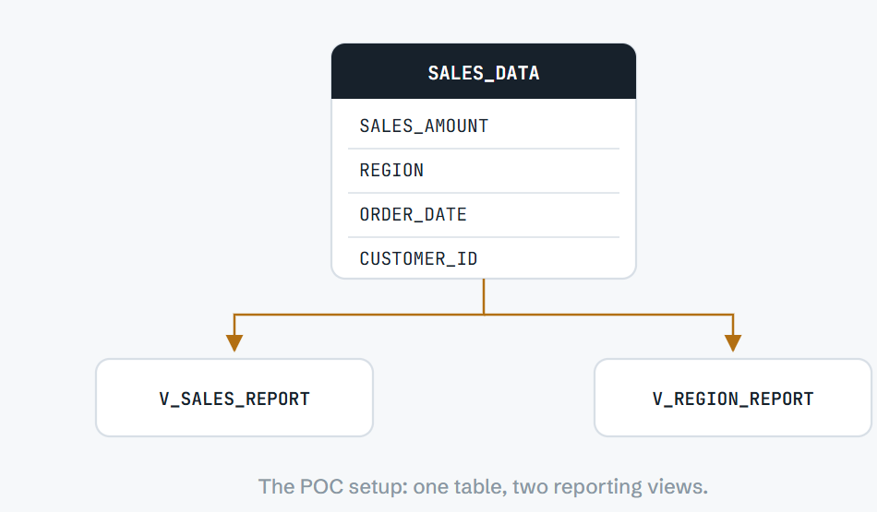
The reporting views use columns such as:
- SALES_AMOUNT
- REGION
- ORDER_DATE
- CUSTOMER_ID
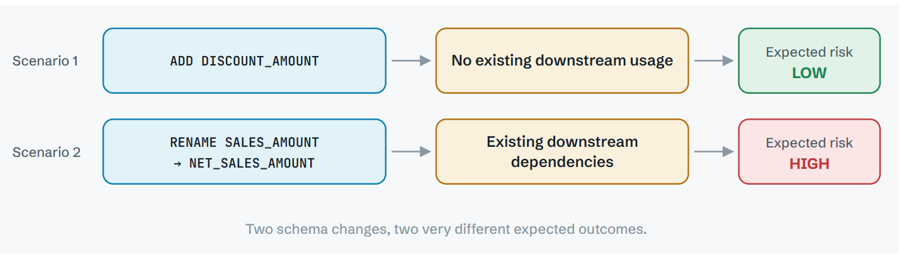
The objective is to detect two different schema changes:
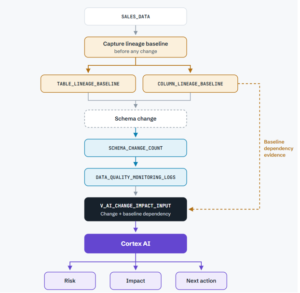
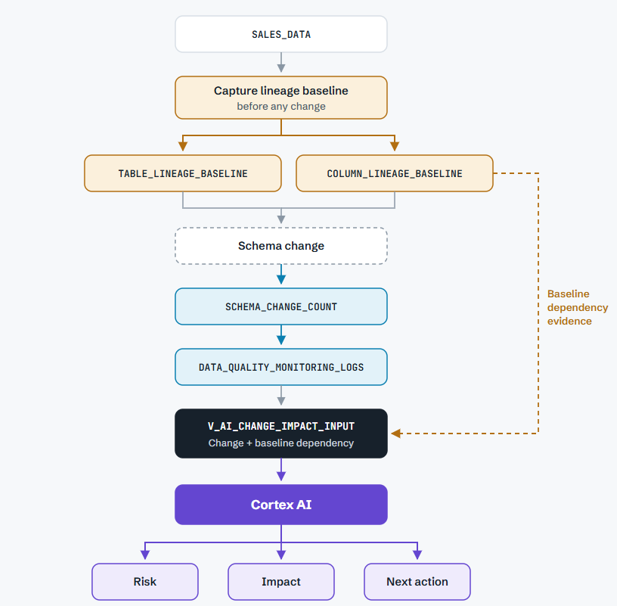
Final architecture
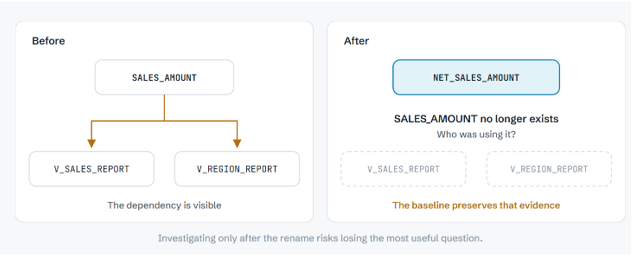
The important improvement in the design is the use of a pre-change lineage baseline.
Lineage
Why capture lineage before the change?
Because once a column is renamed or dropped, the original column may no longer exist.
Step2: Capture the column-level lineage baseline
First create the baseline table:
CREATE OR REPLACE TABLE COLUMN_LINEAGE_BASELINE

(

SOURCE_COLUMN_NAME       STRING,

TARGET_OBJECT_DATABASE   STRING,

TARGET_OBJECT_SCHEMA     STRING,

TARGET_OBJECT_NAME       STRING,

TARGET_COLUMN_NAME       STRING

);
EXECUTE IMMEDIATE

$$

DECLARE

RS RESULTSET;

V_COLUMN_NAME STRING;

V_SQL STRING;

BEGIN

RS := (

SELECT COLUMN_NAME

FROM AI_CHANGE_COPILOT_DB.INFORMATION_SCHEMA.COLUMNS

WHERE TABLE_SCHEMA = 'AI_CHANGE_COPILOT_SCH'

AND TABLE_NAME   = 'SALES_DATA' ORDER BY ORDINAL_POSITION

);

FOR REC IN RS DO

V_COLUMN_NAME := REC.COLUMN_NAME;

V_SQL :=

'INSERT INTO COLUMN_LINEAGE_BASELINE

SELECT

''' || V_COLUMN_NAME || ''',

TARGET_OBJECT_DATABASE,TARGET_OBJECT_SCHEMA,

TARGET_OBJECT_NAME,TARGET_COLUMN_NAME

FROM TABLE(SNOWFLAKE.CORE.GET_LINEAGE(

''AI_CHANGE_COPILOT_DB.AI_CHANGE_COPILOT_SCH.SALES_DATA.'

|| V_COLUMN_NAME || ''',''COLUMN'',

''DOWNSTREAM'',2

)

)';

EXECUTE IMMEDIATE V_SQL;

END FOR;

RETURN 'COLUMN LINEAGE BASELINE CREATED';

END;

$$;
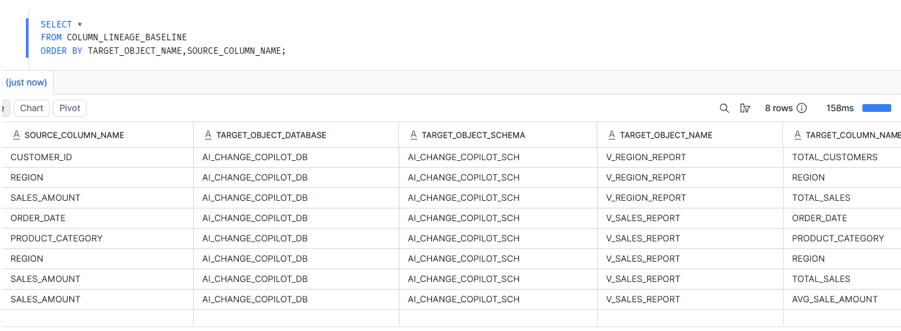
Step 3: Capture the table-level lineage baseline
CREATE OR REPLACE TABLE TABLE_LINEAGE_BASELINE AS

SELECT DISTINCT

TARGET_OBJECT_DATABASE,

TARGET_OBJECT_SCHEMA,

TARGET_OBJECT_NAME

FROM TABLE(

SNOWFLAKE.CORE.GET_LINEAGE(

'AI_CHANGE_COPILOT_DB.AI_CHANGE_COPILOT_SCH.SALES_DATA',

'TABLE',

'DOWNSTREAM',

2

)

);

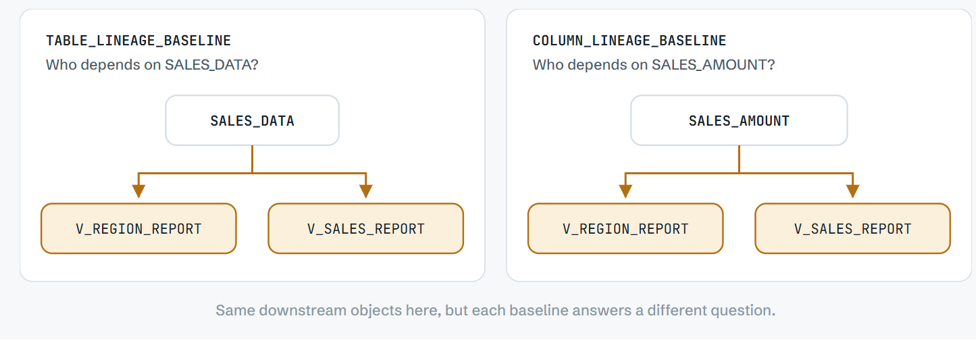
baseline
So the two baseline tables answer different questions:
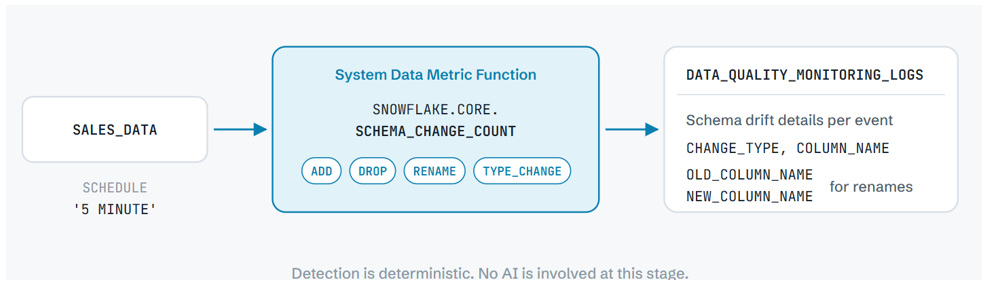
Step 4:Enable schema change detection
I used Snowflake’s system Data Metric Function:
SNOWFLAKE.CORE.SCHEMA_CHANGE_COUNT
First, configure its execution schedule:
ALTER TABLE SALES_DATA SET DATA_METRIC_SCHEDULE = '5 MINUTE';
Then associate the DMF:
ALTER TABLE SALES_DATA ADD DATA METRIC FUNCTION SNOWFLAKE.CORE.SCHEMA_CHANGE_COUNT ON ();
Scenario 1: Add a new column
The first change is deliberately simple:
ALTER TABLE SALES_DATA ADD COLUMN DISCOUNT_AMOUNT NUMBER(12,2);
The DMF records an event similar to:
CHANGE_TYPE : ADD
COLUMN_NAME : DISCOUNT_AMOUNT
Now comes the important part.
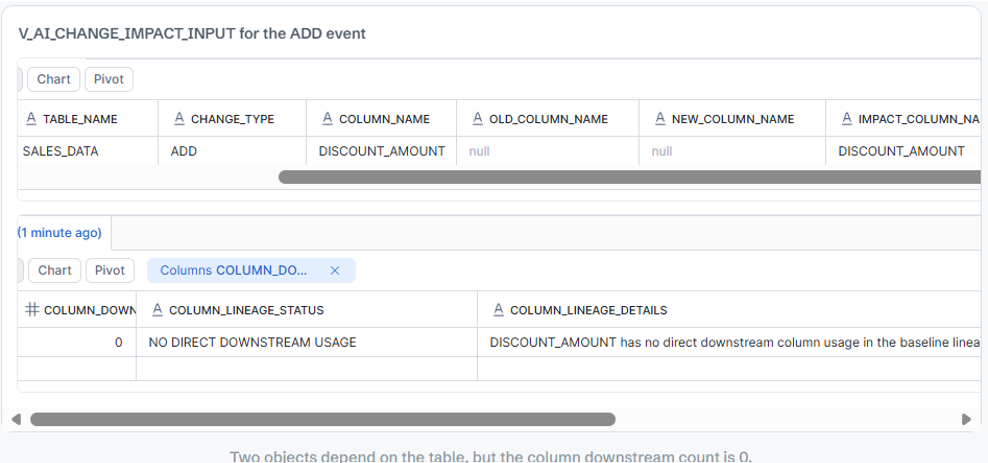
DISCOUNT_AMOUNT did not exist when COLUMN_LINEAGE_BASELINE was captured.
Step 6: Build the generic impact input
The next object is V_AI_CHANGE_IMPACT_INPUT.
Its purpose is to combine three things:
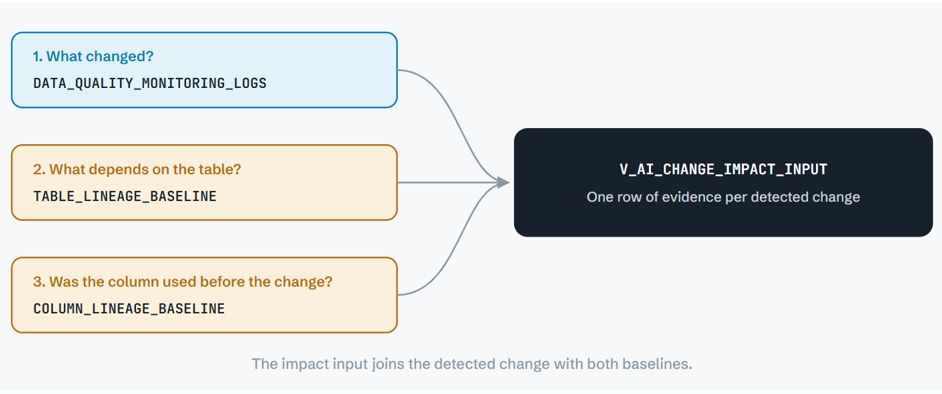
CREATE OR REPLACE VIEW V_AI_CHANGE_IMPACT_INPUT AS
WITH CHANGES AS

(

-- 1. What changed, read from the DMF monitoring log

SELECT

MEASUREMENT_TIME,

TABLE_NAME,

VALUE:"snow.data_metric.schema_change.change_type"::STRING

AS CHANGE_TYPE,

VALUE:"snow.data_metric.schema_change.column_name"::STRING

AS COLUMN_NAME,

...

<IMPACT_COLUMN_NAME logic>
FROM SNOWFLAKE.LOCAL.DATA_QUALITY_MONITORING_LOGS

WHERE TABLE_NAME = 'SALES_DATA'

AND METRIC_NAME = 'SCHEMA_CHANGE_COUNT'

),
TABLE_IMPACT AS

(

-- 2. Who depends on the table

SELECT

COUNT(DISTINCT TARGET_OBJECT_NAME) AS DOWNSTREAM_OBJECT_COUNT,

LISTAGG(DISTINCT TARGET_OBJECT_NAME, ', ') ...

AS DOWNSTREAM_OBJECTS

FROM TABLE_LINEAGE_BASELINE

),
COLUMN_IMPACT AS

(

-- 3. Who depended on the changed column before the change

SELECT

C.IMPACT_COLUMN_NAME,

COUNT(DISTINCT B.TARGET_OBJECT_NAME) AS COLUMN_DOWNSTREAM_COUNT,

...

FROM CHANGES C

LEFT JOIN COLUMN_LINEAGE_BASELINE B

ON B.SOURCE_COLUMN_NAME = C.IMPACT_COLUMN_NAME

GROUP BY ...

)
SELECT

C.CHANGE_TYPE,

C.COLUMN_NAME,

C.OLD_COLUMN_NAME,

C.NEW_COLUMN_NAME,

C.IMPACT_COLUMN_NAME,

T.DOWNSTREAM_OBJECTS,

I.COLUMN_DOWNSTREAM_COUNT,

<COLUMN_LINEAGE_STATUS>,

<COLUMN_LINEAGE_DETAILS>
FROM CHANGES C

LEFT JOIN COLUMN_IMPACT I ON ...

CROSS JOIN TABLE_IMPACT T;
The core logic for identifying the column whose impact should be checked is:
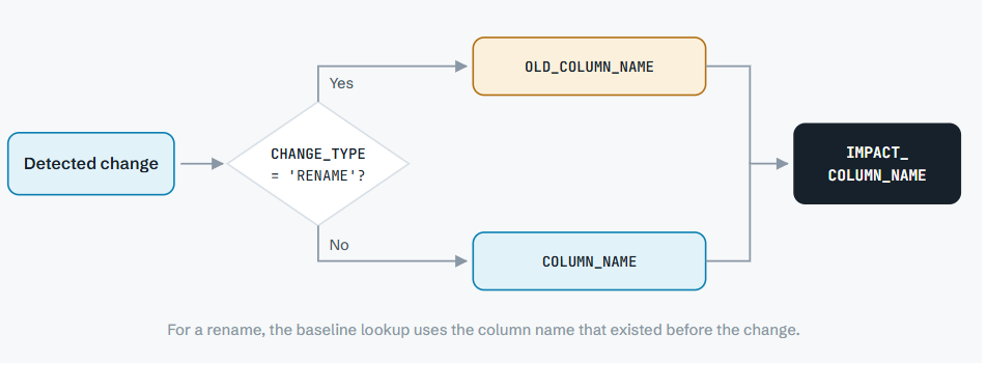
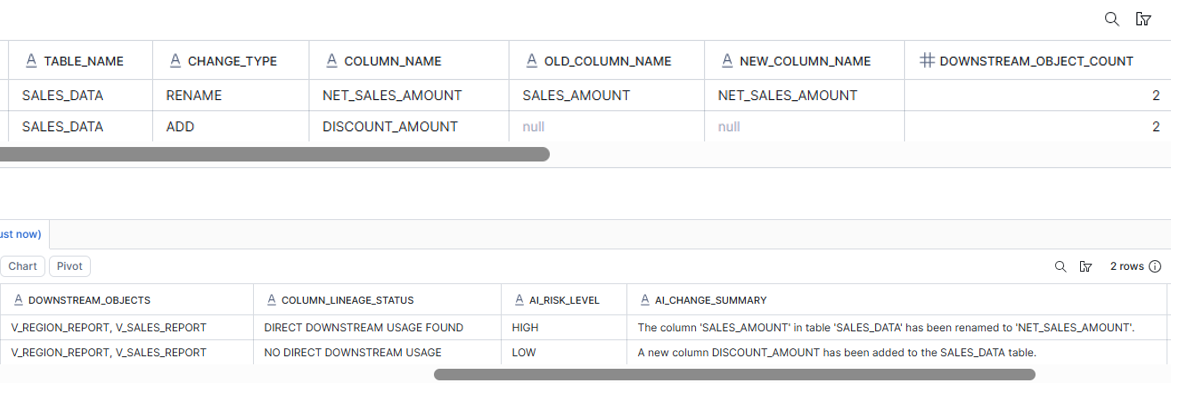
Output: Result: ADD NEW COLUMN
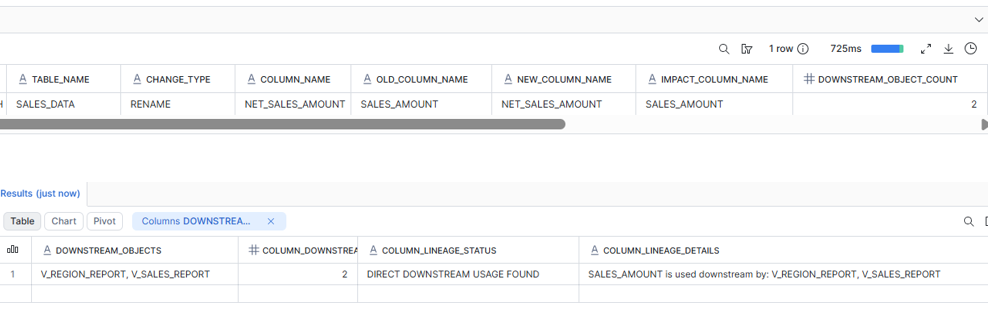
Scenario 2: Rename a Column That Is Actually Used
Next, I renamed a column that both reporting views depend on:
ALTER TABLE SALES_DATA RENAME COLUMN SALES_AMOUNT TO NET_SALES_AMOUNT;
The DMF records the rename with both the old and new column names:
CHANGE_TYPE : RENAME
COLUMN_NAME : NET_SALES_AMOUNT
OLD_COLUMN_NAME : SALES_AMOUNT
NEW_COLUMN_NAME : NET_SALES_AMOUNT
Step 7: Let Cortex AI interpret the evidence
At this point, Snowflake has already done the deterministic work.
Cortex receives evidence such as:
Table:
SALES_DATA
Change:
ADD DISCOUNT_AMOUNT
Table-Level Downstream Objects:
V_REGION_REPORT,
V_SALES_REPORT
Column-Level Impact:
NO DIRECT DOWNSTREAM USAGE
Evidence:
DISCOUNT_AMOUNT has no direct downstream
column usage in the baseline lineage.
—————————————————
Table:
SALES_DATA
Change:
RENAME SALES_AMOUNT → NET_SALES_AMOUNT
Table-Level Downstream Objects:
V_REGION_REPORT,
V_SALES_REPORT
Column-Level Impact:
DIRECT DOWNSTREAM USAGE FOUND
Evidence:
SALES_AMOUNT is used downstream by:
V_REGION_REPORT, V_SALES_REPORT
I then use AI_COMPLETE to turn this into an engineering impact assessment.
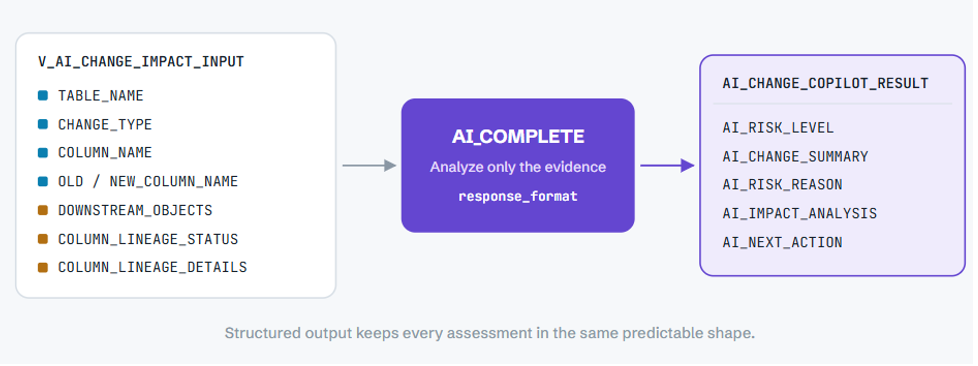
The core logic looks like: CREATE OR REPLACE TABLE AI_CHANGE_COPILOT_RESULT AS
AI_COMPLETE(

model => '<supported-model>',

prompt => CONCAT(

'You are a Snowflake Data Change Impact Copilot.

Analyze only the supplied evidence.

Table: ', TABLE_NAME, '

Change Type: ', CHANGE_TYPE, '

Changed Column: ', COLUMN_NAME, '

Old Column: ', OLD_COLUMN_NAME, '

New Column: ', NEW_COLUMN_NAME, '

Downstream Objects: ', DOWNSTREAM_OBJECTS, '

Column Lineage Status: ', COLUMN_LINEAGE_STATUS, '

Column Lineage Evidence: ', COLUMN_LINEAGE_DETAILS, '

Determine:

- Risk level

- Change summary

- Why that risk was selected

- Potential downstream impact

- One concrete engineering action

Do not invent dependencies.

Do not claim a report is broken unless

the supplied evidence proves it.'

),

response_format => TYPE OBJECT(

RISK_LEVEL STRING,

CHANGE_SUMMARY STRING,

RISK_REASON STRING,

IMPACT_ANALYSIS STRING,

NEXT_ACTION STRING

)

)
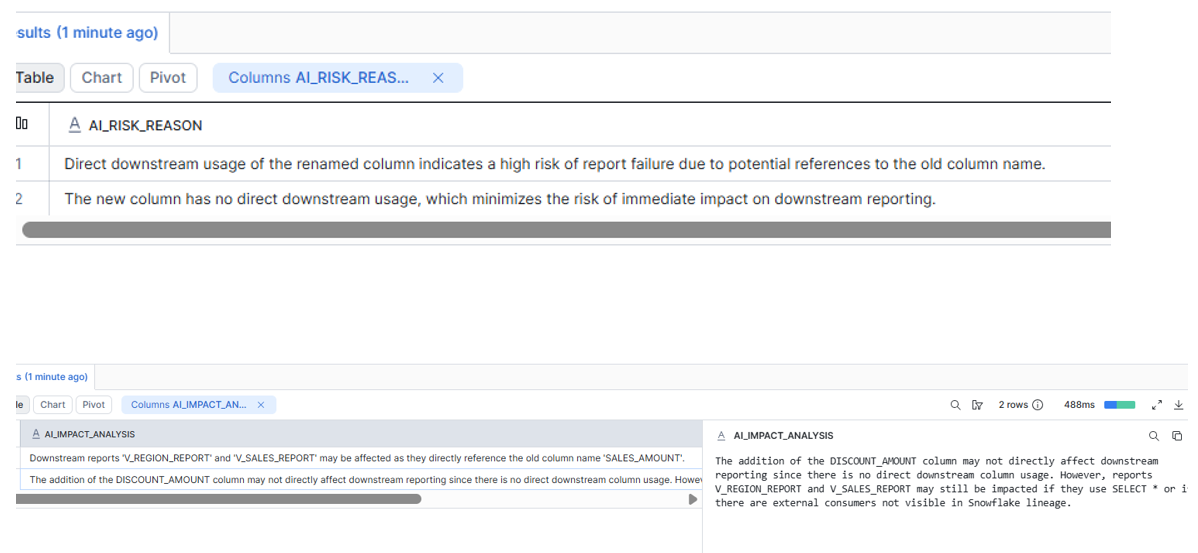
AI_COMPLETE supports structured output using SQL type literals, allowing fields such as risk, impact and recommended action to come back in a predictable structure rather than as an uncontrolled paragraph.
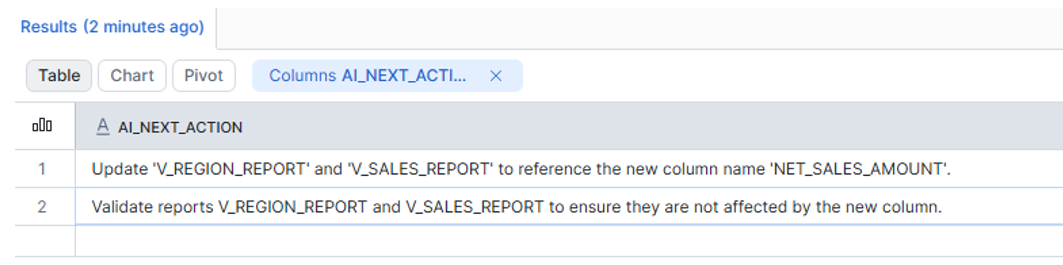
The result is stored in AI_CHANGE_COPILOT_RESULT
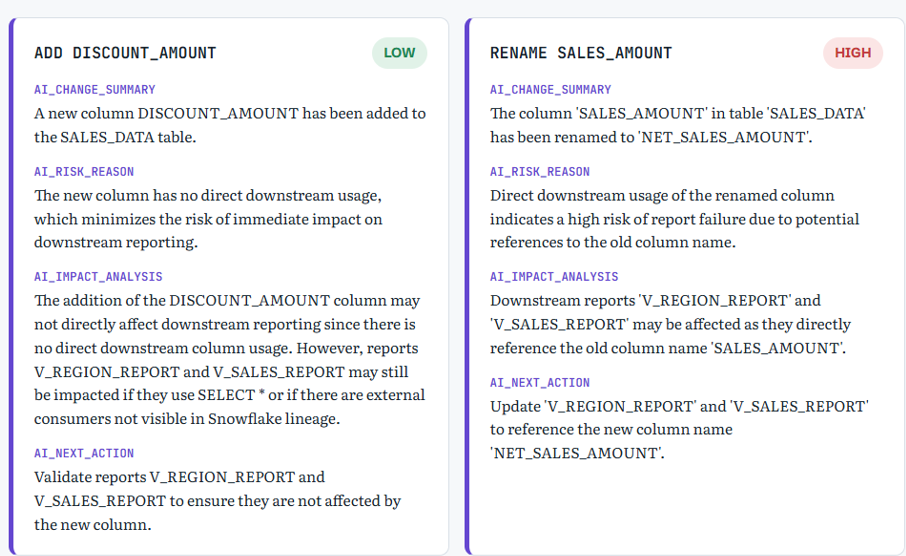
The Cortex output
Both scenarios pass through the same view and the same prompt. The output in AI_CHANGE_COPILOT_RESULT: