 3
3
 0
0
Snowflake Cortex Search Named Scoring Profiles: Semantic search understands meaning. But in enterprise search, meaning alone is rarely enough.
Ask an internal search tool:
Can I work from home three days and claim internet allowance?
A vanilla semantic search will happily return the current flexible work policy, an old COVID guideline, a draft hybrid proposal, a reimbursement FAQ, and an IT setup checklist — all related, none uniformly trustworthy.
The employee doesn’t want related documents. They want the current, official, approved policy.
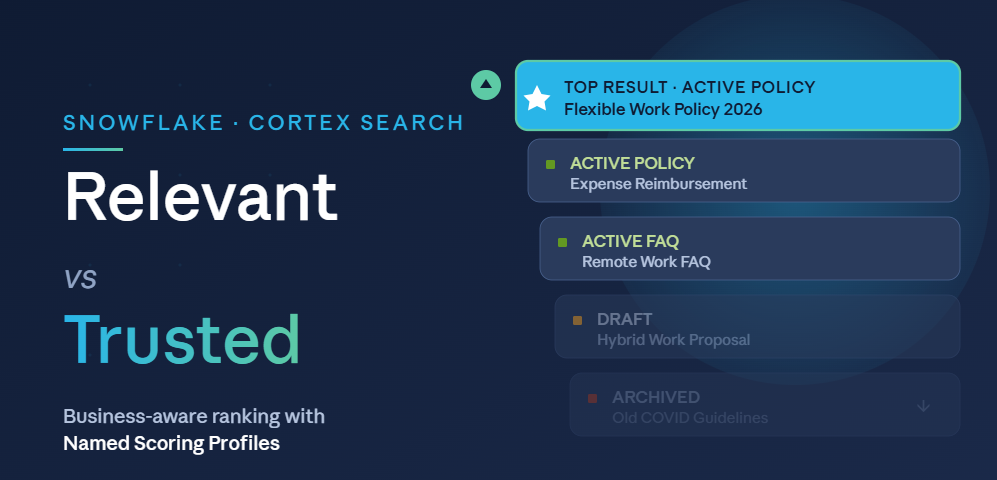
That gap between relevant and authoritative is exactly what Cortex Search Named Scoring Profiles are built to close.
The Idea in One Line
Cortex Search finds relevant documents. Named Scoring Profiles decide which of those relevant documents the business should prefer.
Instead of hardcoding ranking rules inside every app, you register a reusable profile on the search service that boosts results using metadata your organization already maintains — document status, type, version, and last-updated date.
The Demo Setup
The Demo Setup
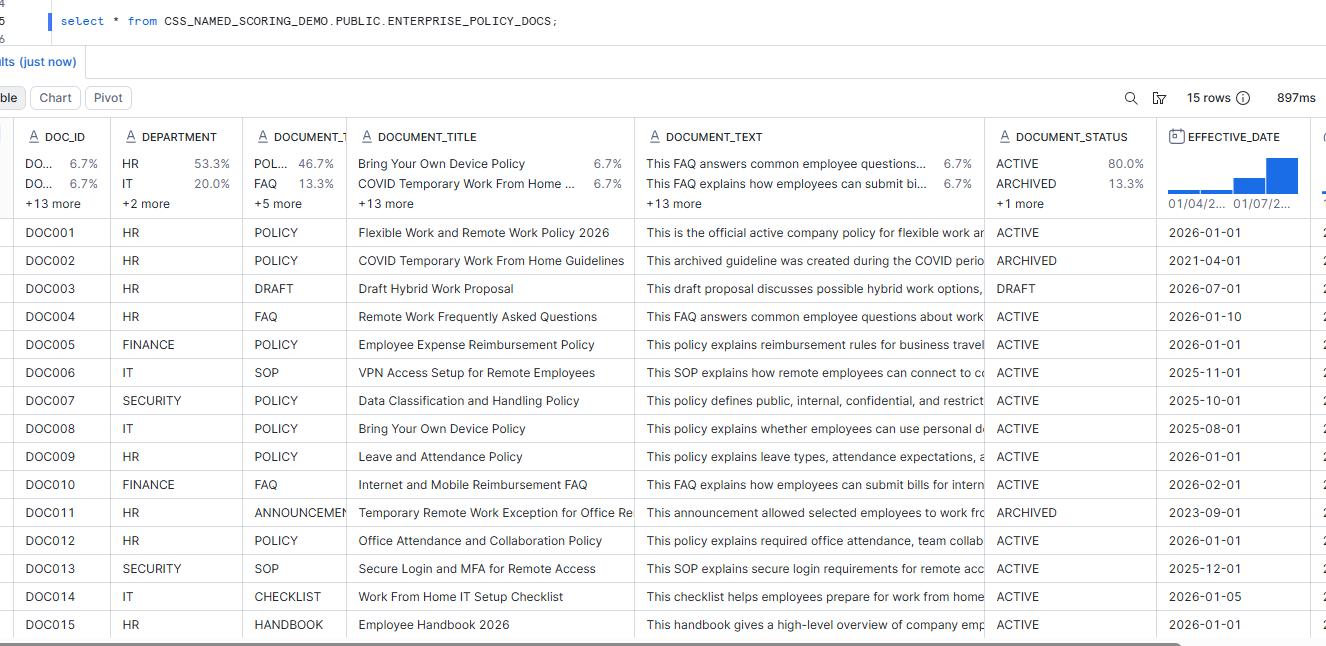
We’ll build a single-table enterprise policy corpus (15 documents across HR, Finance, IT, Security) and layer a scoring profile on top.
- Database, schema, and table
CREATE OR REPLACE DATABASE CSS_NAMED_SCORING_DEMO;
CREATE OR REPLACE TABLE ENTERPRISE_POLICY_DOCS (

DOC_ID           STRING,

DEPARTMENT       STRING,

DOCUMENT_TYPE    STRING,

DOCUMENT_TITLE   STRING,

DOCUMENT_TEXT    STRING,

DOCUMENT_STATUS  STRING,

EFFECTIVE_DATE   DATE,

LAST_UPDATED_TS  TIMESTAMP_NTZ,

VERSION_NUMBER   NUMBER(5,2),

DOCUMENT_OWNER   STRING

);
Populate it with realistic data:
- documents records
- an active flexible-work policy
- an archived COVID guideline
- a draft hybrid proposal
- a remote work FAQ
- expense policies
- IT SOPs
- security policies
Step 2. A search source view — derive scores from metadata
This view creates two important things:
- A clean SEARCH_TEXT column.
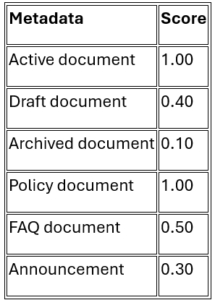
- Simple numeric scores derived from existing metadata.
We are not asking the business team to maintain artificial scores. We are deriving scores from common document fields
CREATE OR REPLACE VIEW POLICY_SEARCH_SOURCE AS

SELECT

DOC_ID, DEPARTMENT, DOCUMENT_TYPE, DOCUMENT_TITLE, DOCUMENT_TEXT,

DOCUMENT_STATUS, EFFECTIVE_DATE, LAST_UPDATED_TS, VERSION_NUMBER, DOCUMENT_OWNER,

CASE DOCUMENT_STATUS

WHEN 'ACTIVE' THEN 1.00

WHEN 'DRAFT' THEN 0.40

WHEN 'ARCHIVED' THEN 0.10

ELSE 0.50

END AS STATUS_SCORE,

CASE DOCUMENT_TYPE

WHEN 'POLICY' THEN 1.00

WHEN 'SOP' THEN 0.75

WHEN 'HANDBOOK' THEN 0.65

WHEN 'CHECKLIST' THEN 0.60

WHEN 'FAQ' THEN 0.50

WHEN 'ANNOUNCEMENT' THEN 0.30

WHEN 'DRAFT' THEN 0.10

ELSE 0.40

END AS DOCUMENT_TYPE_SCORE,

CONCAT(

'Title: ', DOCUMENT_TITLE, '\n',

'Department: ', DEPARTMENT, '\n',

'Document Type: ', DOCUMENT_TYPE, '\n',

'Document Status: ', DOCUMENT_STATUS, '\n',

'Effective Date: ', TO_VARCHAR(EFFECTIVE_DATE), '\n',

'Document Text: ', DOCUMENT_TEXT

) AS SEARCH_TEXT

FROM ENTERPRISE_POLICY_DOCS;
Demp
Step 3: Create Cortex Search Service
CREATE OR REPLACE CORTEX SEARCH SERVICE CSS_NAMED_SCORING_DEMO.PUBLIC.ENTERPRISE_POLICY_CSS

ON SEARCH_TEXT

ATTRIBUTES

DOC_ID,

DEPARTMENT,

DOCUMENT_TYPE,

DOCUMENT_STATUS,

EFFECTIVE_DATE,

LAST_UPDATED_TS,

VERSION_NUMBER,

DOCUMENT_OWNER,

STATUS_SCORE,

DOCUMENT_TYPE_SCORE

WAREHOUSE = COMPUTE_WH

TARGET_LAG = '1 hour'

EMBEDDING_MODEL = 'snowflake-arctic-embed-m-v1.5'

AS

SELECT

DOC_ID,

DEPARTMENT,

DOCUMENT_TYPE,

DOCUMENT_TITLE,

DOCUMENT_TEXT,

DOCUMENT_STATUS,

EFFECTIVE_DATE,

LAST_UPDATED_TS,

VERSION_NUMBER,

DOCUMENT_OWNER,

STATUS_SCORE,

DOCUMENT_TYPE_SCORE,

SEARCH_TEXT

FROM CSS_NAMED_SCORING_DEMO.PUBLIC.POLICY_SEARCH_SOURCE;
Step 4: Search Without Named Scoring Profile
Now run a normal Cortex Search query.
SELECT SNOWFLAKE.CORTEX.SEARCH_PREVIEW(

'CSS_NAMED_SCORING_DEMO.PUBLIC.ENTERPRISE_POLICY_CSS',

'{

"query": "Can I work from home three days and claim internet allowance?",

"columns": [

"DOC_ID",

"DOCUMENT_TITLE",

"DEPARTMENT",

"DOCUMENT_TYPE",

"DOCUMENT_STATUS",

"EFFECTIVE_DATE",

"LAST_UPDATED_TS",

"VERSION_NUMBER"

],

"limit": 8

}'

);
Without Named Scoring Profile
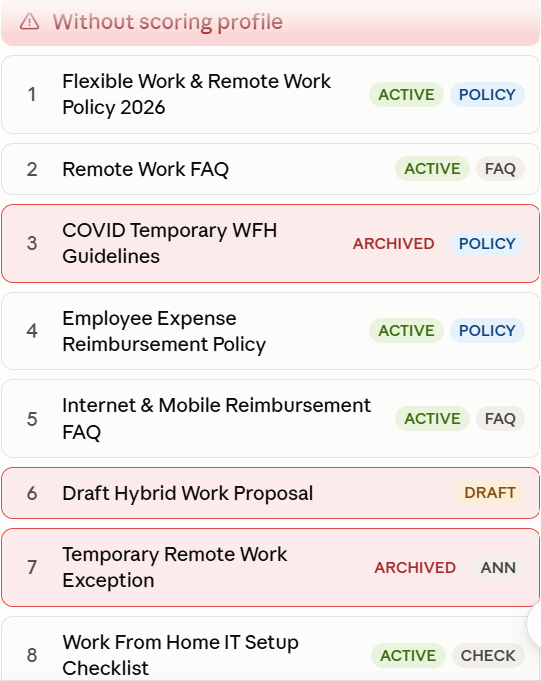
Problem:
- An archived COVID policy came at rank 3.
- A draft policy came at rank 6.
- An archived temporary announcement came at rank 7.
They are semantically related, but not ideal for a business answer.
Step 5: Before Creating the Scoring Profile, Understand the Scoring Components :This part is important.
A named scoring profile can control how Cortex Search ranks results.
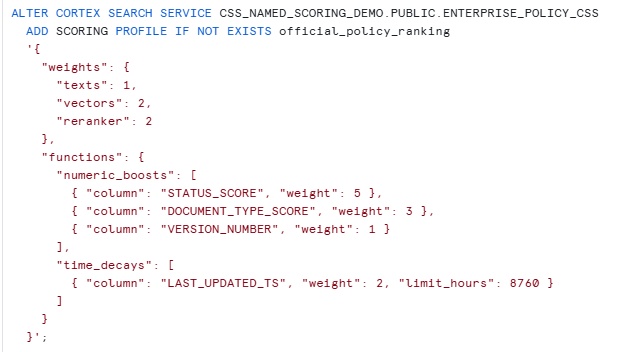
Let’s understand this in simple language.
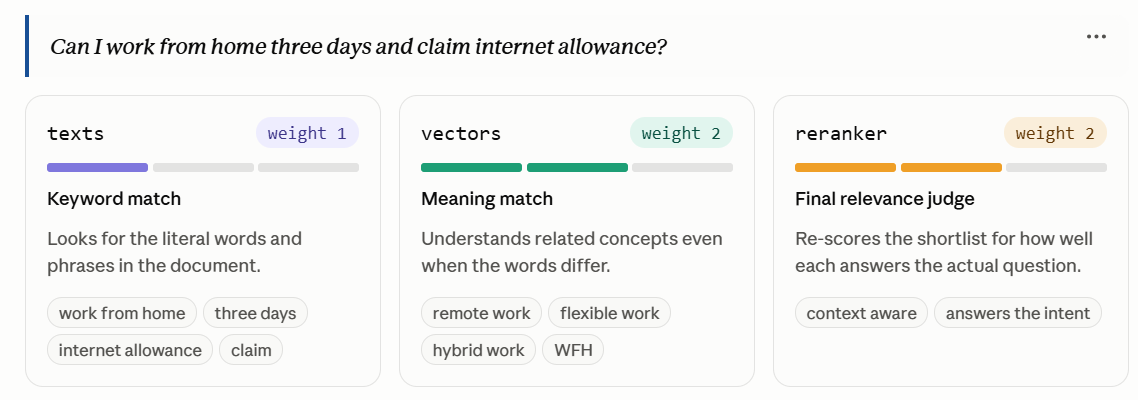
Numeric boost means:
Give extra ranking preference to records with higher numeric values in selected metadata columns.
In our case:
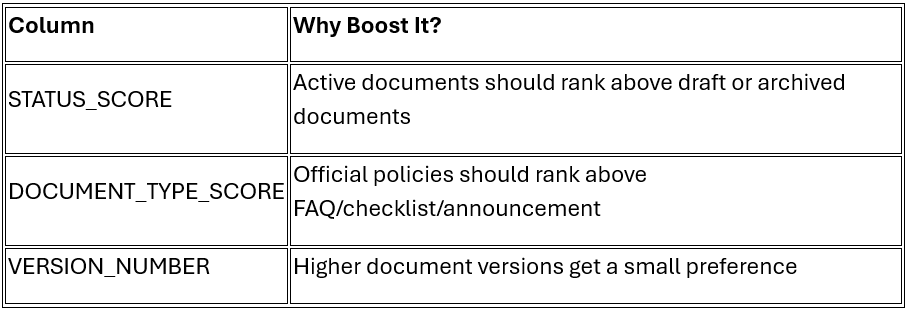
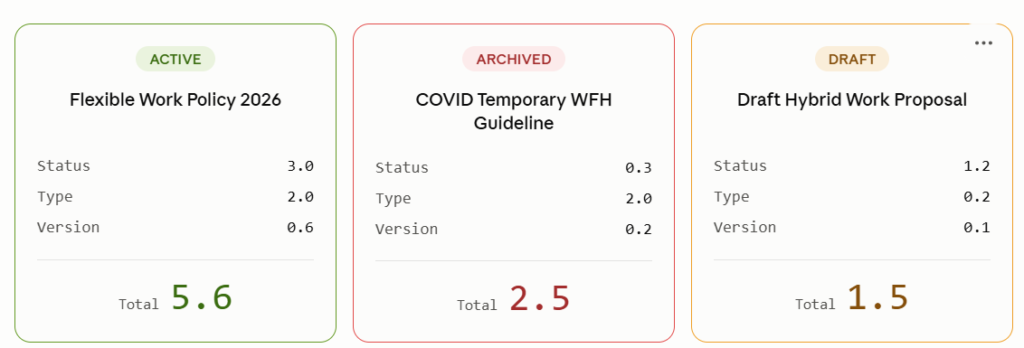
Time Decays:
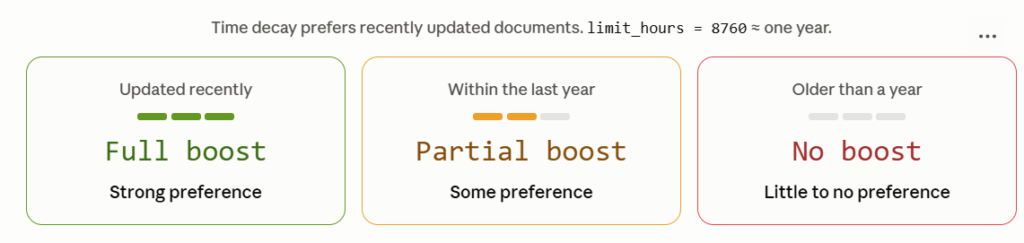
Time decay means:
Prefer recently updated documents.
limit_hours = 8760 means roughly one year.
So a document updated recently gets a stronger recency score. A very old document gets little or no recency boost.
Step 6: Search With Named Scoring Profile
SELECT SNOWFLAKE.CORTEX.SEARCH_PREVIEW(

'CSS_NAMED_SCORING_DEMO.PUBLIC.ENTERPRISE_POLICY_CSS',

'{

"query": "Can I work from home three days and claim internet allowance?",

"columns": [

"DOC_ID",

"DOCUMENT_TITLE",

"DEPARTMENT",

"DOCUMENT_TYPE",

"DOCUMENT_STATUS",

"EFFECTIVE_DATE",

"LAST_UPDATED_TS",

"VERSION_NUMBER"

],

"scoring_profile": "official_policy_ranking",


"limit": 8

}'

);
Expected behavior:
1. Current active policy should stay near the top.
2.Active supporting documents may move up.
3. Archived documents should move lower.
4.Draft documents should not dominate the result.
5.Recently updated documents may get preference where relevance is close.
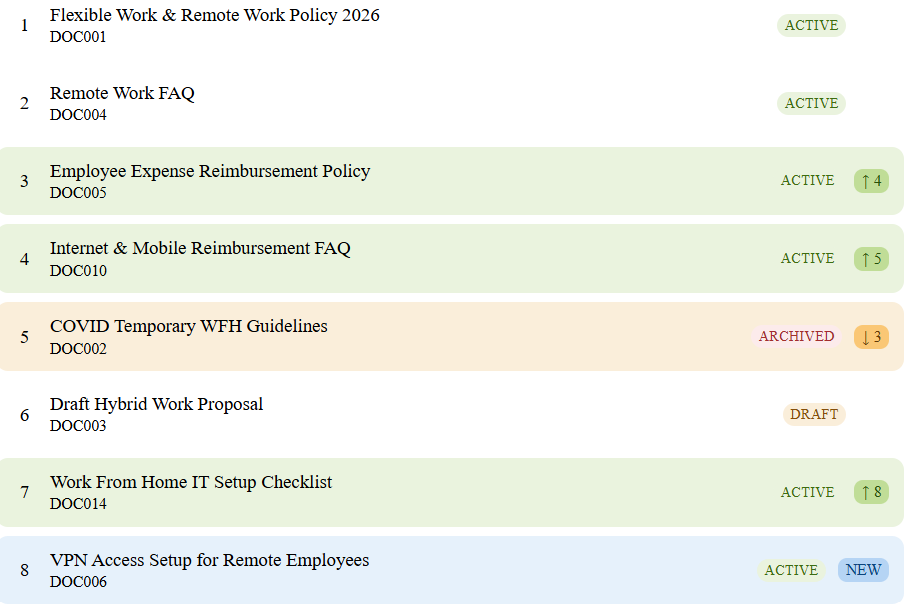
What improved?
- DOC002 archived COVID policy moved down from rank 3 to rank 5.
- DOC005 active official finance policy moved up from rank 4 to rank 3.
- DOC011 archived temporary announcement disappeared from top 8.
- Active documents received stronger ranking preference.
- Recently updated documents received additional boost.
Learned from the Test
What We Learned from the Test
In my test, the normal search already returned the current flexible work policy as the first result.
That is good. It means semantic search understood the query.
But without the named scoring profile, archived and draft documents still appeared high in the top results because they were semantically similar.
After applying the named scoring profile:
- active documents received stronger ranking preference
- official policy documents received stronger ranking preference
- recently updated documents received a recency boost
- archived or draft documents moved lower
- supporting documents such as reimbursement FAQ still appeared because they were relevant.
Why This Matters for RAG
In a RAG application, the LLM answer depends on the retrieved context.If the search retrieves an archived COVID work-from-home policy, the LLM may generate an outdated answer. If the search retrieves the current approved flexible work policy, the answer is more reliable.
So Named Scoring Profiles improve the retrieval layer. Better retrieval means better AI answers.
Takeaway
Semantic search answers: which documents are related to the question? Named Scoring Profiles answer: which of those related documents should the business prefer?