 1
1
 0
0
Building a Snowflake MCP Server with Agent, SQL, and Generic Tools: When I first started exploring Snowflake-managed MCP servers, one question kept coming back:
If I already have Cortex Analyst or a Cortex Agent, why would I also need SYSTEM_EXECUTE_SQL or a GENERIC tool?
Looking at the documentation tells us what each tool does, but I wanted a use case where the difference becomes obvious from the business problem itself.
The business problem
Imagine an online retailer with thousands of customer orders.
- Some orders are delivered on time.
- Some are still packed or shipped even though their promised delivery date has already passed.
Operations teams need to answer questions such as:
- Which type of customer is most affected by delayed deliveries?
Then they may want to drill down:
- Show me the exact orders that are more than two days late.
And eventually take action:
- Escalate ORD-1004 because this Gold customer order is already three days late.
These three questions may sound similar, but technically they represent three very different capabilities.
That is where MCP tool selection becomes interesting.
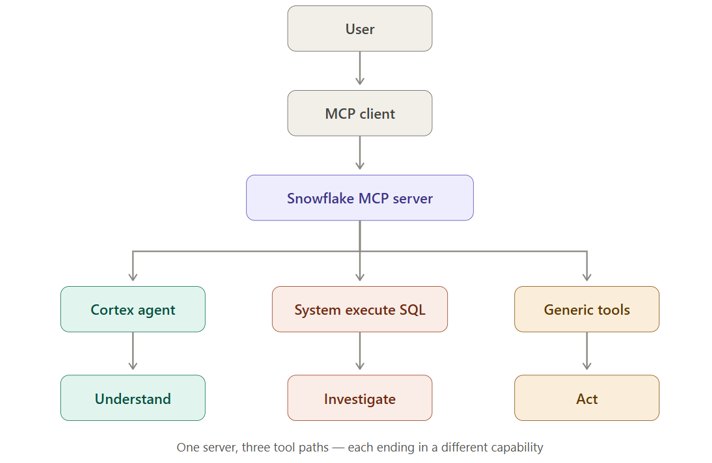
The architecture
I intentionally kept the data model simple so the MCP concepts remain the focus.
Step 1 — Create a very small business dataset
I created a database dedicated to the demo:
CREATE DATABASE RETAIL_MCP_DEMO_DB;
with separate schemas for:
CORE → business data
APP → controlled business actions
ANALYTICS → semantic/analytical layer
AI → Cortex Agent and MCP Server
The core of the demo is just one ORDERS table containing fields such as:
ORDER_ID
CUSTOMER_NAME
CUSTOMER_TIER
REGION
ORDER_STATUS
ORDER_AMOUNT
PROMISED_DELIVERY_DATE
PRIORITY
ESCALATION_STATUS
The sample data intentionally contains delayed Gold, Silver and Bronze customer orders.
For example:
Gold → 3 delayed orders → ₹73,000
Silver → 1 delayed order → ₹12,000
Bronze → 1 delayed order → ₹7,000
This gives us a known answer before AI enters the picture.
If I later ask:
Which type of customer is most affected by delayed deliveries?
I already know the expected answer is Gold customers.
That ground truth becomes important when validating the Agent.
Step 2 — GENERIC: Give AI an action
Now consider this request:
Escalate ORD-1004 because the customer has already missed the promised delivery date.
This is not analysis anymore.The user wants to change data.
One option would be allowing an AI client to generate:
UPDATE ORDERS
SET PRIORITY = ‘URGENT’,
ESCALATION_STATUS = ‘ESCALATED’
WHERE ORDER_ID = ‘ORD-1004’;
Instead of giving the AI broad write capability, I created one stored procedure contains the rules.
It checks that the order is eligible, prevents delivered or cancelled orders from being escalated, changes the priority to URGENT, records the escalation reason, and captures the user and timestamp.
This stored procedure is later exposed as a GENERIC MCP tool. Snowflake’s GENERIC tool type is specifically designed to expose UDFs and stored procedures through MCP.
Step 3 — SYSTEM_EXECUTE_SQL: Flexible investigation
Now consider a different request:
Show me all orders that are more than two days late.
Tomorrow the user may ask:
Show delayed Gold customer orders above ₹20,000.
I cannot realistically create a separate stored procedure for every possible investigation.
This is where SYSTEM_EXECUTE_SQL fits.
The SQL can change depending on the question.
The important difference is:
GENERIC
Developer decides the SQL/business logic.
SYSTEM_EXECUTE_SQL
The investigation SQL can be determined at runtime.
That creates a clean separation:
Step 4 — Why do I still need a Cortex Agent?
If SYSTEM_EXECUTE_SQL can already query the database, why add an Agent?
Compare two questions:
- Show me orders more than two days late.
- Which type of customer is most affected by delayed deliveries?
The first is a lookup. The columns and filters are obvious , the LLM can write that SQL directly.
The second is full of business language that nobody defined in the schema:
- customer type : is that CUSTOMER_TIER (GOLD / SILVER / BRONZE)? Or region? Or industry?
- delayed : promised date in the past and status not DELIVERED or CANCELLED
The Cortex Agent solves this by reading from a semantic model where those terms are already defined once.
Step 5 — Teach Cortex Analyst the business language
I created a Snowflake Semantic View over the order data.
The Semantic View defines concepts such as:
Customer Type : CUSTOMER_TIER
Delayed Orders :DELAYED_ORDER_COUNT
Delayed Business Value :TOTAL_DELAYED_ORDER_VALUE
Average Delay: AVERAGE_DAYS_LATE
Semantic Views allow Snowflake to model dimensions, facts and metrics in business terms and can be used by Cortex Analyst for natural-language analysis.
I also added synonyms, because nobody says CUSTOMER_TIER out loud:
customer type · customer segment · tier → all point to CUSTOMER_TIER
So the semantic layer begins bridging the gap between:
Business language —- Semantic meaning — Physical Snowflake data
Step 6 — Put Cortex Agent above Cortex Analyst
The Semantic View knows the business terms. Now something has to use it.
So I created an Agent, RETAIL_FULFILLMENT_AGENT, and gave it one tool: a Cortex Analyst called OrderAnalyst, pointing at ORDER_FULFILLMENT_SV.
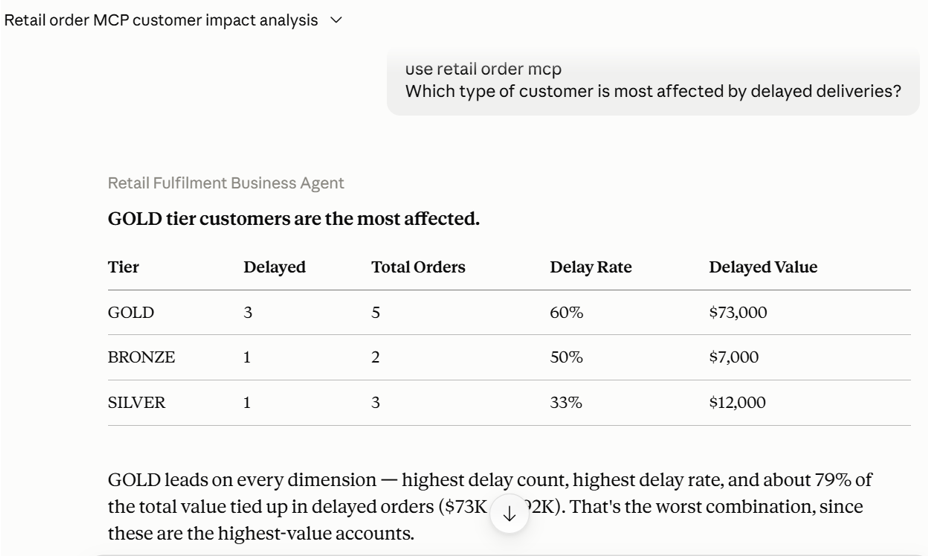
Now when I ask “Which type of customer is most affected by delayed deliveries?”, here’s what happens:
- The Agent picks the right tool for the question — OrderAnalyst.
- Cortex Analyst reads the Semantic View, works out that customer type = CUSTOMER_TIER and delayed = the filter I defined, and writes the SQL.
- Snowflake runs it and returns the numbers:
Gold → 3 delayed orders → ₹73,000
Silver → 1 delayed order → ₹12,000
Bronze → 1 delayed order → ₹7,000
- The Agent turns that table back into an answer: “Gold customers are currently the most affected…”
Step 7 — Bring all three capabilities into MCP
Now the individual pieces exist.
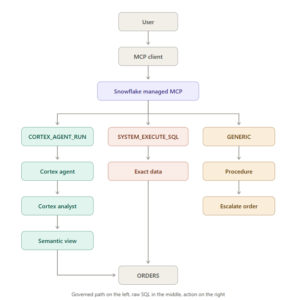
The final MCP server exposes them as three tools.
Conceptually:
tools:
# UNDERSTAND
– type: CORTEX_AGENT_RUN
name: retail_fulfillment_agent
# INVESTIGATE
– type: SYSTEM_EXECUTE_SQL
name: retail_order_sql
# ACT
– type: GENERIC
name: escalate_retail_order
The same external AI client now has three very different ways to interact with Snowflake.
Demo 1 — UNDERSTAND
Ask:
Which type of customer is most affected by delayed deliveries?
Expected route:
MCP Client
↓
CORTEX_AGENT_RUN
↓
Retail Fulfilment Agent
↓
Cortex Analyst
↓
Semantic View
↓
Snowflake
The answer should identify Gold customers and support the conclusion with the governed metrics.
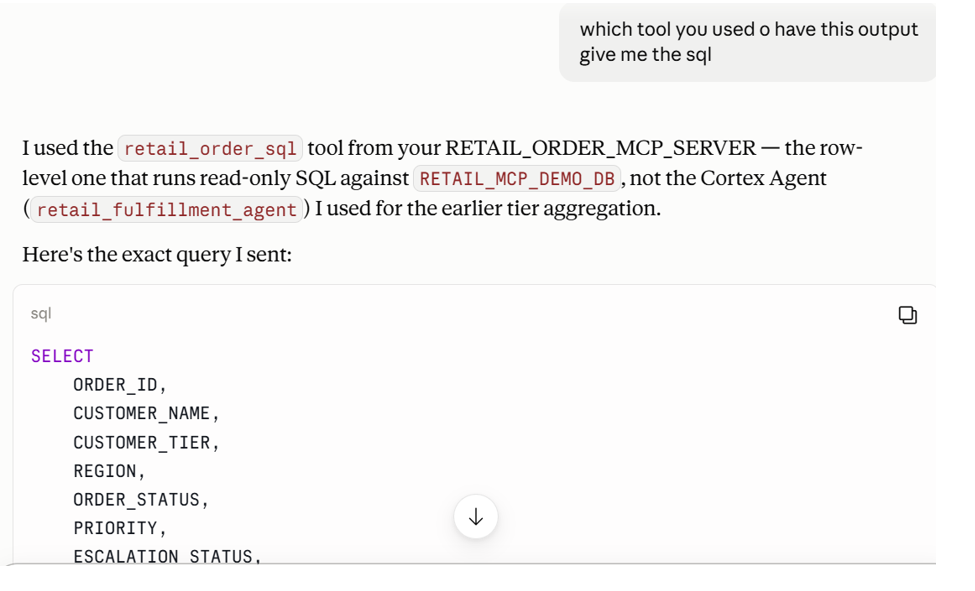
Demo 2 — INVESTIGATE(SQL)
Next ask:
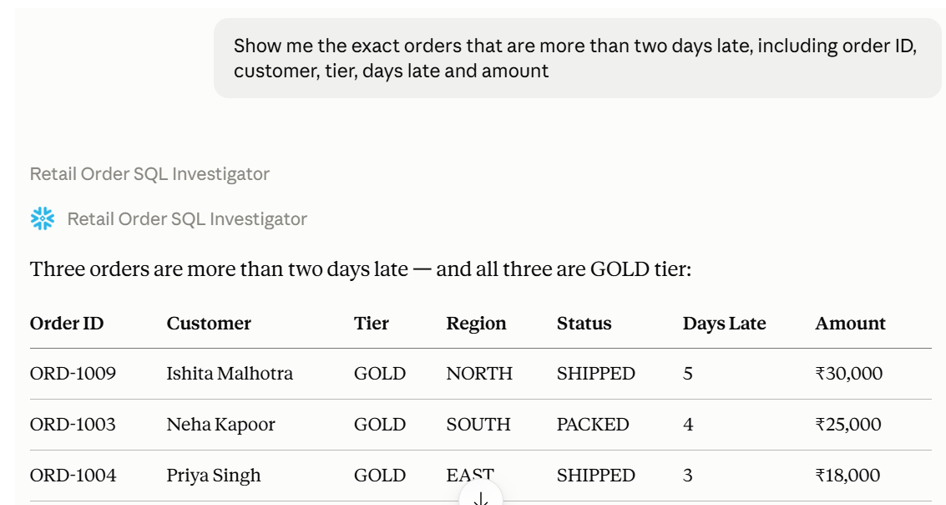
Show me the exact orders that are more than two days late, including order ID, customer, tier, days late and amount.
Now I don’t want just a business summary.
I want evidence.
Expected route:
MCP Client
↓
SYSTEM_EXECUTE_SQL
↓
SELECT…
↓
Exact rows
This exposes the underlying records.
Demo 3 — ACT
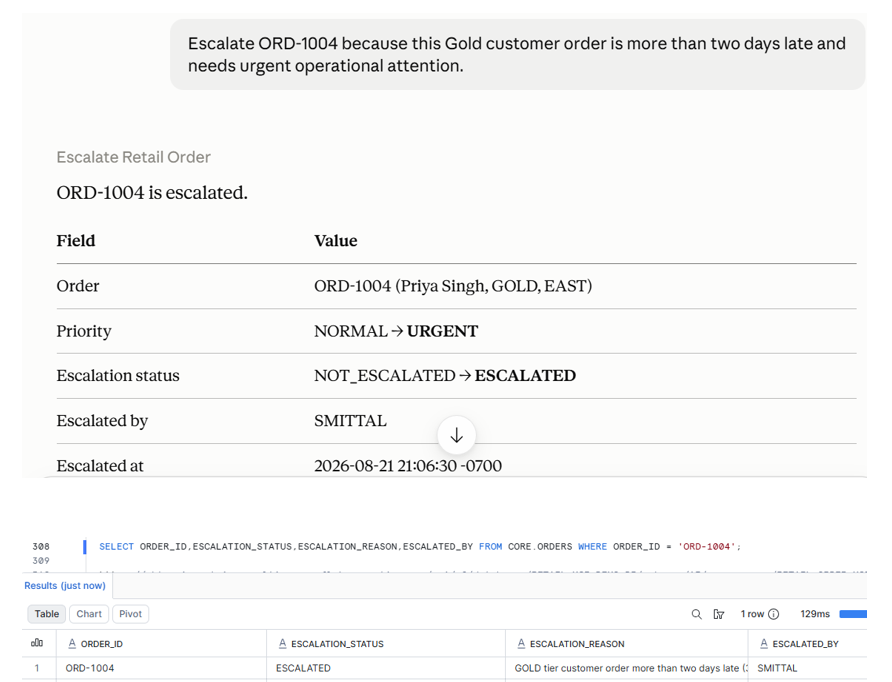
After seeing the delayed orders, ask:
Escalate ORD-1004 because this Gold customer order is more than two days late and needs urgent operational attention.
Expected route:
MCP Client
↓
GENERIC
↓
ESCALATE_ORDER
↓
Controlled update
The order changes from:
PRIORITY = NORMAL
ESCALATION_STATUS = NOT_ESCALATED
to:
PRIORITY = URGENT
ESCALATION_STATUS = ESCALATED
without giving the client arbitrary write SQL.
One MCP server — but should I do this in production?
One MCP server — but should I do this in production?
For this walkthrough I deliberately put all three tools — the Agent, direct SQL, and the generic procedure — on a single MCP server. That was for learning, not for production.
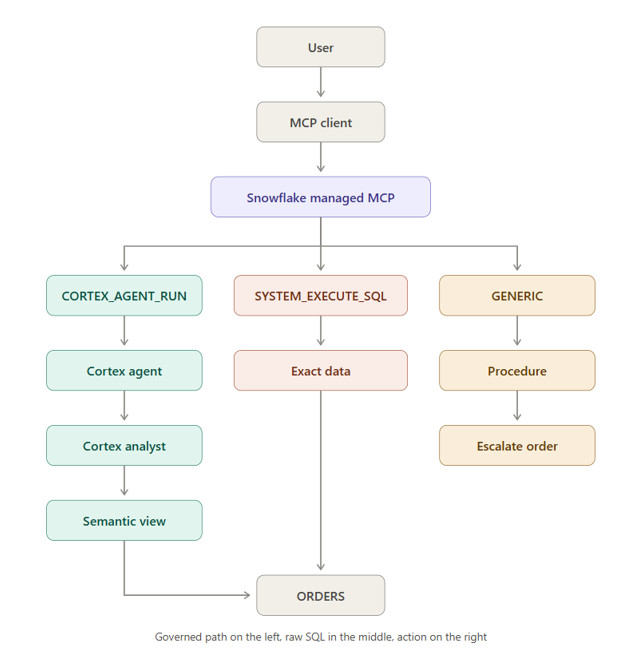
Here’s the problem. If SYSTEM_EXECUTE_SQL sits next to the Agent, the client can simply skip the Agent and run raw SQL instead. Everything you built in Steps 4–6 — the semantic view, the agreed definition of “delayed”, the verified queries — gets bypassed.
Snowflake’s guidance is explicit: on a server meant for governed business questions, the Cortex Agent should be the only client-facing tool. If you also need direct SQL, put it on a separate MCP server with its own least-privileged role.
Final architecture
For the complete implementation and SQL