 4
4
 0
0
Conversational AI Agent: Snowflake Cortex AI is not limited to running individual LLM functions in isolation. The real value comes when we combine multiple Cortex capabilities into one complete workflow.
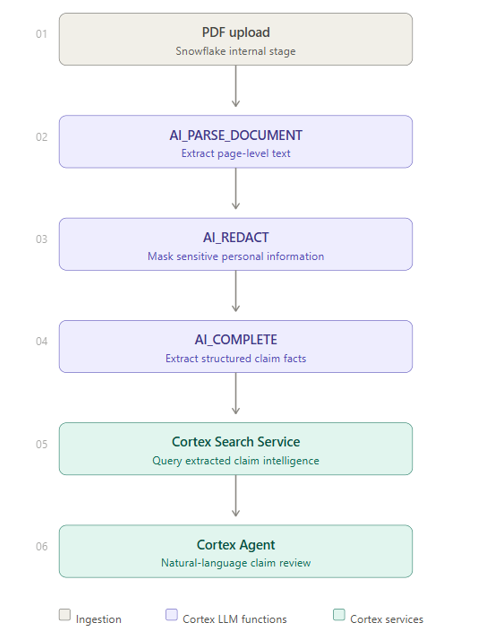
In this blog, I will demonstrate an end-to-end document intelligence use case where a PDF claim document is uploaded into Snowflake, parsed using AI_PARSE_DOCUMENT, protected using AI_REDACT, converted into structured business facts using AI_COMPLETE, made searchable using Cortex Search Service, and finally exposed through a Cortex Agent that can be used from SQL and Snowflake Intelligence/Cowork.
The focus of this blog is not only document extraction. The main objective is to show how Cortex AI LLM functions, Cortex Search, Agent, and Cowork can work together to create an AI-powered workflow inside Snowflake.
Business Problem
Business Problem
Imagine an insurance claim processing team receives a PDF claim bundle. The document contains a claim form, hospital details, diagnosis, procedure details, invoice amount, claim amount, submitted documents, and missing documents.
Traditionally, a claim reviewer may need to manually open the PDF and answer questions like:
- What is the claim number or Policy Number?
- Who is the claimant?
- What is the hospital name?
- What is the claimed amount?
- Which documents were submitted?
- Is anything missing?
This manual process is slow, repetitive, and sensitive because claim documents may contain personally identifiable information such as names, phone numbers, email addresses, date of birth, and physical address.
With Snowflake Cortex, we can build a complete AI pipeline inside Snowflake to process such documents.
In this blog, I will walk through a real-world style use case where we build an AI-Powered Claim Document Intake Agent using Snowflake Cortex.
Solution Overview
Solution Overview
The solution follows this flow:
Step 0: Setup
CREATE DATABASE IF NOT EXISTS CORTEX_CLAIM_DB;
CREATE SCHEMA IF NOT EXISTS CORTEX_CLAIM_DB.APP;
Step 1: Create Internal Stage for Claim Documents
create an internal stage where the sample claim PDF will be uploaded.

CREATE OR REPLACE STAGE CLAIM_DOC_STAGE

DIRECTORY = (ENABLE = TRUE)

ENCRYPTION = (TYPE = 'SNOWFLAKE_SSE');
After creating the stage, upload the sample insurance claim PDF into this stage.
Step 2: Parse the PDF using AI_PARSE_DOCUMENT
Now we parse the PDF directly from the stage.
Since the file is already uploaded to a Snowflake stage, we can read it directly from the stage directory and pass it to AI_PARSE_DOCUMENT.
CREATE OR REPLACE TABLE CLAIM_DOCUMENT_PARSED AS

SELECT

RELATIVE_PATH AS FILE_NAME,

SIZE AS FILE_SIZE,

LAST_MODIFIED,

FILE_URL,

SNOWFLAKE.CORTEX.AI_PARSE_DOCUMENT(

TO_FILE('@CLAIM_DOC_STAGE', RELATIVE_PATH),

{'mode': 'LAYOUT', 'page_split': TRUE}

) AS PARSED_DOCUMENT,

CURRENT_TIMESTAMP() AS PARSED_AT

FROM DIRECTORY(@CLAIM_DOC_STAGE)

WHERE LOWER(RELATIVE_PATH) LIKE '%.pdf';
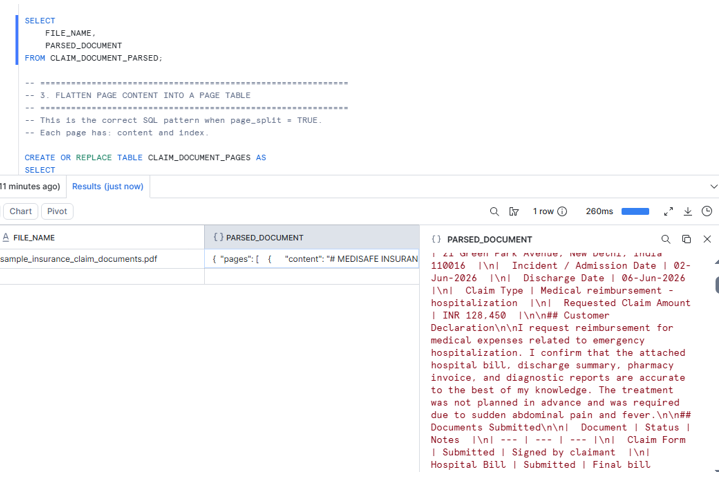
Step 3: Flatten Page Content into a Page Table
Because we used page_split = TRUE, we now flatten the pages array.
CREATE OR REPLACE TABLE CLAIM_DOCUMENT_PAGES AS

SELECT

FILE_NAME,

FILE_URL,

PAGE.VALUE:index::NUMBER AS PAGE_INDEX,

PAGE.VALUE:content::STRING AS PAGE_TEXT,

PARSED_AT

FROM CLAIM_DOCUMENT_PARSED,

LATERAL FLATTEN(INPUT => PARSED_DOCUMENT:pages) PAGE;
Step 4: Redact PII using AI_REDACT
The parsed page text may contain sensitive values such as claimant name, date of birth, phone number, email address, and address.
Before sending this text to downstream AI extraction or search, we apply AI_REDACT.
CREATE OR REPLACE TABLE CLAIM_DOCUMENT_REDACTED AS

SELECT

FILE_NAME,

FILE_URL,

PAGE_INDEX,

PAGE_TEXT AS ORIGINAL_PAGE_TEXT,
SNOWFLAKE.CORTEX.AI_REDACT(PAGE_TEXT) AS REDACTED_PAGE_TEXT,

CURRENT_TIMESTAMP() AS REDACTED_AT

FROM CLAIM_DOCUMENT_PAGES;
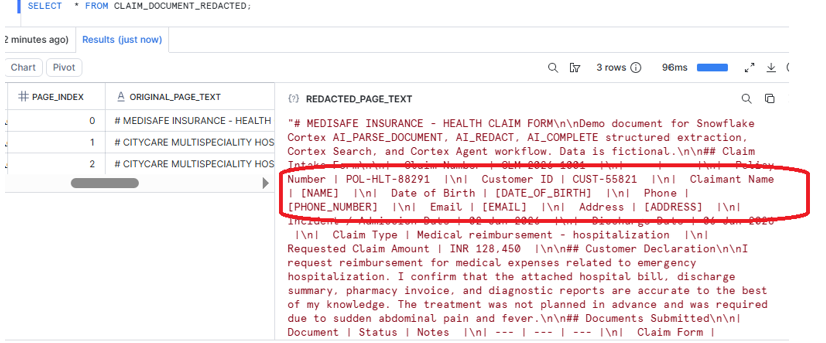
Step 5: Combine Redacted Pages into Full Document Text
Now we combine all redacted page text into one document-level text field.
CREATE OR REPLACE TABLE CLAIM_DOCUMENT_FULL_TEXT AS

SELECT

FILE_NAME,

FILE_URL,

LISTAGG(REDACTED_PAGE_TEXT, '\n\n')

WITHIN GROUP (ORDER BY PAGE_INDEX) AS REDACTED_DOCUMENT_TEXT,

CURRENT_TIMESTAMP() AS CREATED_AT

FROM CLAIM_DOCUMENT_REDACTED

GROUP BY FILE_NAME, FILE_URL;
Steps
Step 6: Extract Structured Claim Facts using AI_COMPLETE
Now we use AI_COMPLETE to extract structured claim information from the redacted document text. This is one of the most important parts of the solution. Instead of asking the LLM to return free text, we ask it to return a predictable structured object using response_format => TYPE OBJECT(…).
CREATE OR REPLACE TABLE CLAIM_DOCUMENT_EXTRACTED AS

SELECT

FILE_NAME,

FILE_URL,

SNOWFLAKE.CORTEX.AI_COMPLETE(

model => 'mistral-large2',

prompt => CONCAT(

'You are an insurance claim document analyst. ',

'Extract structured claim information from this redacted insurance claim document. ',

'Use null if a field is not available. ',

'Return only the fields requested in the response format. ',

'Document text: ',

REDACTED_DOCUMENT_TEXT

),

model_parameters => {

'temperature': 0,

'max_tokens': 1200,

'guardrails': TRUE

},

response_format => TYPE OBJECT(

claim_number STRING,

policy_number STRING,

customer_id STRING,

claimant_name_status STRING,

incident_date STRING,

hospital_or_vendor STRING,

diagnosis_or_issue STRING,

procedure_or_service STRING,

invoice_amount NUMBER,

claim_amount NUMBER,

submitted_documents ARRAY,

missing_information ARRAY,

risk_flags ARRAY,

document_summary STRING,

recommended_next_action STRING,

confidence NUMBER

)

) AS EXTRACTED_CLAIM_DATA,

CURRENT_TIMESTAMP() AS EXTRACTED_AT

FROM CLAIM_DOCUMENT_FULL_TEXT;
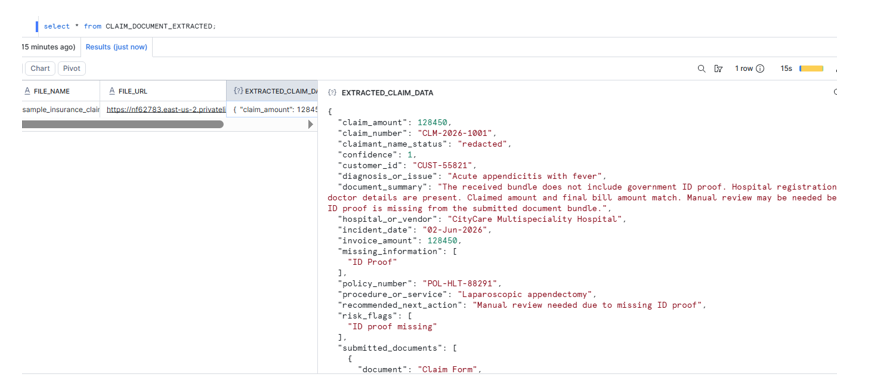
Step 7: Create Cortex Search Service on Extracted Claim Facts
Now we make the extracted claim intelligence searchable.The reason is simple: CLAIM_DOCUMENT_EXTRACTED already contains the structured business outcome we want the agent to answer from.
We create a searchable text column by combining important fields from EXTRACTED_CLAIM_DATA.
CREATE OR REPLACE CORTEX SEARCH SERVICE CLAIM_EXTRACTED_SEARCH_SVC

ON SEARCH_TEXT

ATTRIBUTES CLAIM_NUMBER, POLICY_NUMBER, CUSTOMER_ID, REVIEW_STATUS

WAREHOUSE = compute_wh

TARGET_LAG = '1 hour'

COMMENT = 'Search service over AI-extracted insurance claim facts.'

AS

SELECT

FILE_NAME,

FILE_URL,

EXTRACTED_CLAIM_DATA:claim_number::STRING AS CLAIM_NUMBER,

EXTRACTED_CLAIM_DATA:policy_number::STRING AS POLICY_NUMBER,

EXTRACTED_CLAIM_DATA:customer_id::STRING AS CUSTOMER_ID,

EXTRACTED_CLAIM_DATA:claimant_name_status::STRING AS CLAIMANT_NAME_STATUS,

EXTRACTED_CLAIM_DATA:hospital_or_vendor::STRING AS HOSPITAL_OR_VENDOR,

EXTRACTED_CLAIM_DATA:diagnosis_or_issue::STRING AS DIAGNOSIS_OR_ISSUE,

EXTRACTED_CLAIM_DATA:procedure_or_service::STRING AS PROCEDURE_OR_SERVICE,

EXTRACTED_CLAIM_DATA:incident_date::STRING AS INCIDENT_DATE,

EXTRACTED_CLAIM_DATA:invoice_amount::NUMBER AS INVOICE_AMOUNT,

EXTRACTED_CLAIM_DATA:claim_amount::NUMBER AS CLAIM_AMOUNT,

TO_JSON(EXTRACTED_CLAIM_DATA:submitted_documents) AS SUBMITTED_DOCUMENTS_TEXT,

TO_JSON(EXTRACTED_CLAIM_DATA:missing_information) AS MISSING_INFORMATION_TEXT,

TO_JSON(EXTRACTED_CLAIM_DATA:risk_flags) AS RISK_FLAGS_TEXT,

EXTRACTED_CLAIM_DATA:document_summary::STRING AS DOCUMENT_SUMMARY,

EXTRACTED_CLAIM_DATA:recommended_next_action::STRING AS RECOMMENDED_NEXT_ACTION,

EXTRACTED_CLAIM_DATA:confidence::NUMBER(5,2) AS CONFIDENCE,

CASE

WHEN ARRAY_SIZE(EXTRACTED_CLAIM_DATA:missing_information) > 0

OR ARRAY_SIZE(EXTRACTED_CLAIM_DATA:risk_flags) > 0

THEN 'MANUAL_REVIEW_REQUIRED'

ELSE 'READY_FOR_ADJUSTER_REVIEW'

END AS REVIEW_STATUS,

CONCAT(

'Claim Number: ', COALESCE(EXTRACTED_CLAIM_DATA:claim_number::STRING, 'UNKNOWN'), '\n',

'Policy Number: ', COALESCE(EXTRACTED_CLAIM_DATA:policy_number::STRING, 'UNKNOWN'), '\n',

'Customer ID: ', COALESCE(EXTRACTED_CLAIM_DATA:customer_id::STRING, 'UNKNOWN'), '\n',

'Claimant Name Status: ', COALESCE(EXTRACTED_CLAIM_DATA:claimant_name_status::STRING, 'UNKNOWN'), '\n',

'Incident Date: ', COALESCE(EXTRACTED_CLAIM_DATA:incident_date::STRING, 'UNKNOWN'), '\n',

'Hospital or Vendor: ', COALESCE(EXTRACTED_CLAIM_DATA:hospital_or_vendor::STRING, 'UNKNOWN'), '\n',

'Diagnosis or Issue: ', COALESCE(EXTRACTED_CLAIM_DATA:diagnosis_or_issue::STRING, 'UNKNOWN'), '\n',

'Procedure or Service: ', COALESCE(EXTRACTED_CLAIM_DATA:procedure_or_service::STRING, 'UNKNOWN'), '\n',

'Invoice Amount: ', COALESCE(EXTRACTED_CLAIM_DATA:invoice_amount::STRING, 'UNKNOWN'), '\n',

'Claim Amount: ', COALESCE(EXTRACTED_CLAIM_DATA:claim_amount::STRING, 'UNKNOWN'), '\n',

'Submitted Documents: ', COALESCE(TO_JSON(EXTRACTED_CLAIM_DATA:submitted_documents), '[]'), '\n',

'Missing Information: ', COALESCE(TO_JSON(EXTRACTED_CLAIM_DATA:missing_information), '[]'), '\n',

'Risk Flags: ', COALESCE(TO_JSON(EXTRACTED_CLAIM_DATA:risk_flags), '[]'), '\n',

'Document Summary: ', COALESCE(EXTRACTED_CLAIM_DATA:document_summary::STRING, 'UNKNOWN'), '\n',

'Recommended Next Action: ', COALESCE(EXTRACTED_CLAIM_DATA:recommended_next_action::STRING, 'UNKNOWN')

) AS SEARCH_TEXT,

EXTRACTED_AT

FROM CLAIM_DOCUMENT_EXTRACTED;
Step 9: Create Cortex Agent
Now we create a Cortex Agent on top of the Cortex Search Service.
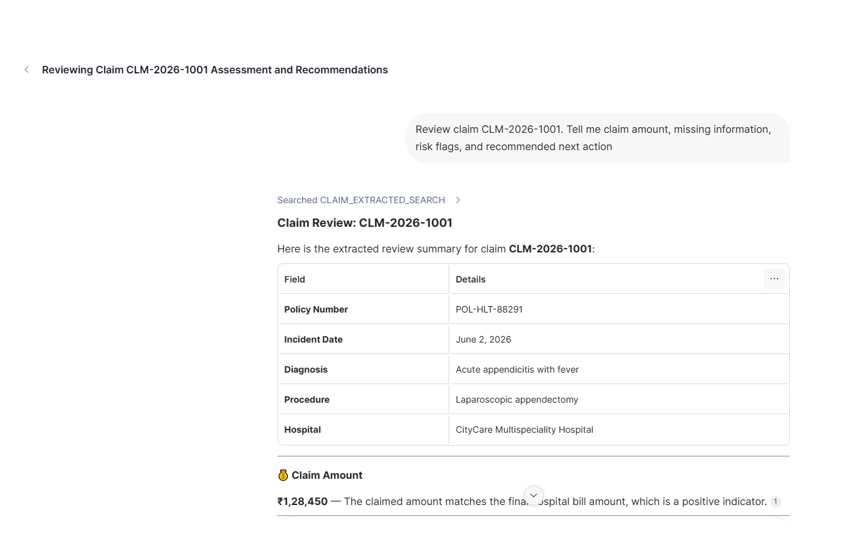
The purpose of the agent is to allow a business user or claim reviewer to ask claim-related questions in natural language.
CREATE OR REPLACE AGENT CLAIM_INTAKE_AGENT

COMMENT = 'Agent for reviewing AI-extracted insurance claim facts.'

PROFILE = '{"display_name": "Claim Intake Agent", "avatar": "assistant", "color": "blue"}'

FROM SPECIFICATION

$$

models:

orchestration: auto

orchestration:

budget:

seconds: 30

tokens: 16000

instructions:

response: "You are a careful insurance claim review assistant. Use only the extracted claim information available in the search service. Do not expose personal information. Clearly mention missing information, risk flags, claim amount, and recommended next action. Always state that final approval requires human adjuster review."

orchestration: "Use CLAIM_EXTRACTED_SEARCH whenever the user asks about a claim, claim amount, missing documents, risk flags, review status, or recommended action."

sample_questions:

- question: "Review claim CLM-2026-1001."

- question: "What is missing in claim CLM-2026-1001?"

- question: "What is the recommended next action for claim CLM-2026-1001?"

tools:

- tool_spec:

type: "cortex_search"

name: "CLAIM_EXTRACTED_SEARCH"

description: "Searches AI-extracted insurance claim facts including claim amount, missing information, risk flags, and recommended action."

tool_resources:

CLAIM_EXTRACTED_SEARCH:

search_service: "CORTEX_CLAIM_DB.APP.CLAIM_EXTRACTED_SEARCH_SVC"

max_results: 5

title_column: "CLAIM_NUMBER"

columns_and_descriptions:

SEARCH_TEXT:

description: "Searchable text containing structured AI-extracted claim facts."

type: "string"

searchable: true

filterable: false

CLAIM_NUMBER:

description: "Insurance claim number, for example CLM-2026-1001. Use this column to filter when the user mentions a claim number."

type: "string"

searchable: false

filterable: true

POLICY_NUMBER:

description: "Insurance policy number extracted from the claim document."

type: "string"

searchable: false

filterable: true

CUSTOMER_ID:

description: "Customer identifier extracted from the claim document."

type: "string"

searchable: false

filterable: true

REVIEW_STATUS:

description: "Claim review status such as MANUAL_REVIEW_REQUIRED or READY_FOR_ADJUSTER_REVIEW."

type: "string"

searchable: false

filterable: true

DOCUMENT_SUMMARY:

description: "AI-generated document summary for the claim."

type: "string"

searchable: true

filterable: false

RECOMMENDED_NEXT_ACTION:

description: "AI-generated recommended next action for the claim reviewer."

type: "string"

searchable: true

filterable: false

$$;
Step 11: Run the Agent from SQL
Finally, run the agent using DATA_AGENT_RUN.
SELECT

TRY_PARSE_JSON(

SNOWFLAKE.CORTEX.DATA_AGENT_RUN(

'CORTEX_CLAIM_DB.APP.CLAIM_INTAKE_AGENT',

$${

"messages": [

{

"role": "user",

"content": [

{

"type": "text",

"text": "Review claim CLM-2026-1001. Tell me claim amount, missing information, risk flags, and recommended next action."

}

]

}

],

"tool_choice": {

"type": "auto"

}

}$$,

TRUE

)

) AS AGENT_RESPONSE;
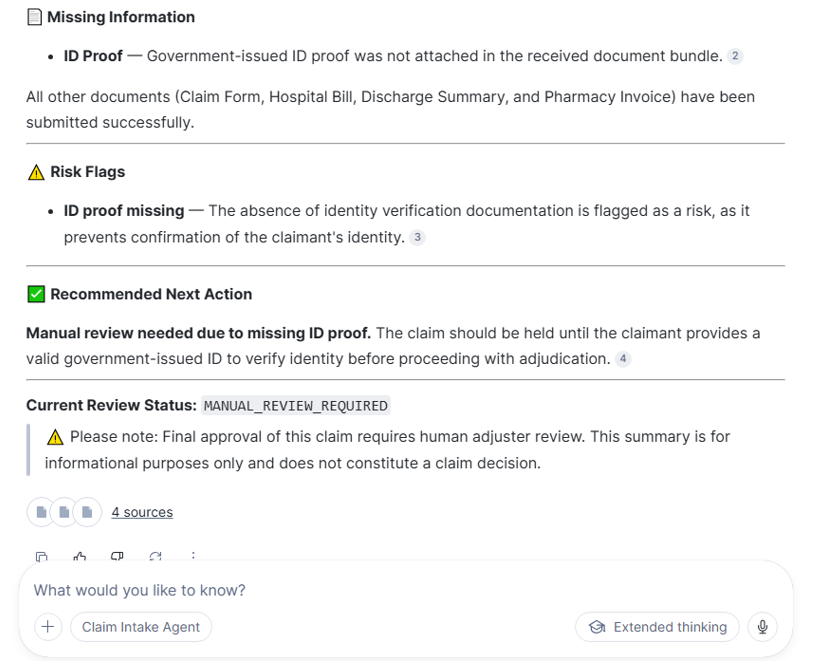
Or We can verify the agent in snowflake cowork.
Important Design Notes
- Why redact before extraction?
Redaction protects sensitive personal information before downstream AI processing. In this demo, values such as claimant name, date of birth, phone number, email, and address were replaced with placeholders.
- Why create Cortex Search on extracted data?
For this demo, the goal is to search extracted claim intelligence such as claim amount, missing documents, risk flags, and recommended action. Since CLAIM_DOCUMENT_EXTRACTED already contains the business outcome, creating Cortex Search directly on it keeps the architecture simple.
- Why use Cortex Agent?
Cortex Search makes the extracted data searchable. Cortex Agent makes the experience conversational.Instead of asking users to write SQL, we allow them to ask:
What is missing in claim CLM-2026-1001?
The agent can use the search service and respond in business-friendly language.