 1
1
 0
0
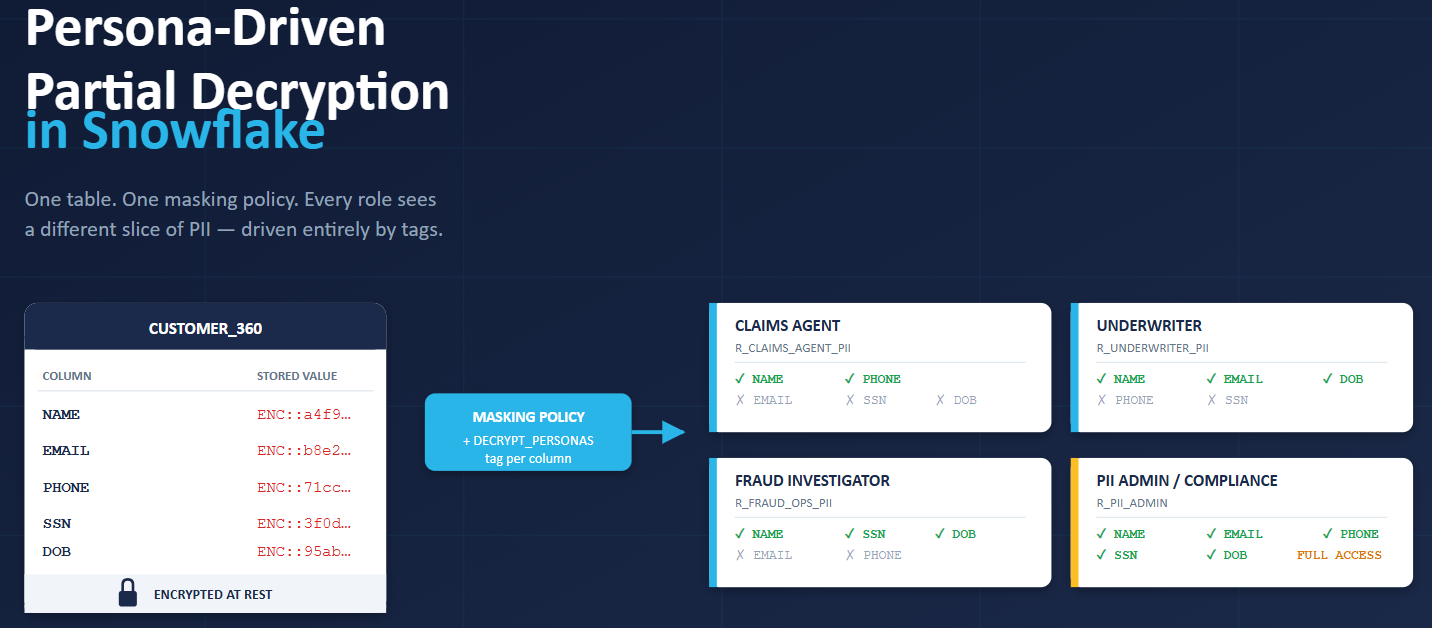
Persona-Driven Partial Decryption in Snowflake: An insurance carrier maintains a single CUSTOMER_360 table holding policyholder PII — NAME, EMAIL, PHONE, SSN, DOB. The same table is read every day by very different people across the business, and each one legitimately needs a different slice of it:
Most masking conversations stop at one question: “Is this user allowed to see PII or not?” .
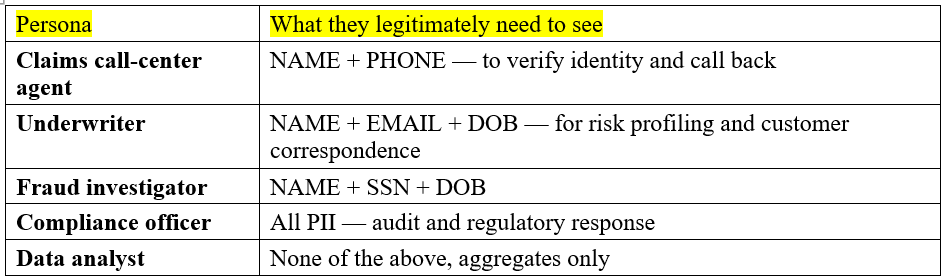
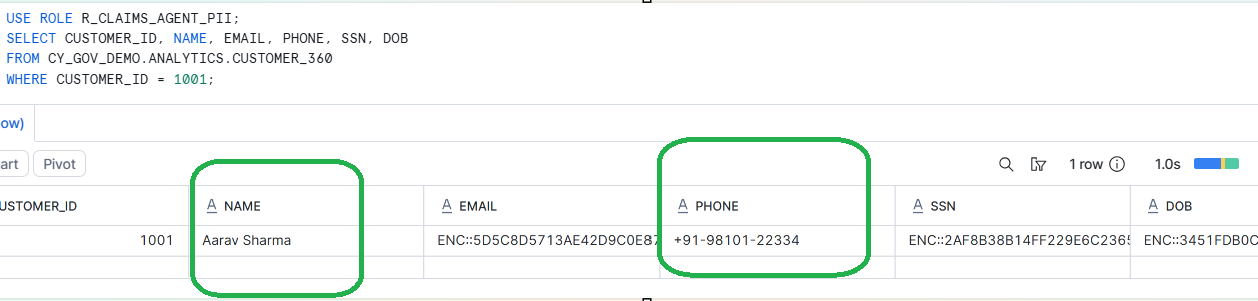
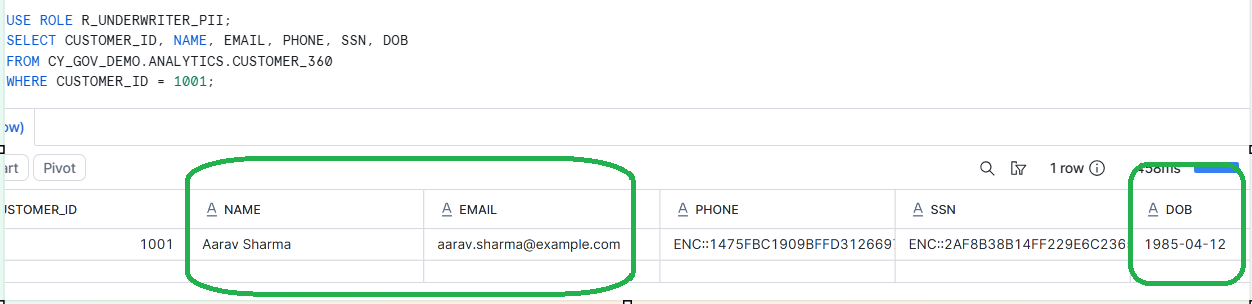
The claims agent on the phone needs the customer’s name and number to do her job. Nothing else. The fraud investigator chasing a suspicious claim needs SSN and date of birth — but has zero reason to see email. The underwriter pricing a renewal needs email and DOB, never SSN. Each of them is a “PII user” in the broad sense, and yet none of them needs the same columns as the others.
The Obvious Solutions — and Why They All Hit a Wall
The Obvious Solutions — and Why They All Hit a Wall
- Attempt 1 — One masking policy for everyone. PII-access role sees clear text, everyone else sees masked. Two weeks in, the claims agent can’t see phone numbers and can’t do their job — so IT grants them the PII role. Now that agent also sees SSN and DOB they never needed.
- Attempt 2 — A separate view per persona. Build CUSTOMER_360_CLAIMS_VW, CUSTOMER_360_UNDERWRITER_VW, and so on. It works — until someone adds a column. Now you update five views, retest five views, re-grant on five views. BI users see five near-identical tables and pick the wrong one. A sixth persona arrives, you build a sixth view. The maintenance tax never ends.
- Multiple tags, each with its own masking policy → Create CLAIMS_ACCESS, UNDERWRITER_ACCESS, FRAUD_ACCESS tags, attach a policy to each, tag the NAME column with all three. The second attachment fails — Snowflake allows only one masking policy per column for a given data type.
What we actually want: one physical column, one masking policy, persona-level decryption driven by metadata that any tag-admin can edit.
The Approach
Two tags do all the work. Only one carries the policy.
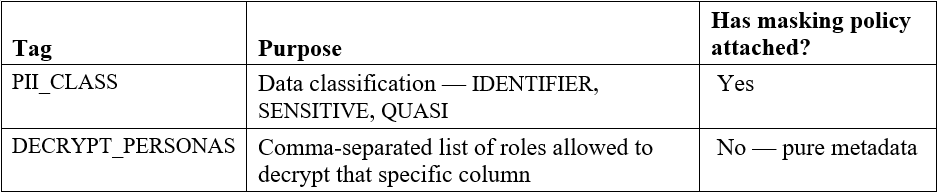
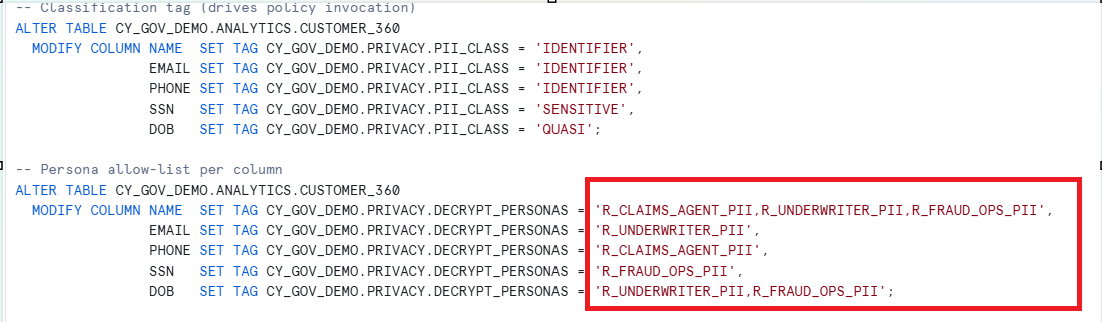
The classification tag is the trigger. Whenever Snowflake sees a column tagged with PII_CLASS, it runs the masking policy. Inside that policy, we ask a second question by reading the column’s own DECRYPT_PERSONAS tag at evaluation time — that’s what makes the same policy behave differently for every column.
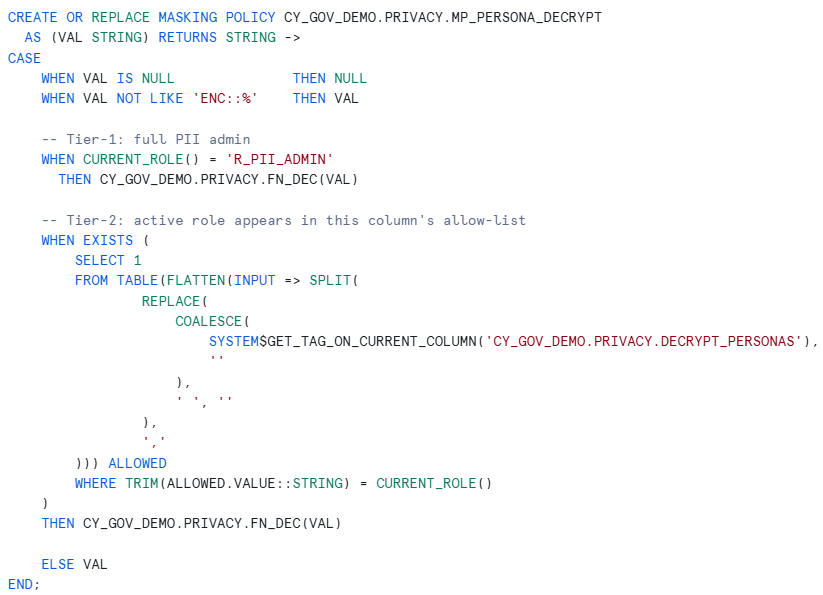
The decision tree inside the policy:
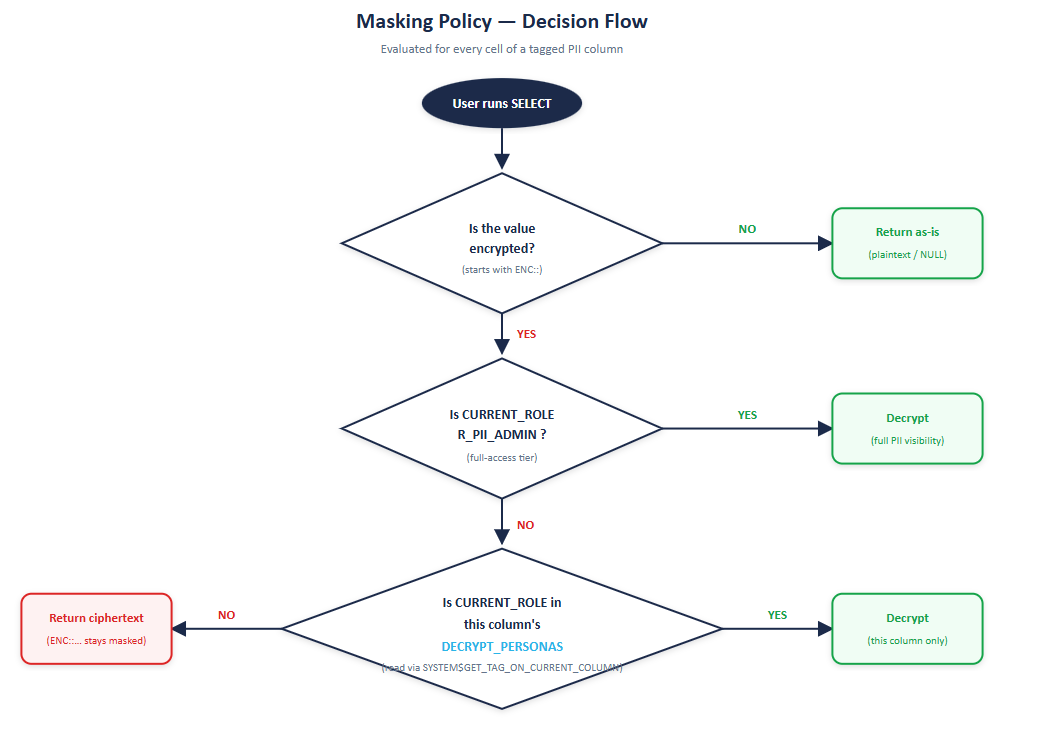
Use of Tags and Masking Policy
A quick mental model before the code:
- PII_CLASS is the classification — it answers “is this column sensitive?” It carries the masking policy.
- DECRYPT_PERSONAS is the access control list — it answers “who is allowed to see this column in clear text?” It carries no policy. It’s just metadata that the policy reads.
- The masking policy is the brain. It checks CURRENT_ROLE() against the allow-list and decides whether to call the decrypt function.
This separation matters: classification rarely changes, but access rules change all the time. Keeping the two concerns on two tags lets your access management team modify allow-lists without ever touching policy logic.
The Solution — Complete Working Code
Step 1 — Setup: database, schema, and encryption helpers
CREATE DATABASE IF NOT EXISTS CY_GOV_DEMO;

CREATE SCHEMA   IF NOT EXISTS CY_GOV_DEMO.PRIVACY;

CREATE SCHEMA   IF NOT EXISTS CY_GOV_DEMO.ANALYTICS;
Two SQL UDFs handle encryption. We prefix the ciphertext with ENC:: so the masking policy can cheaply detect whether a value is encrypted or already plaintext.
CREATE OR REPLACE FUNCTION CY_GOV_DEMO.PRIVACY.FN_ENC(PLAIN STRING)

RETURNS STRING

LANGUAGE SQL

AS

$$

CASE

WHEN PLAIN IS NULL THEN NULL

ELSE 'ENC::' || HEX_ENCODE(

ENCRYPT(TO_BINARY(PLAIN, 'UTF-8'), 'cy_demo_passphrase_2026')

)

END

$$;
CREATE OR REPLACE FUNCTION CY_GOV_DEMO.PRIVACY.FN_DEC(CIPHER STRING)

RETURNS STRING

LANGUAGE SQL

AS

$$

CASE

WHEN CIPHER IS NULL              THEN NULL

WHEN CIPHER NOT LIKE 'ENC::%'    THEN CIPHER

ELSE TO_VARCHAR(

DECRYPT(HEX_DECODE_BINARY(SUBSTR(CIPHER, 6)), 'cy_demo_passphrase_2026'),

'UTF-8'

)

END

$$;
Step 2 — Create the customer table and load plaintext.
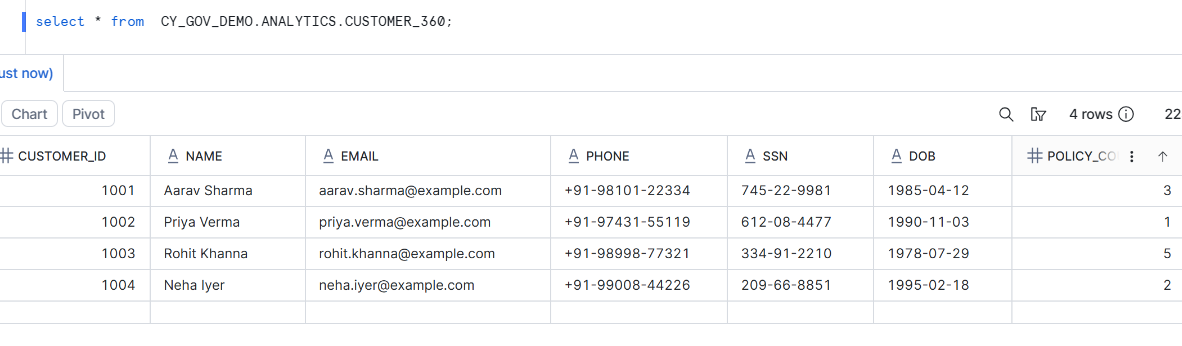
Step 3 — Encrypt the PII columns at rest
UPDATE CY_GOV_DEMO.ANALYTICS.CUSTOMER_360

SET NAME  = CY_GOV_DEMO.PRIVACY.FN_ENC(NAME),

EMAIL = CY_GOV_DEMO.PRIVACY.FN_ENC(EMAIL),

PHONE = CY_GOV_DEMO.PRIVACY.FN_ENC(PHONE),

SSN   = CY_GOV_DEMO.PRIVACY.FN_ENC(SSN),

DOB   = CY_GOV_DEMO.PRIVACY.FN_ENC(DOB);
SELECT * FROM CY_GOV_DEMO.ANALYTICS.CUSTOMER_360;
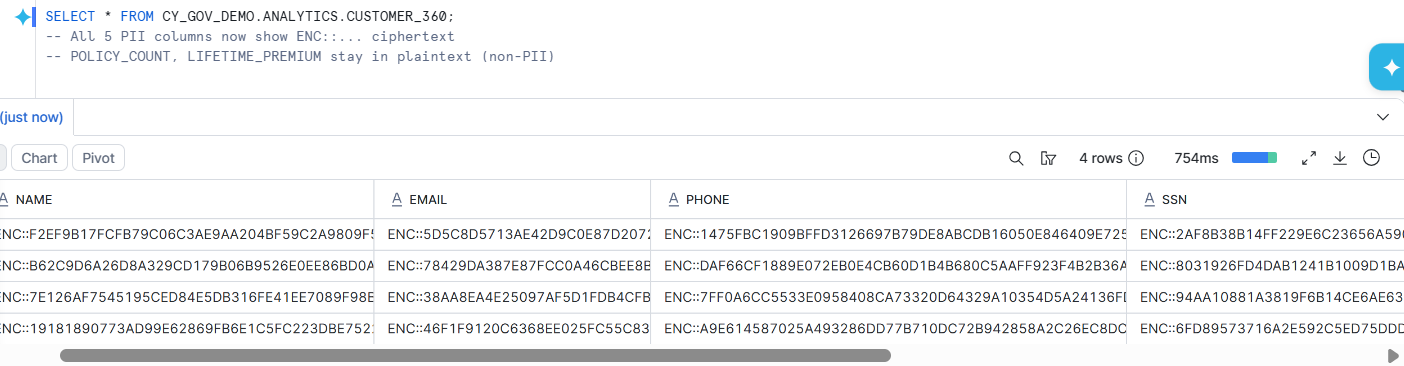
At this point the data is encrypted at rest. Without the masking policy and a permitted role, nobody can read the PII columns in clear text — not even data engineers querying the table directly.
Step 4 — Create the two tags
— Tag 1: classification — will carry the masking policy
CREATE OR REPLACE TAG CY_GOV_DEMO.PRIVACY.PII_CLASS

ALLOWED_VALUES 'IDENTIFIER', 'SENSITIVE', 'QUASI'

COMMENT = 'PII classification — masking policy attached here';
— Tag 2: metadata-only persona allow-list per column
CREATE OR REPLACE TAG CY_GOV_DEMO.PRIVACY.DECRYPT_PERSONAS

COMMENT = 'Comma-separated list of persona roles allowed to decrypt this column';
Step 5 — Define the persona-aware masking policy
Step 6 — Apply the tags to every PII column
The classification tag drives policy invocation. The persona allow-list tag drives the decision inside the policy.
Step 7 — Attach the masking policy to the classification tag
ALTER TAG CY_GOV_DEMO.PRIVACY.PII_CLASS SET MASKING POLICY CY_GOV_DEMO.PRIVACY.MP_PERSONA_DECRYPT;
Step 8 — Create roles and grant table access
USE ROLE SECURITYADMIN;
1.CREATE ROLE IF NOT EXISTS R_CUSTOMER_READ;
2.CREATE ROLE IF NOT EXISTS R_CLAIMS_AGENT_PII;
3.CREATE ROLE IF NOT EXISTS R_UNDERWRITER_PII;
4.CREATE ROLE IF NOT EXISTS R_FRAUD_OPS_PII;
5.CREATE ROLE IF NOT EXISTS R_PII_ADMIN;
We have granted all required privileges to these roles so that they can access the DB,Schema,Tables. Grant all roles to a single test user so we can switch contexts easily.
GRANT ROLE R_CUSTOMER_READ    TO USER SACHINMITTAL;

GRANT ROLE R_CLAIMS_AGENT_PII TO USER SACHINMITTAL;

GRANT ROLE R_UNDERWRITER_PII  TO USER SACHINMITTAL;

GRANT ROLE R_FRAUD_OPS_PII    TO USER SACHINMITTAL;

GRANT ROLE R_PII_ADMIN        TO USER SACHINMITTAL;
Step 9 — Test by switching active roles
USE ROLE R_CUSTOMER_READ;
SELECT CUSTOMER_ID, NAME, EMAIL, PHONE, SSN, DOB
FROM CY_GOV_DEMO.ANALYTICS.CUSTOMER_360 WHERE CUSTOMER_ID = 1001;

USE ROLE R_CLAIMS_AGENT_PII;
SELECT CUSTOMER_ID, NAME, EMAIL, PHONE, SSN, DOB
FROM CY_GOV_DEMO.ANALYTICS.CUSTOMER_360 WHERE CUSTOMER_ID = 1001;
USE ROLE R_UNDERWRITER_PII;
SELECT CUSTOMER_ID, NAME, EMAIL, PHONE, SSN, DOB
FROM CY_GOV_DEMO.ANALYTICS.CUSTOMER_360 WHERE CUSTOMER_ID = 1001;
USE ROLE R_FRAUD_OPS_PII;
SELECT CUSTOMER_ID, NAME, EMAIL, PHONE, SSN, DOB
FROM CY_GOV_DEMO.ANALYTICS.CUSTOMER_360
WHERE CUSTOMER_ID = 1001;
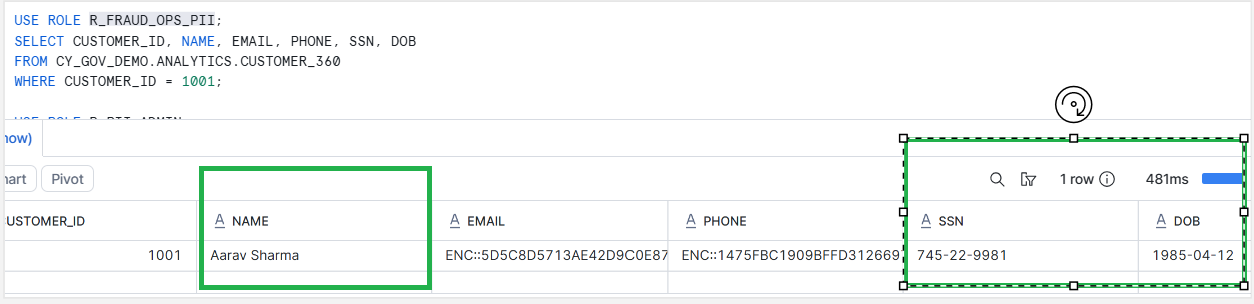
R_FRAUD_OPS_PII
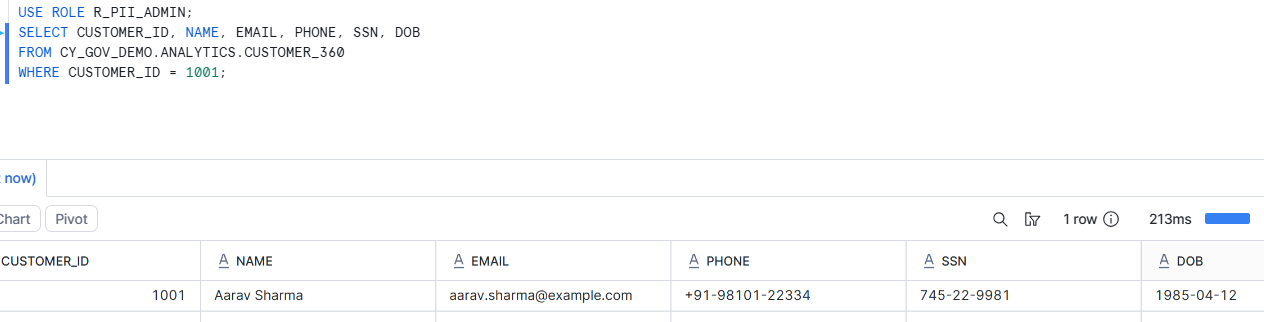
USE ROLE R_PII_ADMIN;
SELECT CUSTOMER_ID, NAME, EMAIL, PHONE, SSN, DOB
FROM CY_GOV_DEMO.ANALYTICS.CUSTOMER_360
WHERE CUSTOMER_ID = 1001;
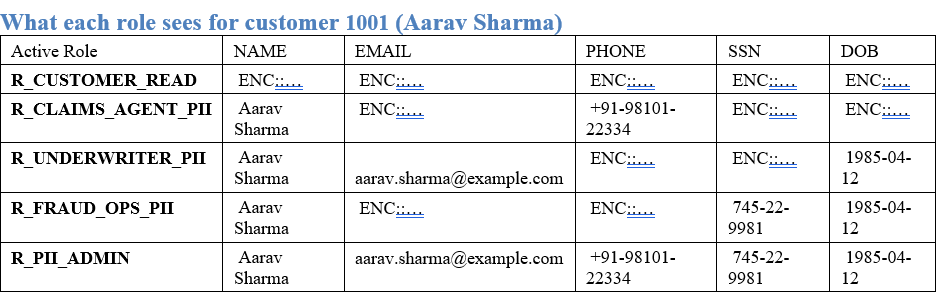
The Role × Column Matrix
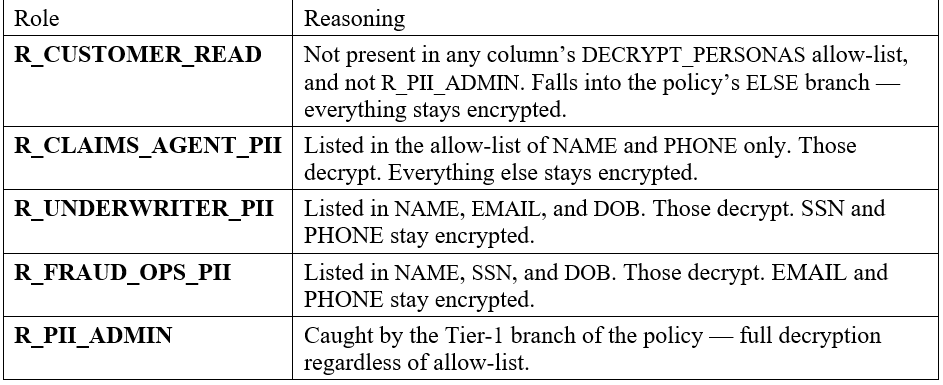
This is the part that tells the whole story at a glance. Same table, same query, the only thing that changes is USE ROLE.
Why This Design Holds Up
- One policy, not five. No policy conflicts on any column. New persona = ALTER TABLE … MODIFY COLUMN … SET TAG … to update an allow-list. That’s it.
- Metadata-driven access control. Anyone with tag-admin rights can change who sees what — without touching policy code or being a Snowflake DDL expert.
- No table copies, no view sprawl. One physical table serves every persona. BI tools, dbt models, downstream consumers all point at the same object.
- Tier-1 escape hatch built in. The R_PII_ADMIN branch ensures compliance and audit workflows can always see everything, regardless of per-column allow-lists.