2
2
 0
0
Freeze the Past:Using IMMUTABLE WHERE in Dynamic Tables: If you’ve ever worked in finance analytics, Every finance org has two competing needs
- Open period (current month): data keeps changing (late transactions, adjustments, corrections, reversals). Dashboards must stay live.
- Closed periods (prior months): after month-end close, numbers are signed off and reported (CFO/regulators). Those numbers must never change in reporting outputs.
What Actually Breaks in Analytics Pipelines?
Even if you don’t directly update the reporting table, historical values can change because of upstream corrections:
Scenario 1: Source System Corrections
The ERP sends a “correction” record for a January invoice — after January was already closed. Your pipeline dutifully processes it, and suddenly January’s revenue changes.
Scenario 2: ETL Replay
Someone reruns a data load job for January to “fix” a different issue. Side effect? January numbers get recomputed.
Scenario 3: Bug Reprocesses Old Partitions
A bug in your pipeline accidentally touches historical partitions. You don’t even know until the monthly variance report shows unexplained differences.
The Result?
CFO: “The board deck from last month showed $4.2M for January.
Today’s dashboard shows $4.15M. Which one is right?”
You: “Um… let me check…”
This is called a RESTATEMENT — and it’s the nightmare scenario that every finance analytics team dreads.
Traditional Approaches: What We Used to Do (And Why It Hurts)
Traditional Approaches: What We Used to Do (And Why It Hurts)
Before Snowflake’s IMMUTABLE WHERE, teams tried various workarounds. All of them have significant pain points.
A) “Separate tables per month” (hard freeze)
What teams do
- Create LEDGER_2025_01, LEDGER_2025_02, etc.
- For reporting, build a view: SELECT * FROM LEDGER_2025_01 UNION ALL …
Why it hurts
- Too many objects
- View becomes huge and slow to maintain
B) “IS_CLOSED flag” (soft freeze)
What teams do
- Add is_closed column
- Promise: “ETL won’t touch closed rows”
Why it hurts
- It’s not enforcing at the platform level
- Any re-run, bug, or human mistake can still update old rows
The Solution: Dynamic Table IMMUTABLE WHERE
Snowflake’s IMMUTABLE WHERE feature solves this problem at the platform level.
What It Actually Does
It creates a single Dynamic Table with two distinct zones:
- Immutable zone (closed months): Snowflake will not change these rows during refresh.
- Mutable zone (open month): continues to refresh normally.
The Magic Syntax
CREATE DYNAMIC TABLE FINANCIAL_LEDGER

TARGET_LAG = '5 minutes'

WAREHOUSE = FINANCE_WH

IMMUTABLE WHERE (TRANSACTION_MONTH < DATE_TRUNC('MONTH', CURRENT_DATE()))

AS

<< Query>>
What this means:
- DATE_TRUNC(‘MONTH’, CURRENT_DATE()) = First day of current month
- On December 26, 2025 → evaluates to 2025-12-01
- All data before December 1st = IMMUTABLE (Oct, Nov)
- All data on or after December 1st = MUTABLE (Dec)
Why This Is Different
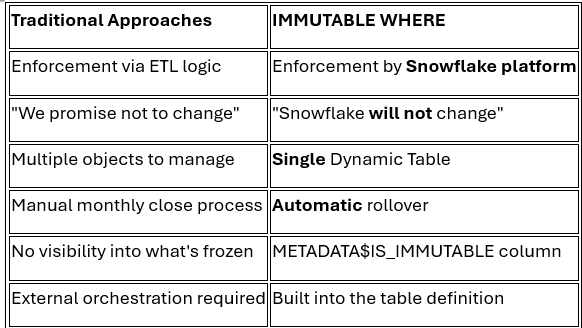
How It Handles the Nightmare Scenarios
How It Handles the Nightmare Scenarios
Let’s revisit those scenarios that break traditional pipelines:
Scenario 1: Source System Corrections
ERP sends a January correction in December.
- Old way: January numbers change silently
- IMMUTABLE WHERE: January is frozen → correction is ignored for immutable rows
Scenario 2: ETL Replay
Someone reruns January data load.
- Old way: January gets recomputed
- IMMUTABLE WHERE: January refresh is skipped — immutable region untouched
Scenario 3: Bug Reprocesses Old Partitions
Pipeline bug touches historical data.
- Old way: History corrupted, panic ensues
- IMMUTABLE WHERE: Immutable zone is protected — bug only affects current month
Complete Hands-On Implementation
Now let’s build this from scratch with working code you can run in your Snowflake account.
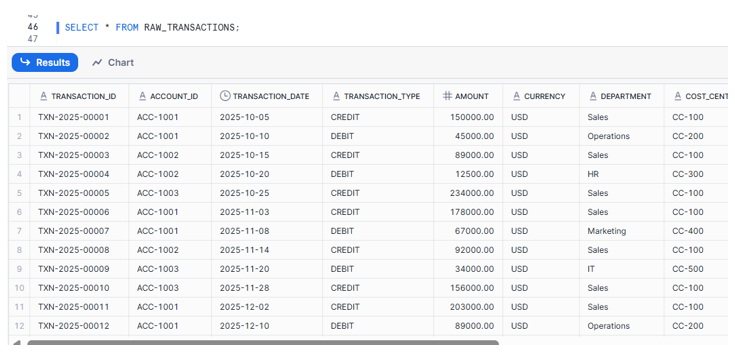
Step 1: Source Staging Table
Step 2: Create the Dynamic Table with “IMMUTABLE WHERE”.
CREATE OR REPLACE DYNAMIC TABLE FINANCIAL_LEDGER

TARGET_LAG = '5 minutes'

WAREHOUSE = COMPUTE_WH

IMMUTABLE WHERE (TRANSACTION_MONTH < DATE_TRUNC('MONTH', CURRENT_DATE()))

AS

SELECT

TRANSACTION_ID,

ACCOUNT_ID,

TRANSACTION_DATE,

DATE_TRUNC('MONTH', TRANSACTION_DATE) AS TRANSACTION_MONTH,

TRANSACTION_TYPE,

AMOUNT,

CURRENCY,

DEPARTMENT,

COST_CENTER,

GL_CODE,

DESCRIPTION,

SOURCE_SYSTEM,

CASE WHEN TRANSACTION_TYPE = 'CREDIT' THEN AMOUNT ELSE 0 END AS CREDIT_AMOUNT,

CASE WHEN TRANSACTION_TYPE = 'DEBIT' THEN AMOUNT ELSE 0 END AS DEBIT_AMOUNT,

CASE WHEN TRANSACTION_TYPE = 'CREDIT' THEN AMOUNT ELSE -AMOUNT END AS NET_AMOUNT

FROM RAW_TRANSACTIONS;
Step 3: Verify the Immutable vs Mutable Zones
SELECT

TRANSACTION_MONTH,

METADATA$IS_IMMUTABLE AS IS_FROZEN,

COUNT(*) AS RECORD_COUNT,

SUM(CREDIT_AMOUNT) AS TOTAL_CREDITS,

SUM(DEBIT_AMOUNT) AS TOTAL_DEBITS,

SUM(NET_AMOUNT) AS NET_TOTAL

FROM FINANCIAL_LEDGER

GROUP BY TRANSACTION_MONTH, METADATA$IS_IMMUTABLE

ORDER BY TRANSACTION_MONTH;
Expected Output:
Expected Output:

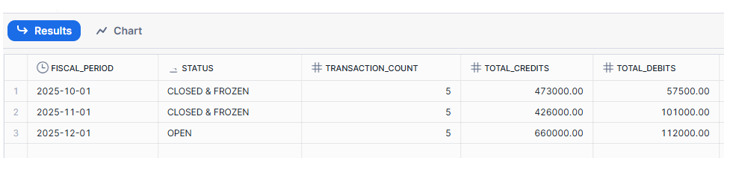
October & November → IS_FROZEN = TRUE
December → IS_FROZEN = FALSE
The Critical Test: Proving Protection Works
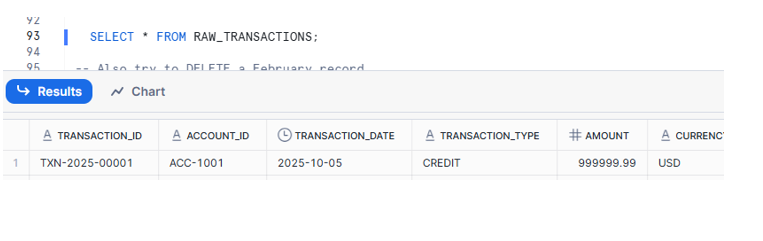
Now let’s simulate the nightmare scenario — someone corrupts source data for a closed month.
Simulate Data Corruption:Someone “accidentally” updates a closed month record
UPDATE RAW_TRANSACTIONS

SET AMOUNT = 999999.99,

DESCRIPTION = 'CORRUPTED BY ACCIDENT'

WHERE TRANSACTION_ID = 'TXN-2025-00001'

AND TRANSACTION_DATE = '2025-10-05';
Force Dynamic Table Refresh
ALTER DYNAMIC TABLE FINANCIAL_LEDGER REFRESH;
Verify: The Immutable Data is PROTECTED!
SELECT

TRANSACTION_ID,

TRANSACTION_DATE,

AMOUNT,

DESCRIPTION,

METADATA$IS_IMMUTABLE AS IS_PROTECTED

FROM FINANCIAL_LEDGER

WHERE TRANSACTION_ID = 'TXN-2025-00001';
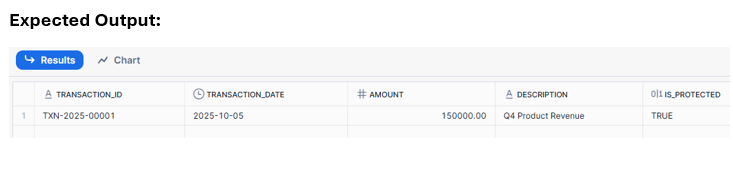
The original values are preserved!
- Source table shows: $999,999.99 and CORRUPTED BY ACCIDENT
- Dynamic Table shows: $150,000.00 and Q4 Product Revenue
This is the power of IMMUTABLE WHERE — Snowflake refuses to update rows in the immutable zone, regardless of what happens to the source.
Audit & Compliance Queries:
Query 1: Show All Frozen Periods for Auditors
SELECT
TRANSACTION_MONTH AS FISCAL_PERIOD,
CASE WHEN METADATA$IS_IMMUTABLE THEN ‘CLOSED & FROZEN’ ELSE ‘OPEN’ END AS STATUS,
COUNT(*) AS TRANSACTION_COUNT,
SUM(CREDIT_AMOUNT) AS TOTAL_CREDITS,
SUM(DEBIT_AMOUNT) AS TOTAL_DEBITS,
SUM(NET_AMOUNT) AS NET_POSITION
FROM FINANCIAL_LEDGER
GROUP BY TRANSACTION_MONTH, METADATA$IS_IMMUTABLE
ORDER BY TRANSACTION_MONTH;
Key Takeaways
- IMMUTABLE WHERE solves the “live dashboards vs. frozen books” problem at the platform level — not via ETL promises or manual processes.
- Use CURRENT_DATE() for automatic rollover — no monthly ALTER statements needed.
- METADATA$IS_IMMUTABLE provides audit trail — show auditors exactly which data is frozen.
- Protection from upstream chaos — source corrections, ETL bugs, dimension changes won’t affect closed periods.