 1
1
 0
0
Every data engineer who has worked with Snowflake Tasks config has faced this scenario: your pipeline runs perfectly in production on a daily schedule. Then someone walks up and says:
- “We need a one-time full reload for January data — something went wrong at source.”
- “Can you run the pipeline against the DEV schema? I want to test before we push changes.”
- “Run it for just the CLAIMS table, not all 47 tables.”
- “We need to backfill with a larger batch size — the weekend load was huge.”
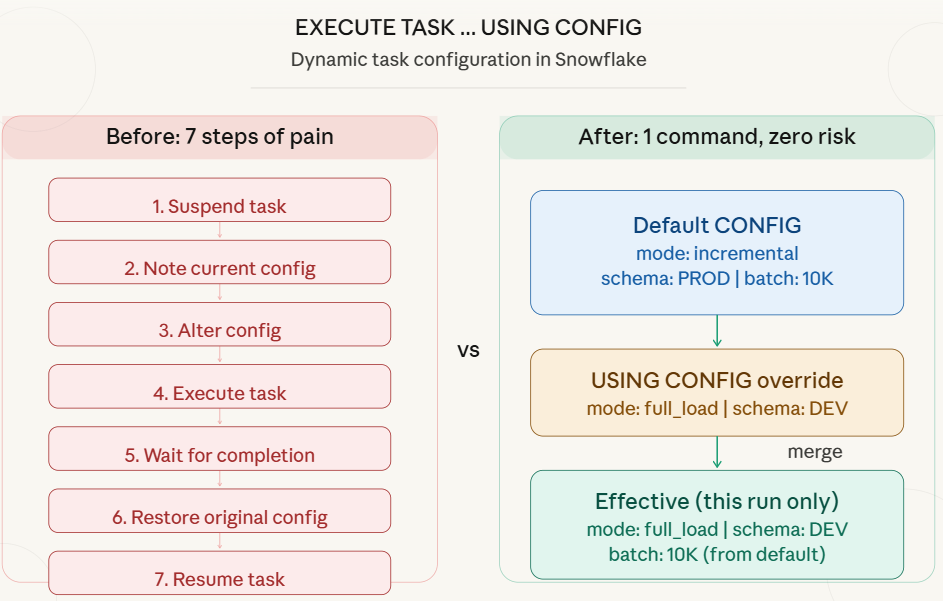
Before the USING CONFIG feature, here is what you had to do every single time:
— Step1: Suspend the root tasks (stops the schedule)
— Step2: Alter the CONFIG for your ad-hoc need
ALTER TASK claims_pipeline SET

CONFIG = $${

"mode": "full_load",

"target_schema": "DEV",

"batch_size": 50000

}$$;
— Step3: Execute the tasks
— Step4: Wait for it to finish (monitor TASK_HISTORY)
— Step5: Restore the original CONFIG
ALTER TASK claims_pipeline SET

CONFIG = $${

"mode": "incremental",

"target_schema": "PROD",

"batch_size": 10000,

"enable_logging": FALSE

}$$;
— Step6: Resume the task (re-enable the schedule)
What Could Go Wrong?
What Could Go Wrong?
#1: Forgetting to Restore :If you forget Step 5 or Step 6, your production pipeline either runs with the wrong config or does not run at all.
#2: Schedule Disruption :Suspending the root task cancels any upcoming scheduled runs.
#3: Child Task Impact:Suspending the root task affects the entire task graph.
The New Way: EXECUTE TASK … USING CONFIG
Released on January 26, 2026, Snowflake introduced the USING CONFIG clause for the EXECUTE TASK command. It allows you to dynamically override the task configuration for a single execution without modifying the task definition.
— That is it. One command. Production untouched.
EXECUTE TASK claims_pipeline

USING CONFIG = $${

"mode": "full_load",

"target_schema": "DEV",

"batch_size": 50000

}$$;
How the Merge Works
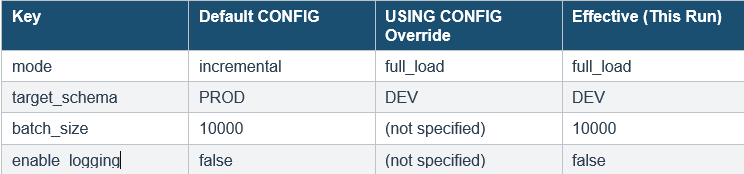
Snowflake merges your dynamic config with the default config defined in the task. The merge logic is simple:
- For matching keys: the dynamic value wins (overrides the default).
- For non-matching keys: the default value is preserved.
Complete Working Use Case: Insurance Claims Pipeline
Let us build a real-world scenario from scratch. We will create a claims processing pipeline for an insurance company that loads claim data daily. Then we will show five different ad-hoc scenarios using USING CONFIG.
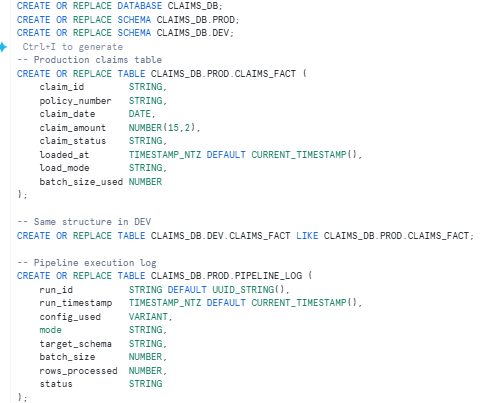
3.1 Setup: Create the Environment
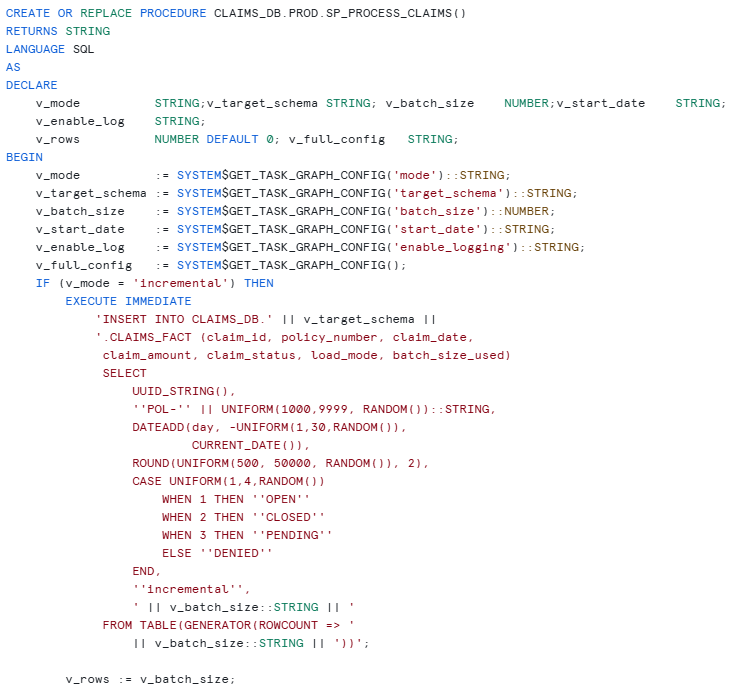
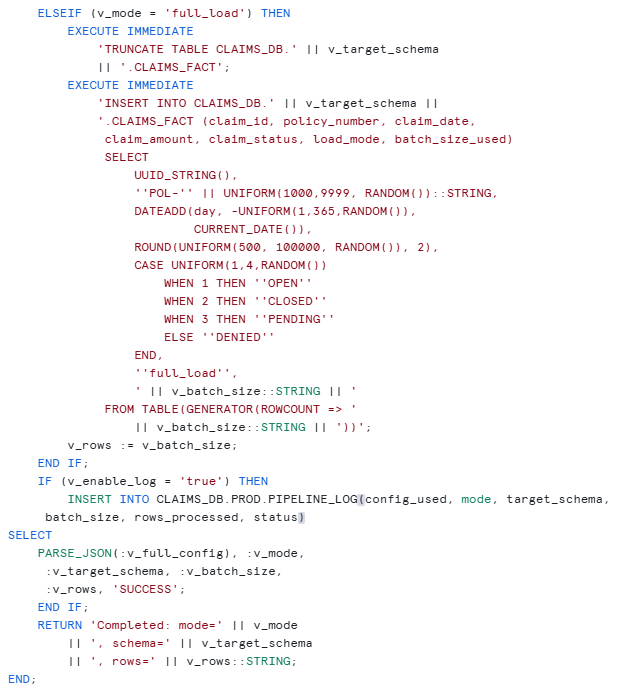
Create the Stored Procedure
This is the core of the pipeline. The procedure reads the CONFIG at runtime using SYSTEM$GET_TASK_GRAPH_CONFIG and behaves differently based on the values.
Create the Task with Default CONFIG
This is the production task. It runs every 24 hours, processes 10,000 rows incrementally into the PROD schema.
CREATE OR REPLACE TASK CLAIMS_DB.PROD.CLAIMS_PIPELINE

WAREHOUSE = COMPUTE_WH

SCHEDULE = '1 minute'

CONFIG = $${

"mode": "incremental",

"target_schema": "PROD",

"batch_size": 10000,

"start_date": "auto",

"enable_logging": "true"

}$$

AS

CALL CLAIMS_DB.PROD.SP_PROCESS_CLAIMS();
ALTER TASK CLAIMS_DB.PROD.CLAIMS_PIPELINE RESUME;

Real-World Scenarios Using USING CONFIG
Scenario 1: Historical Backfill / Full Reload
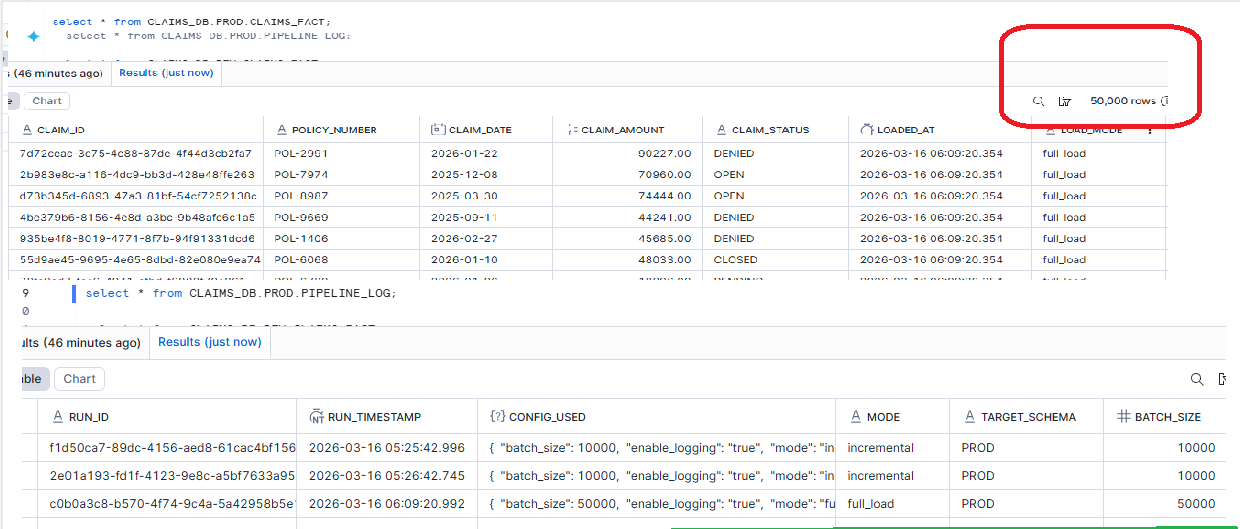
The Ask: “Source system corrected January claims data. We need a full reload into PROD.”
Old Way (6 steps, high risk):
New Way (1 command, zero risk):
EXECUTE TASK CLAIMS_DB.PROD.CLAIMS_PIPELINE

USING CONFIG = $${

"mode": "full_load",

"batch_size": 50000

}$$;
— What happens:
— mode -> full_load (overridden)
— batch_size -> 50000 (overridden)
— target_schema-> PROD (from default, untouched)
— enable_logging-> true (from default, untouched)
— start_date -> auto (from default, untouched)
— Next scheduled run at 2 AM?
— Runs with original default CONFIG. Zero changes needed.
Scenario 2: Test in DEV Before Production Push
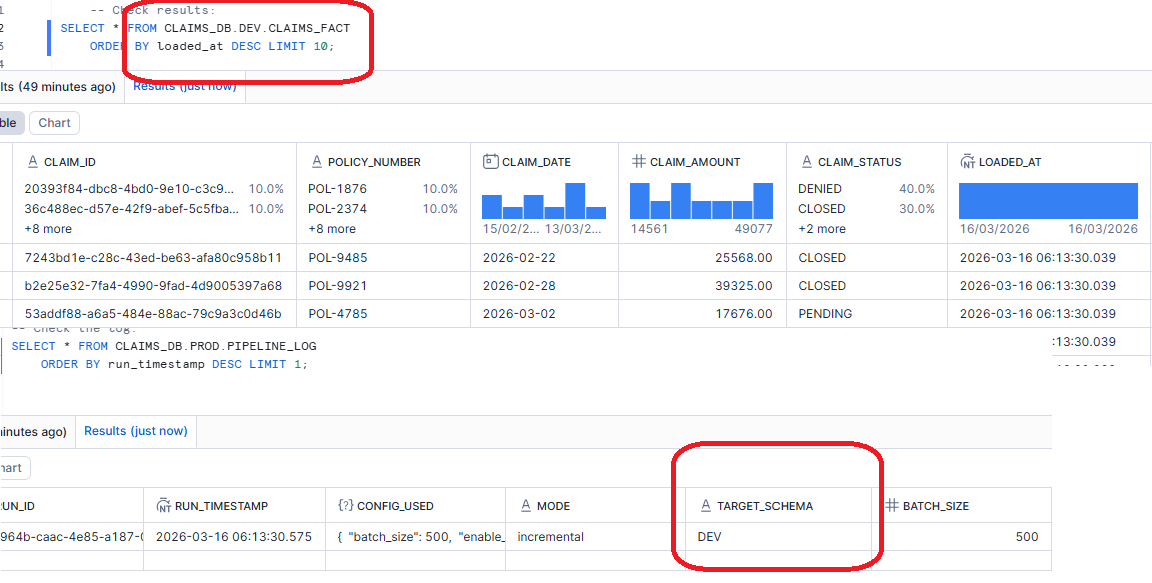
The Ask: “We modified the stored procedure logic. Let us test it against DEV before the next production run.”
EXECUTE TASK CLAIMS_DB.PROD.CLAIMS_PIPELINE

USING CONFIG = $${

"target_schema": "DEV",

"batch_size": 500,

"enable_logging": "true"

}$$;
Scenario 3: Full Load into DEV for UAT
The Ask: “Business users need a full dataset in DEV for User Acceptance Testing before go-live.”
EXECUTE TASK CLAIMS_DB.PROD.CLAIMS_PIPELINE

USING CONFIG = $${

"mode": "full_load",

"target_schema": "DEV",

"batch_size": 200000,

"enable_logging": "true"

}$$;
Scenario 4: Silent Run with Logging Disabled
The Ask: “I am debugging the procedure. Run it but do not pollute the pipeline log table.”

Conclusion
The EXECUTE TASK … USING CONFIG feature solves a real, daily pain point that every Snowflake data engineer has faced. The old pattern of Suspend → Alter → Execute → Alter Back → Resume was not just tedious — it was risky. Production configs got lost, schedules got disrupted, and team members got confused.
With USING CONFIG, you get runtime parameterization for tasks. One command, zero risk, zero disruption. Your production task definition stays exactly as it is, while you run backfills, test in DEV, handle emergency batch sizes, or debug silently.