 0
0
 0
0
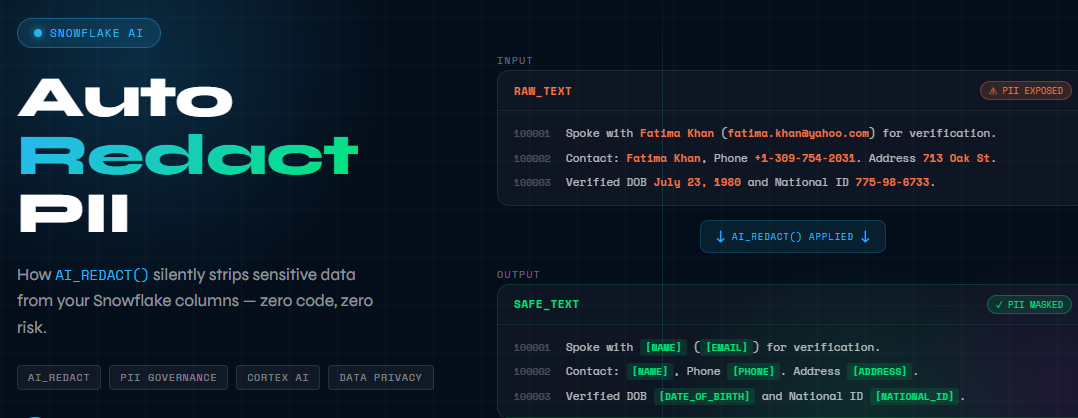
Every insurance company sits on a goldmine of unstructured data—claim adjuster notes, customer communications, incident descriptions. This text is incredibly valuable for analytics and AI (trend detection, severity scoring, fraud hints, summarization). But it also frequently contains PII embedded inside sentences, not neatly stored in structured columns. Snowflake’s AI_REDACT function changes this calculus entirely. It uses Large Language Models to intelligently detect and replace PII in unstructured text—no regex dictionaries, no manual tagging, no maintenance burden.
The Business Problem
Consider a typical claim adjuster note:
“Spoke with John Smith (john.smith@gmail.com) for verification. Verified DOB March 15, 1985 and National ID 456-78-9012. Rear-end collision at signal; claimant reports neck pain and vehicle bumper damage.”
This single note contains five PII elements: name, email, date of birth, SSN, and implicitly—through the verification context—confirms this person filed a claim.
Now multiply this by millions of claims across your organization. Your data science team wants to train a claims classification model. The fraud detection vendor needs access to historical patterns. Your business analysts want to understand claim trends by region.
The challenge: How do you enable these analytics without exposing customer PII?
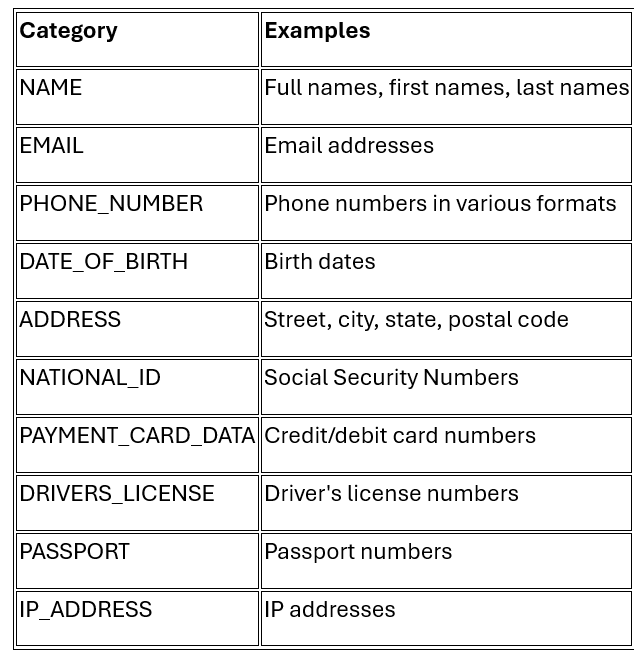
What AI_REDACT Detects
AI_REDACT automatically identifies and replaces these PII categories:
Implementation: Step by Step
Implementation: Step by Step
Setting Up the Source Data
Step 1 — Build a realistic claims dataset (2,000 rows)
CREATE OR REPLACE DATABASE DATA_GOVERNANCE;
CREATE OR REPLACE SCHEMA DATA_GOVERNANCE.AI_REDACT_DEMO;
USE SCHEMA DATA_GOVERNANCE.AI_REDACT_DEMO;
CREATE OR REPLACE TABLE RAW_CLAIM_NOTES (

CLAIM_ID NUMBER,

CLAIM_TYPE STRING,

LOSS_DATE DATE,

STATE_CODE STRING,

LOSS_AMOUNT NUMBER(12,2),

ADJUSTER_NOTES STRING,

INGEST_TS TIMESTAMP_NTZ DEFAULT CURRENT_TIMESTAMP()

);

/* (Use generator INSERT to load 2000 records) */
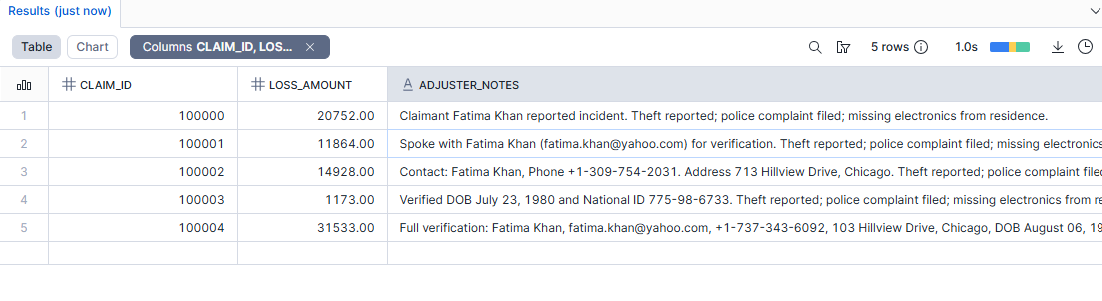
SELECT * FROM RAW_CLAIM_NOTES LIMIT 5;
The ADJUSTER_NOTES column contains free-text with embedded PII—names, emails, phone numbers, addresses, dates of birth, and SSN-like identifiers. Some records have minimal PII (just a name), while others contain the full spectrum.
Step 2 — Apply AI_REDACT with row-level error capture
Why this step is critical
In multi-row queries, AI functions can fail on a small number of rows (bad text, extreme length, encoding quirks). By default, if an AI function errors, the entire query can fail.
Snowflake supports a robust approach:
- Set session parameter AI_SQL_ERROR_HANDLING_USE_FAIL_ON_ERROR = FALSE
With this setting, rows that fail redaction return NULL instead of terminating the query. Combined with AI_REDACT’s object return mode, you get both the redacted text and any error messages:
ALTER SESSION SET AI_SQL_ERROR_HANDLING_USE_FAIL_ON_ERROR = FALSE;
CREATE OR REPLACE TABLE SAFE_CLAIM_NOTES AS

WITH r AS (

SELECT

CLAIM_ID, CLAIM_TYPE, LOSS_DATE, STATE_CODE, LOSS_AMOUNT, INGEST_TS,

AI_REDACT(ADJUSTER_NOTES, TRUE) AS rr

FROM RAW_CLAIM_NOTES

)

SELECT

CLAIM_ID, CLAIM_TYPE, LOSS_DATE, STATE_CODE, LOSS_AMOUNT,

rr:value::STRING AS ADJUSTER_NOTES_REDACTED,

rr:error::STRING AS REDACT_ERROR,

INGEST_TS

FROM r;
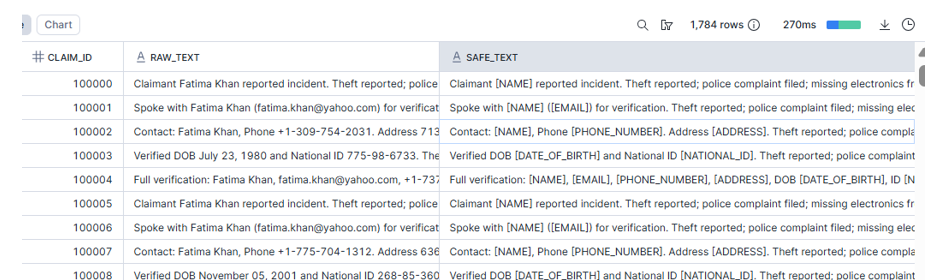
Step 3 — Verify redaction (before vs after)
SELECT

r.CLAIM_ID,

r.ADJUSTER_NOTES AS RAW_TEXT,

s.ADJUSTER_NOTES_REDACTED AS SAFE_TEXT

FROM RAW_CLAIM_NOTES r

JOIN SAFE_CLAIM_NOTES s USING (CLAIM_ID) WHERE SAFE_TEXT IS not NULL;
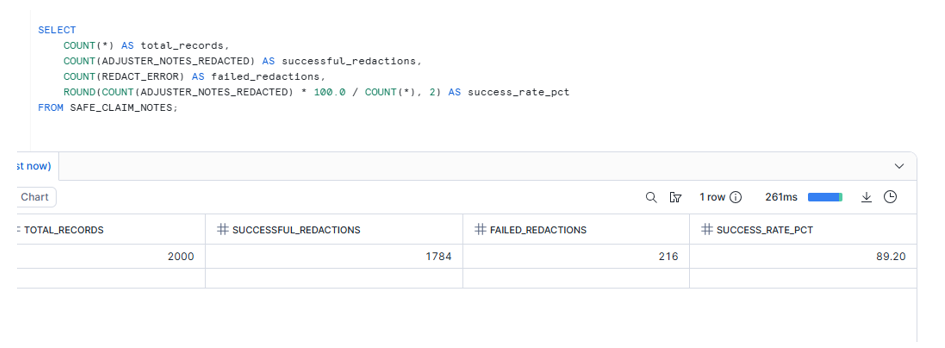
Step 4 — Monitor redaction quality at scale
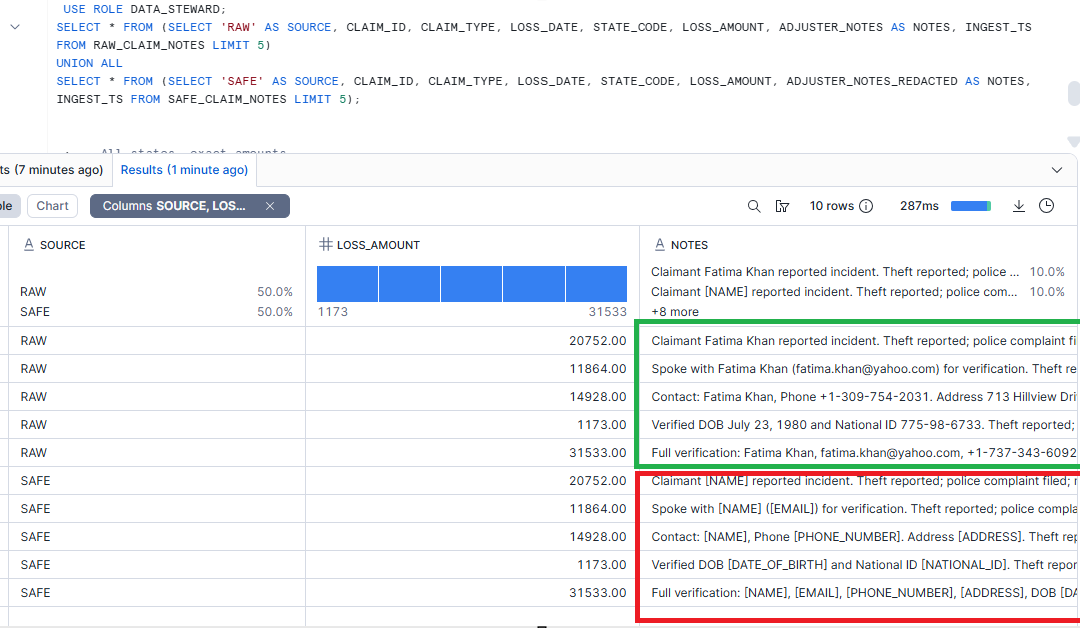
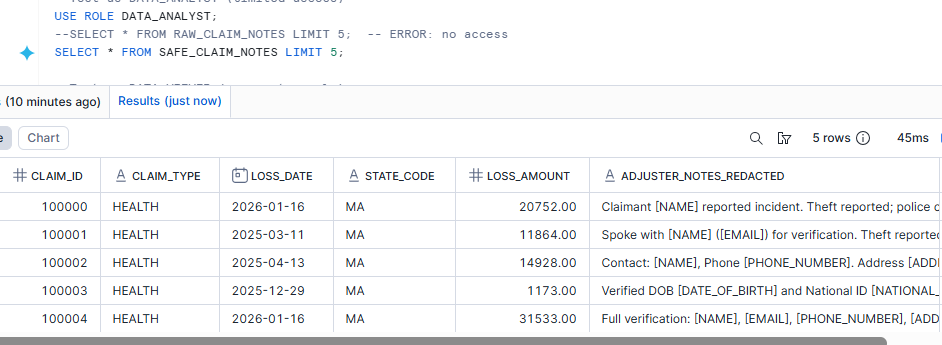
Step 5 — RBAC: Defense in depth
- DATA_STEWARD: access to RAW + SAFE
- SENIOR_ANALYST: SAFE only
- DATA_ANALYST: SAFE only
— Only DATA_STEWARD can see raw PII
GRANT SELECT ON TABLE RAW_CLAIM_NOTES TO ROLE DATA_STEWARD;
— Safe table accessible to analysts
GRANT SELECT ON TABLE SAFE_CLAIM_NOTES TO ROLE DATA_STEWARD;
GRANT SELECT ON TABLE SAFE_CLAIM_NOTES TO ROLE SENIOR_ANALYST;
GRANT SELECT ON TABLE SAFE_CLAIM_NOTES TO ROLE DATA_ANALYST;
Cost and Limitations
Pricing: AI_REDACT is billed based on tokens processed (input + output). For high-volume workloads, factor this into your architecture—consider whether you need real-time redaction or can batch process during off-peak hours.
Token Limit: Each AI_REDACT call supports up to 4,096 tokens. For longer text fields (detailed incident reports, legal correspondence), use SPLIT_TEXT_RECURSIVE_CHARACTER to chunk the text before processing.
WITH chunks AS (

SELECT

claim_id,

c.index AS chunk_index,

c.value::STRING AS chunk

FROM raw_claim_notes,

LATERAL FLATTEN(

input => SNOWFLAKE.CORTEX.SPLIT_TEXT_RECURSIVE_CHARACTER(adjuster_notes, 'none', 1000, 200)

) c

),

redacted AS (

SELECT

claim_id,

chunk_index,

AI_REDACT(chunk) AS chunk_redacted

FROM chunks

)

SELECT

claim_id,

LISTAGG(chunk_redacted, ' ') WITHIN GROUP (ORDER BY chunk_index) AS full_redacted_text

FROM redacted

GROUP BY claim_id;
Key Takeaways
- AI_REDACT eliminates regex maintenance: No more updating patterns when you encounter new phone number formats or address styles.
- Error handling is non-negotiable: Always set AI_SQL_ERROR_HANDLING_USE_FAIL_ON_ERROR = FALSE and capture the error column.
- Layer your defenses: AI_REDACT + table permissions + dynamic masking + row access policies = comprehensive protection.