 2
2
 0
0
The Problem Everyone’s Worried About: Your business users are excited about Gen AI Analytics. They want to ask questions like:
- “Show me customer emails for active policies in California”
- “Which policyholders have claims over $50K?”
- “Give me contact details for renewals expiring this month”
But your security team is nervous. “If Gen AI can freely access and return sensitive data, you’ve just created a massive new data leakage risk”.
The Solution: Security That Actually Works
Here’s the good news: Snowflake Cortex Analyst doesn’t bypass your security. It works within your existing RBAC and masking policies.
In this blog, I’ll show you something more convincing than theory:
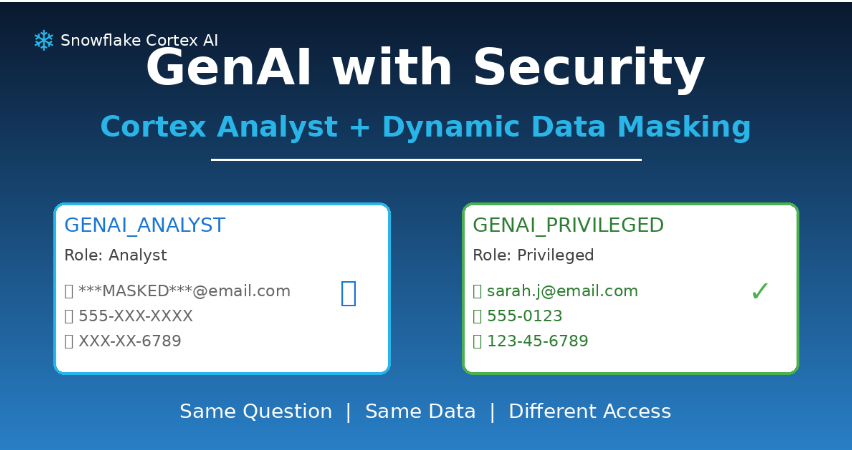
- Same question
- Same dataset
- Two different roles
- Two completely different answers by Semantic Views
What We’re Building
A simple scenario that proves Gen AI can be both powerful AND secure:
The Setup:
- A policy table with PII (emails, phone numbers, SSNs)
- Dynamic Data Masking applied to sensitive columns
- A Semantic View for Cortex Analyst
- Two roles with different privileges
The Test:
- Ask the same question through Cortex Analyst
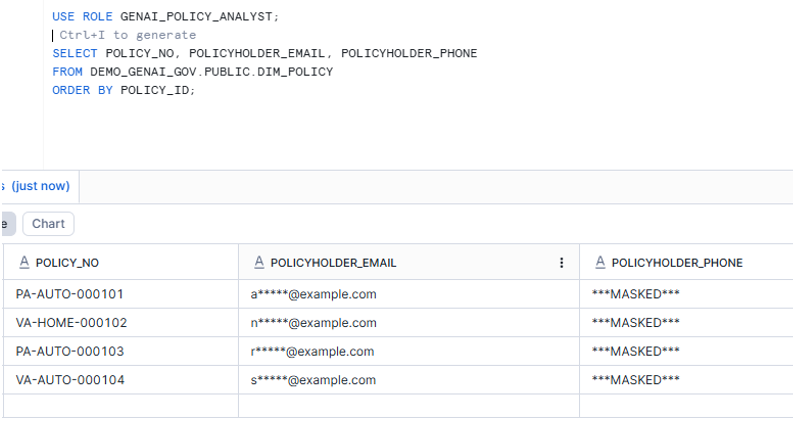
- Role 1 (GENAI_ANALYST) sees masked data
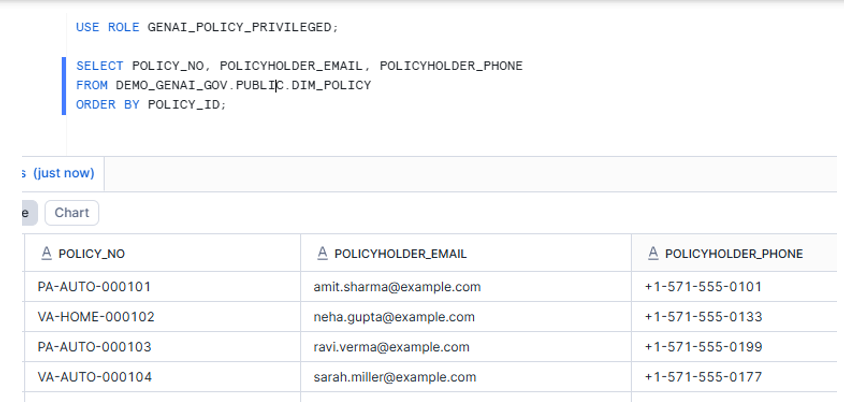
- Role 2 (GENAI_PRIVILEGED) sees real data
The Proof: Gen AI that respects your governance without any special configuration.
Step-by-Step Implementation
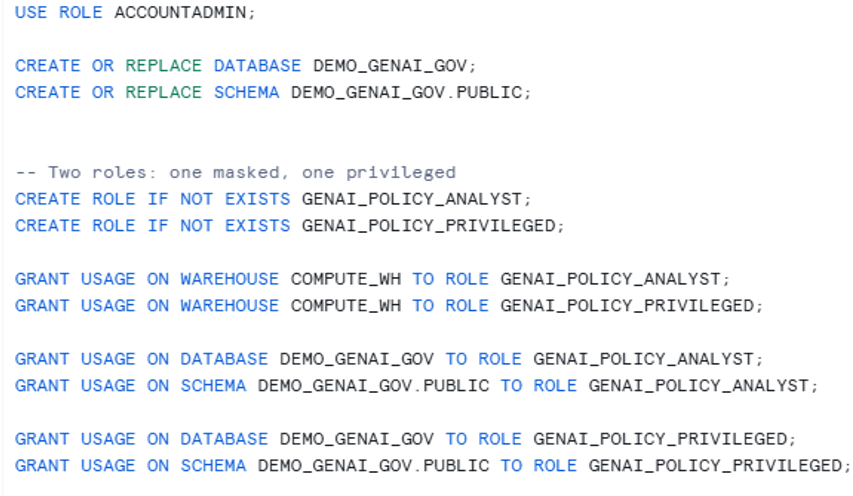
- Create database, schema, warehouse, and roles
- Create a meaningful policy table + sample data
CREATE OR REPLACE TABLE DIM_POLICY (

POLICY_ID            NUMBER,

POLICY_NO            STRING,

POLICY_STATUS        STRING,

LINE_OF_BUSINESS     STRING,

STATE_CD             STRING,

EFFECTIVE_DATE       DATE,

EXPIRY_DATE          DATE,

ANNUAL_PREMIUM       NUMBER(10,2),

-- PII columns we will mask

POLICYHOLDER_NAME    STRING,

POLICYHOLDER_EMAIL   STRING,

POLICYHOLDER_PHONE   STRING

);
INSERT INTO DIM_POLICY VALUES

(101,'PA-AUTO-000101','ACTIVE','AUTO','PA','2025-01-01','2025-12-31',12450.25,'Amit Sharma','amit.sharma@example.com','+1-571-555-0101'),

(102,'VA-HOME-000102','ACTIVE','HOME','VA','2025-03-01','2026-02-28',18999.00,'Neha Gupta','neha.gupta@example.com','+1-571-555-0133'),

(103,'PA-AUTO-000103','CANCELLED','AUTO','PA','2024-06-01','2025-05-31', 8450.75,'Ravi Verma','ravi.verma@example.com','+1-571-555-0199'),

(104,'VA-AUTO-000104','ACTIVE','AUTO','VA','2025-07-15','2026-07-14',10300.10,'Sarah Miller','sarah.miller@example.com','+1-571-555-0177');
- Create masking policies (unmask only for privileged role)
CREATE OR REPLACE MASKING POLICY MASK_EMAIL AS (val STRING)

RETURNS STRING ->

CASE

WHEN CURRENT_ROLE() IN ('GENAI_POLICY_PRIVILEGED') THEN val

WHEN val IS NULL THEN NULL

ELSE REGEXP_REPLACE(val, '(^.).*(@.*$)', '\\1*****\\2')

END;
CREATE OR REPLACE MASKING POLICY MASK_PHONE AS (val STRING)

RETURNS STRING ->

CASE

WHEN CURRENT_ROLE() IN ('GENAI_POLICY_PRIVILEGED') THEN val

WHEN val IS NULL THEN NULL

ELSE '***MASKED***'

END;
ALTER TABLE DEMO_GENAI_GOV.PUBLIC.DIM_POLICY MODIFY COLUMN POLICYHOLDER_EMAIL SET MASKING POLICY DEMO_GENAI_GOV.PUBLIC.MASK_EMAIL;
ALTER TABLE DEMO_GENAI_GOV.PUBLIC.DIM_POLICY MODIFY COLUMN POLICYHOLDER_PHONE SET MASKING POLICY DEMO_GENAI_GOV.PUBLIC.MASK_PHONE;
GRANT SELECT ON TABLE DEMO_GENAI_GOV.PUBLIC.DIM_POLICY TO ROLE GENAI_POLICY_ANALYST;
GRANT SELECT ON TABLE DEMO_GENAI_GOV.PUBLIC.DIM_POLICY TO ROLE GENAI_POLICY_PRIVILEGED;
- Create a Semantic View for Cortex Analyst
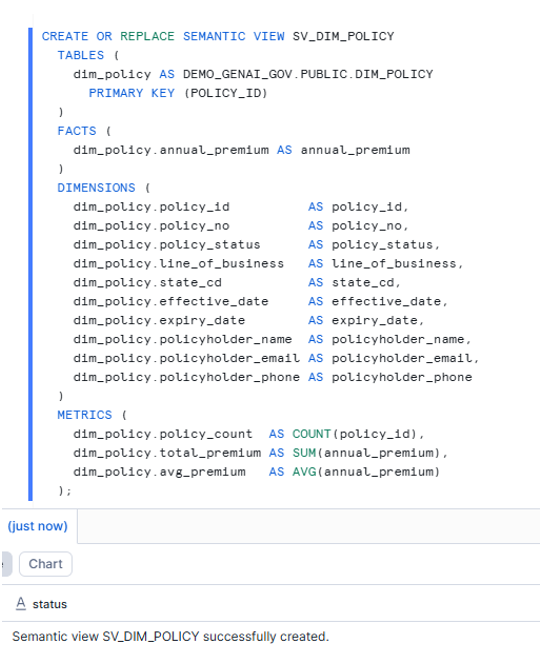
GRANT SELECT ON SEMANTIC VIEW DEMO_GENAI_GOV.PUBLIC.SV_DIM_POLICY TO ROLE GENAI_POLICY_ANALYST;
GRANT SELECT ON SEMANTIC VIEW DEMO_GENAI_GOV.PUBLIC.SV_DIM_POLICY TO ROLE GENAI_POLICY_PRIVILEGED;
Verification
- Verification Part 1: SQL proof (masked vs unmasked)
- Verification Part 2: Cortex Analyst Playground proof (same prompt, different answer)
In Snowsight → Cortex Analyst Playground:
- Set role = GENAI_POLICY_ANALYST
- Select semantic view = DEMO_GENAI_GOV.PUBLIC.SV_DIM_POLICY
- Ask this prompt:
List policyholder email and phone for ACTIVE AUTO policies in VA
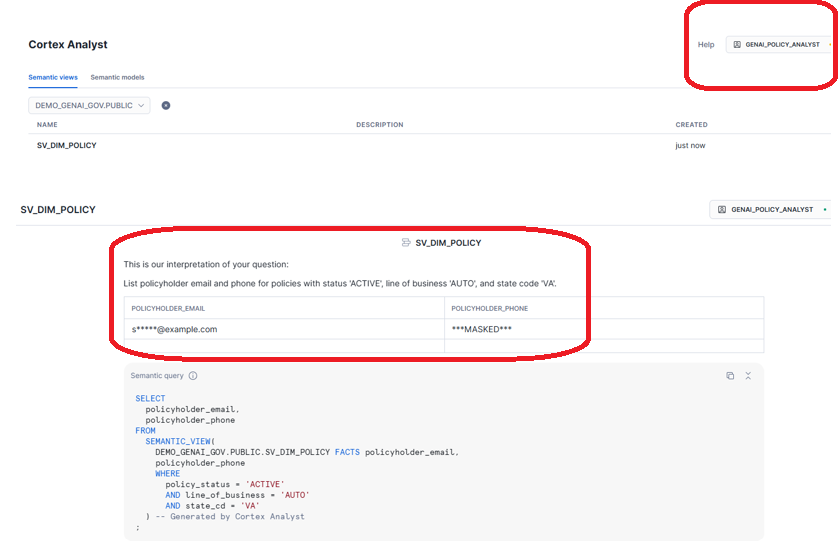
Expected result: emails/phones appear masked
Now change role = GENAI_POLICY_PRIVILGED
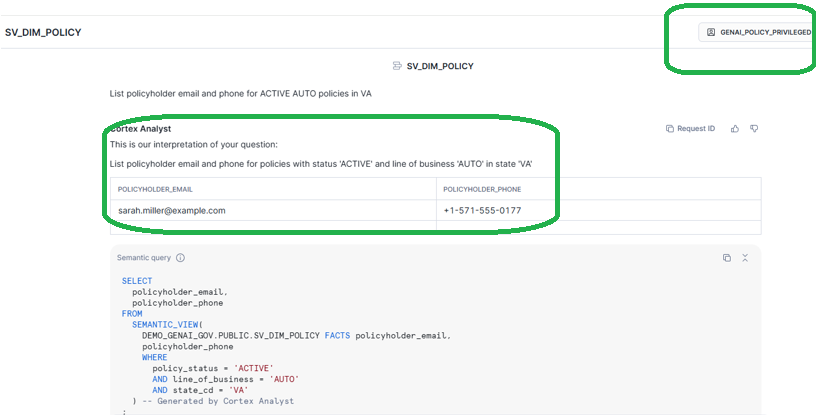
Expected result: emails/phones appear unmasked
What happened:
Same question. Same semantic model. Completely different answers.
Here’s the flow:
- You asked a question in natural language
- Cortex Analyst translated it to SQL
- The SQL executed using YOUR current role
- Snowflake applied masking policies based on your role
- You got a governed result
GenAI answers are still governed because the query runs under the user’s role, and masking policies apply at runtime.
Key Takeaways
- Cortex Analyst doesn’t bypass security — it works within Snowflake’s governance framework
- Masking policies apply automatically — no special configuration needed for GenAI
- Same semantic model for everyone — security happens at runtime based on role
- GenAI + Governance aren’t enemies — when architected correctly, they work together