 3
3
 0
0
Document AI: Modern finance and operations teams are working in PDF invoices and logistics documents. These files contain rich information – header details, nested line items, shipment summaries – but they are locked in unstructured formats.
In this post, we’ll walk through an example that combines:
- Snowflake Document AI to extract structured JSON from PDF invoices
- A lateral FLATTEN + array indexing pattern to handle nested line items cleanly
- Dynamic Tables to materialize header- and line-level facts continuously
It’s designed to handle variable numbers of line items and incremental ingestion of new PDFs.
The Use Case: Logistics Invoice with Nested Line Items
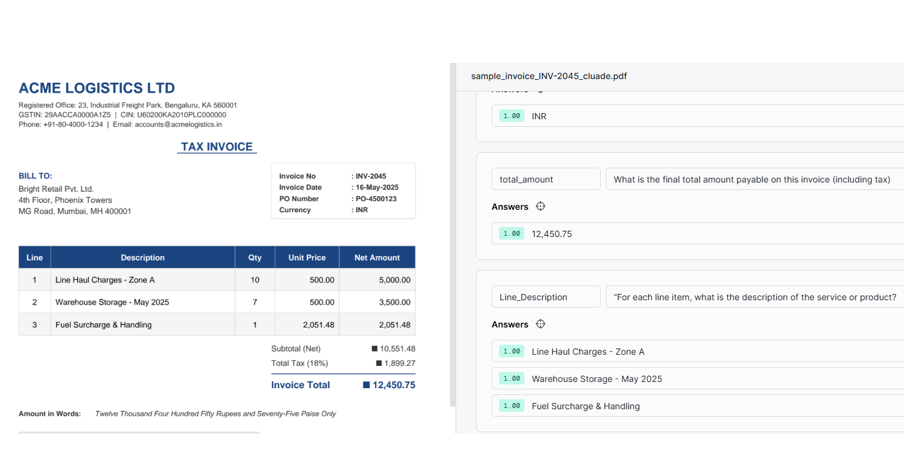
Our scenario is a logistics company (Acme Logistics Ltd) generating invoices for a retail customer. Each invoice is a PDF with:
- Header-level fields
- Invoice number: INV-2045
- Invoice date: 16-May-2025
- Vendor name: ACME LOGISTICS LTD
- PO number: PO-4500123
- Currency: INR
- Nested line items – one line per service, e.g.
- SRV-ZONEA Line Haul Charges – Zone A
- SRV-WH-MAY Warehouse Storage – May 2025
- SRV-FUEL Fuel Surcharge & Handling
- Quantities and prices per line, and invoice-level totals.
Technical:
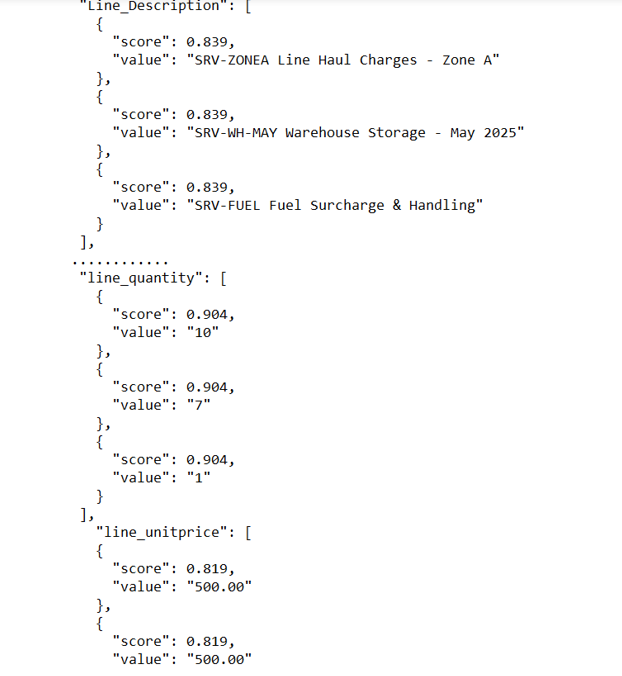
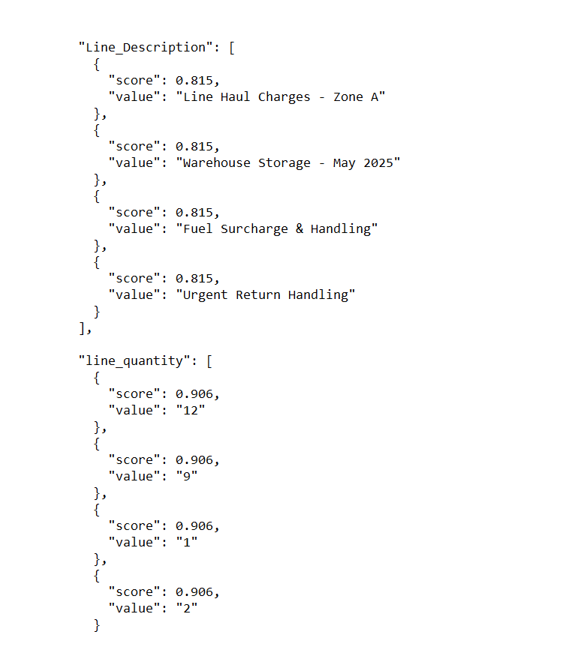
We use Snowflake Document AI to build a model that extracts invoice metadata and returns a JSON payload like:
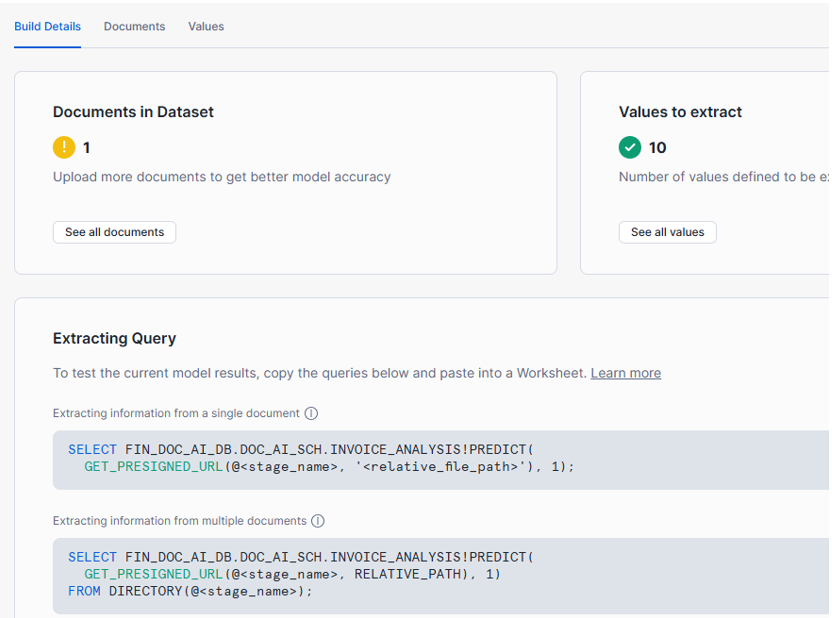
Step1 : We have developed the model using Document AI.
Observe the Description:Nested Array, and our goal is convert nested arrays into a clean relational structure.
Step2: Landing Raw Document AI Results
We start with a raw table that captures both the predictions and basic file metadata from the stage. To avoid re-scoring the same PDFs on each run, we introduce a NOT EXISTS filter:
INSERT INTO INVOICE_DOC_AI_RESULTS

(FILE_NAME, DOC_AI_RESULT, STAGE_LAST_MODIFIED, STAGE_FILE_SIZE)

SELECT

d.RELATIVE_PATH                                                  AS FILE_NAME,

INVOICE_ANALYSIS!PREDICT(

GET_PRESIGNED_URL(@INVOICE_PDF_STAGE, d.RELATIVE_PATH)

)                                                                AS DOC_AI_RESULT,

d.LAST_MODIFIED::TIMESTAMP_NTZ                                   AS STAGE_LAST_MODIFIED,

d.SIZE                                                           AS STAGE_FILE_SIZE

FROM DIRECTORY(@INVOICE_PDF_STAGE) d

WHERE NOT EXISTS (

SELECT 1

FROM INVOICE_DOC_AI_RESULTS r

WHERE r.FILE_NAME = d.RELATIVE_PATH

);
Step3: Analyze the JSON data extracted by Document AI
select * from INVOICE_DOC_AI_RESULTS;
Document AI gives us aligned arrays:
- Line_Description[0..n]
- line_quantity[0..n]
- line_unitprice[0..n]
Step 4. Benefit of the Lateral FLATTEN Approach:
We designed a much cleaner pattern:
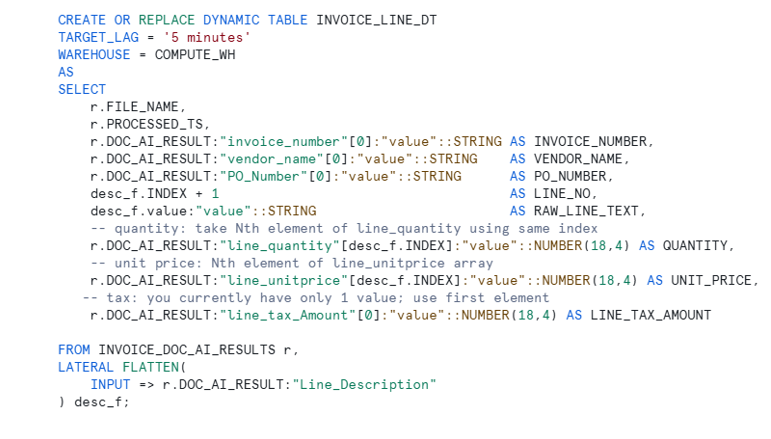
- FLATTEN only the descriptions (Line_Description) → one row per line.
- Use desc_f.INDEX to directly pull matching elements from other arrays:
FROM INVOICE_DOC_AI_RESULTS r,

LATERAL FLATTEN(INPUT => r.DOC_AI_RESULT:"Line_Description") desc_f

DOC_AI_RESULT:"line_quantity"[desc_f.INDEX]:"value"

DOC_AI_RESULT:"line_unitprice"[desc_f.INDEX]:"value"
In other words:
- LATERAL FLATTEN gives us the line index
- The index gives us random access into other arrays
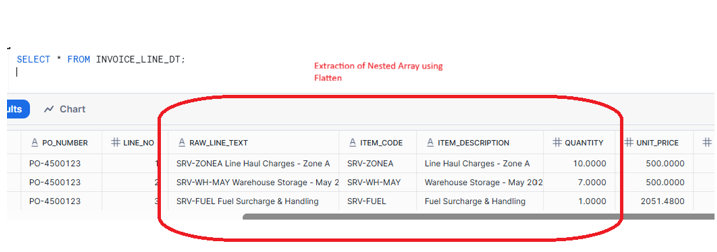
If tomorrow a PDF has 3 lines, we get 3 rows.If another has 10 lines, we get 10 rows. The SQL does not change – it is naturally driven by the array size.
Implement:
Step 5 Implementing the Line-Items Dynamic Table with FLATTEN
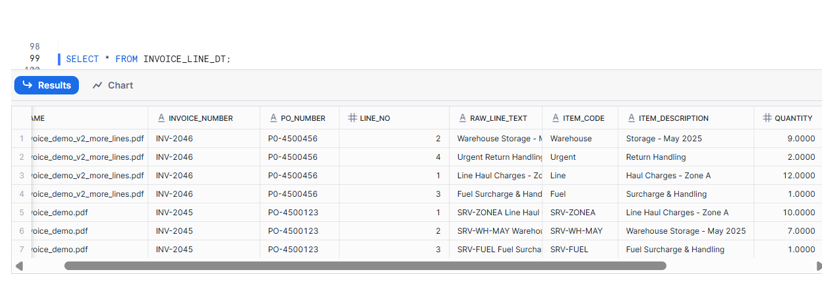
We build a Dynamic Table INVOICE_LINE_DT that:
- Anchors on Line_Description
- Derives ITEM_CODE and ITEM_DESCRIPTION from the combined value
- Uses the same index to fetch quantity and unit price
Step 6: Header Dynamic Table
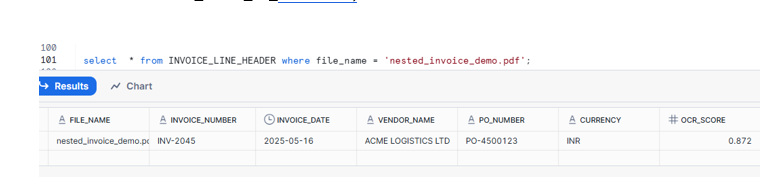
CREATE OR REPLACE DYNAMIC TABLE INVOICE_LINE_HEADER
TARGET_LAG = '5 minutes'
WAREHOUSE = COMPUTE_WH
AS
SELECT
FILE_NAME,
DOC_AI_RESULT:"invoice_number"[0]:"value"::STRING AS INVOICE_NUMBER,
TO_DATE(DOC_AI_RESULT:"invoice_date"[0]:"value"::STRING, 'DD-MON-YYYY') AS INVOICE_DATE,
DOC_AI_RESULT:"vendor_name"[0]:"value"::STRING AS VENDOR_NAME,
DOC_AI_RESULT:"PO_Number"[0]:"value"::STRING AS PO_NUMBER,
DOC_AI_RESULT:"Currency"[0]:"value"::STRING AS CURRENCY,
DOC_AI_RESULT:"__documentMetadata":"ocrScore"::FLOAT AS OCR_SCORE,
PROCESSED_TS
FROM INVOICE_DOC_AI_RESULTS;
Separation of responsibilities:
- INVOICE_DOC_AI_RESULTS: raw, auditable Document AI output.
- INVOICE_HEADER_DT: clean, relational header data.
- INVOICE_LINE_DT: normalized line details.
Delta Load:
The real strength of this pattern shows up on Day 2.
On the first day, our sample invoice (INV-2045) contained 3 line items, so INVOICE_LINE_DT materialized 3 rows for that file. The next day, we received a new invoice PDF (INV-2046) with an additional service line – in other words, the Document AI JSON now contained 4 elements in Line_Description, line_quantity, and line_unitprice.
We did not change a single line of SQL. Because our design anchors on LATERAL FLATTEN over Line_Description and uses the array INDEX to fetch matching entries from line_quantity and line_unitprice, the Dynamic Table simply produced 4 rows for the new file instead of 3.
Benefits of using Dynamic Tables here:
Near real-time analytics
As new PDFs are dropped into the stage and processed, our header and line tables are refreshed automatically. There’s no need for orchestrating multi-step ETL jobs – just a periodic insert into the raw table and a TARGET_LAG on each Dynamic Table.