 5
5
 0
0
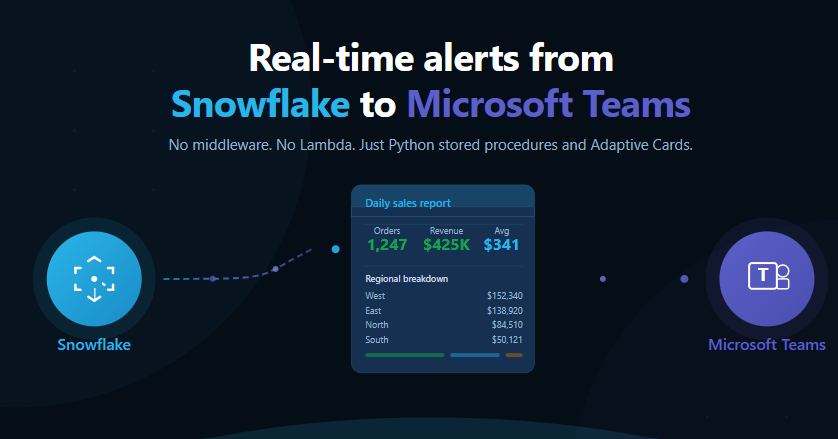
Real-Time Alerts from Snowflake to Microsoft Teams: The Problem: Your Data Lives in Snowflake, But Your Team Lives in Teams
If you’re running a modern data platform, you’ve likely faced this scenario: a critical data pipeline fails at 3 AM, a table that should have 10M rows only has 50K, your daily sales report finishes processing, or a data quality check identifies anomalies.
The catch? All of these events happen inside Snowflake, but the people who need to act on them are in Microsoft Teams — not monitoring a Snowflake dashboard.
Traditional solutions require middleware like Azure Functions (adds Azure dependency and cold start latency), AWS Lambda (requires cross-cloud networking and IAM complexity), or third-party orchestrators like Airflow and Prefect (another system to maintain, more failure points). Email alerts get buried in inboxes with no rich formatting.
What if Snowflake could talk directly to Teams?
With Snowflake’s External Access Integration, it can. No middleware. No extra infrastructure. Just a stored procedure that queries your data and posts a rich, formatted message to your Teams channel — all from within Snowflake.
Why this matters:
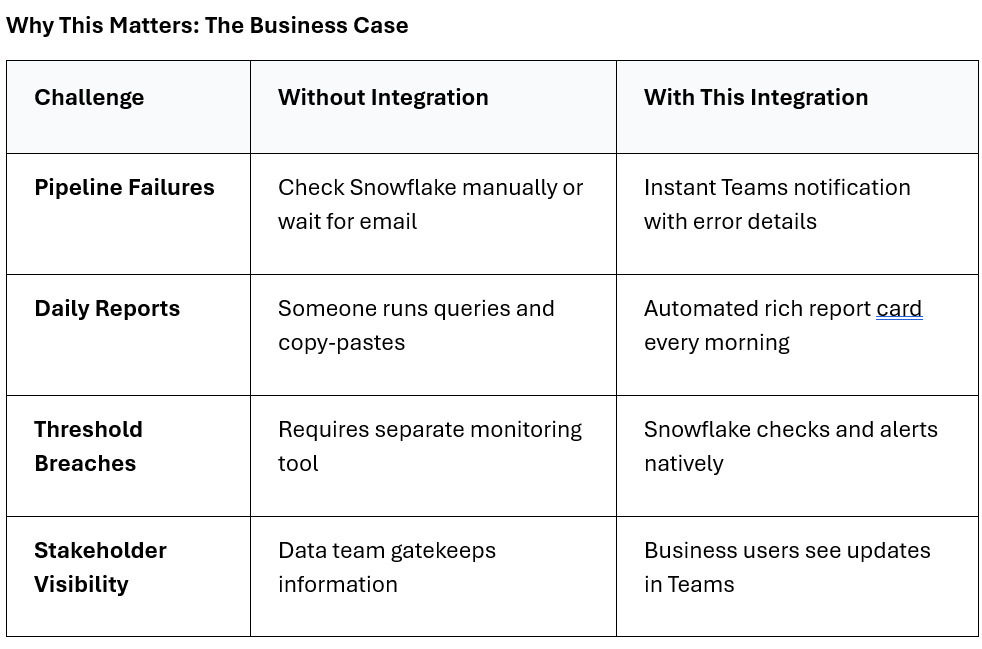
Key Benefits
🚫Zero Middleware
No Azure Functions, no Lambda, no Airflow. Lives entirely inside Snowflake.
⚡Real-Time Alerting
Pair with Tasks to schedule checks every minute, hour, or day.
🎨Rich Formatting
Uses Microsoft Adaptive Cards for structured, visual reports.
🔒Secure by Design
Webhook URLs encrypted as Secrets; egress locked to specific endpoints.
Architecture Overview
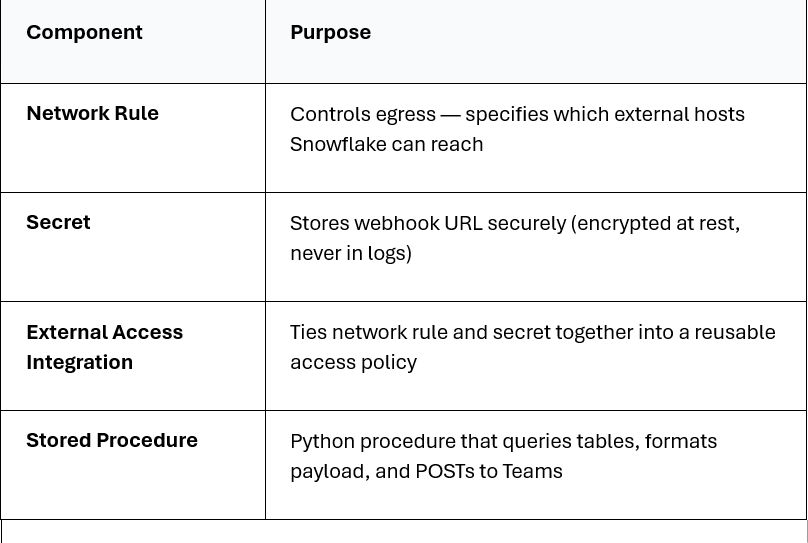
Here’s how the pieces fit together — four Snowflake objects and one Teams configuration:
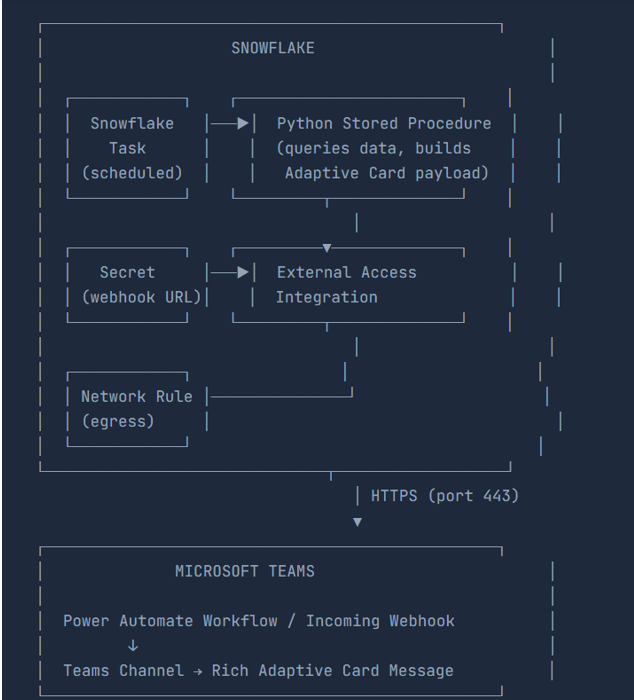
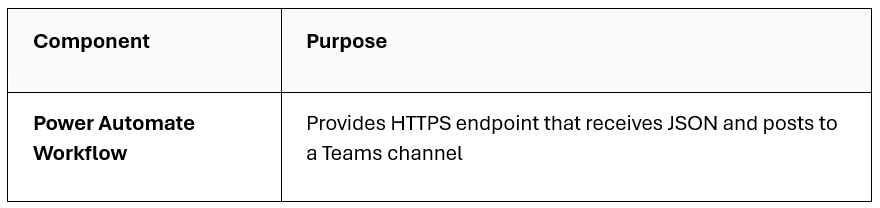
Components Breakdown
Snowflake Side (4 Objects).
Microsoft Teams Side (1 Component)
Step-by-Step Implementation
Step-by-Step Implementation
1.Create the Teams Webhook
Power Automate Workflow (Recommended): Open Microsoft Teams → Navigate to target channel → Click … → Workflows → Search for webhook → Click “Send webhook alerts to a channel” → Add workflow → Copy the generated webhook URL.
The URL will look like: https://prod-XX.logic.azure.com:443/workflows/… or https://defaultXXX.0d.environment.api.powerplatform.com:443/…
2 Create the Network Rule
CREATE OR REPLACE NETWORK RULE API_PDF_POC_DB.PUBLIC.teams_network_rule

MODE = EGRESS

TYPE = HOST_PORT

VALUE_LIST = ('outlook.office.com:443', '*.webhook.office.com:443', '*.logic.azure.com:443', 'defaultd6f8cc30deXXXXXXXX.0d.environment.api.powerplatform.com:443');
3.Store the Webhook URL as a Secret
CREATE OR REPLACE SECRET teams_webhook_url

TYPE = GENERIC_STRING

SECRET_STRING = '<your-full-webhook-url>';
4 Create the External Access Integration
Link the network rule with the secret to create a reusable access policy:
CREATE OR REPLACE EXTERNAL ACCESS INTEGRATION teams_access_integration

ALLOWED_NETWORK_RULES = (teams_network_rule)

ALLOWED_AUTHENTICATION_SECRETS = (teams_webhook_url)

ENABLED = TRUE;
5 Build the Notification Stored Procedure
Create a Python stored procedure that reads the secret, builds an Adaptive Card, and sends it via HTTP POST:
CREATE OR REPLACE PROCEDURE SEND_TEAMS_NOTIFICATION(

MESSAGE_TITLE VARCHAR,

MESSAGE_TEXT VARCHAR

)

RETURNS VARCHAR

LANGUAGE = PYTHON

RUNTIME_VERSION = '3.9'

PACKAGES = ('snowflake-snowpark-python', 'requests')

HANDLER = 'send_notification'

SECRETS = ('webhook_url' = TEAMS_WEBHOOK_URL)

EXTERNAL_ACCESS_INTEGRATIONS = (teams_access_integration)

AS

$$

import _snowflake

import requests

import json
def send_notification(session, message_title, message_text):

# Retrieve webhook URL from encrypted secret

webhook_url = _snowflake.get_generic_secret_string('webhook_url')
# Build the Adaptive Card payload

payload = {

"type": "message",

"attachments": [{

"contentType": "application/vnd.microsoft.card.adaptive",

"content": {

"$schema": "http://adaptivecards.io/schemas/adaptive-card.json",

"type": "AdaptiveCard",

"version": "1.4",

"body": [

{"type": "TextBlock", "text": message_title,

"weight": "Bolder", "size": "Medium"},

{"type": "TextBlock", "text": message_text,

"wrap": True}

]

}

}]

}
# Send the POST request

response = requests.post(

webhook_url,

headers={'Content-Type': 'application/json'},

data=json.dumps(payload)

)

return f"Status: {response.status_code}"

$$;
Test It!
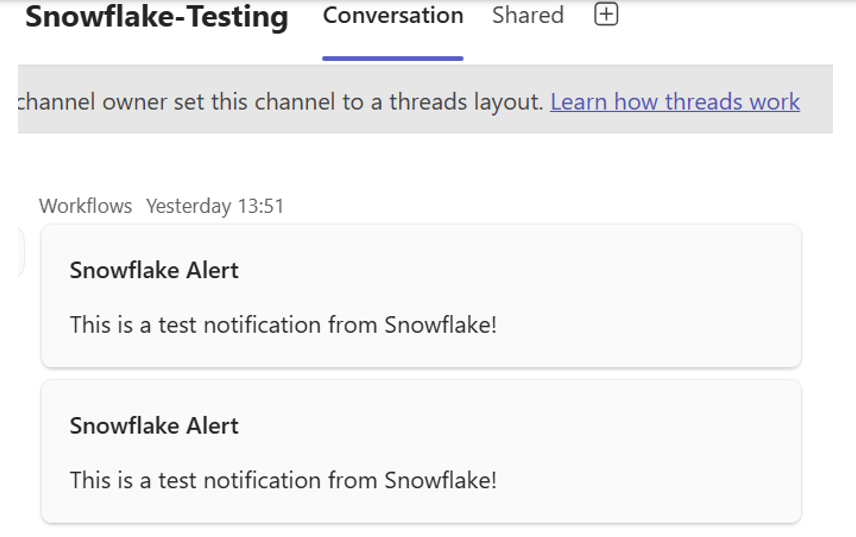
Run a simple test call to verify end-to-end connectivity:
CALL SEND_TEAMS_NOTIFICATION(
‘ Snowflake Integration Test’,
‘This is a test notification sent directly from Snowflake!’
);
Expected result: The procedure returns Status: 200 and your Teams channel displays a formatted message with the title and text.
Real-World Use Cases
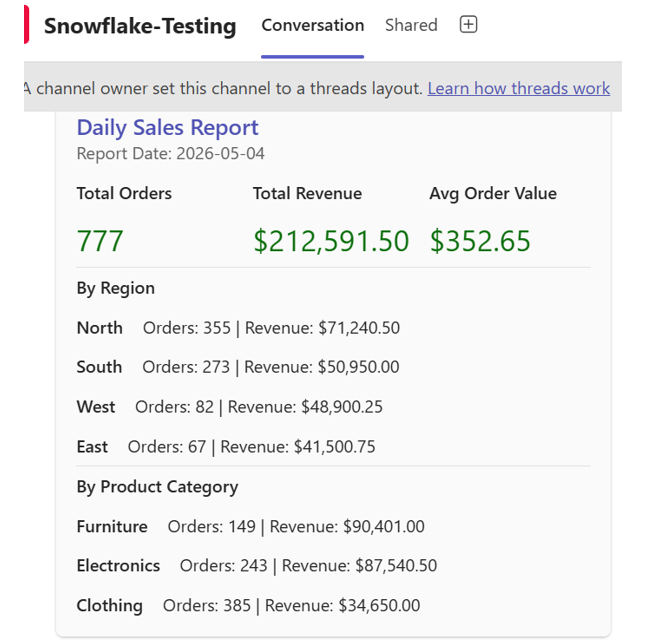
Use Case 1: Daily Sales Report
A procedure that queries a sales table, aggregates KPIs (total orders, revenue, average order value), breaks results down by region, and delivers a rich report card to Teams.
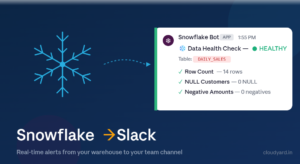
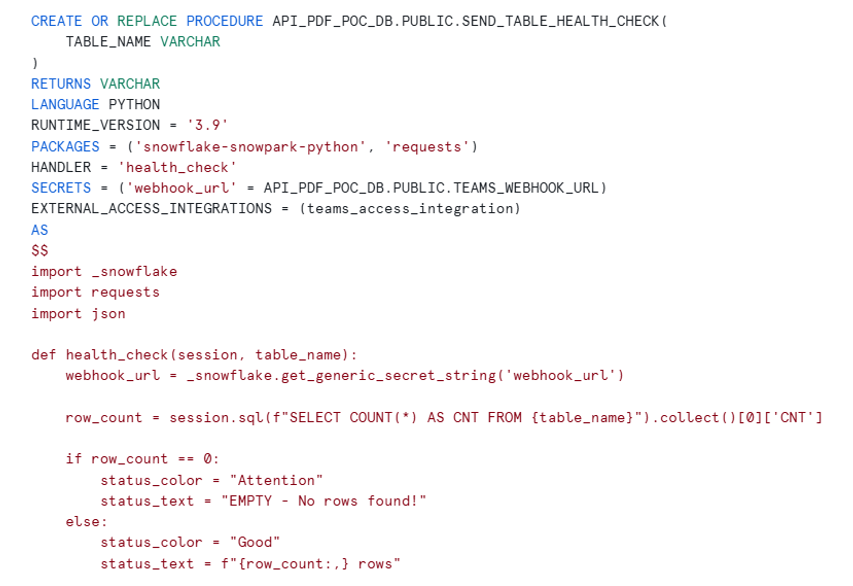
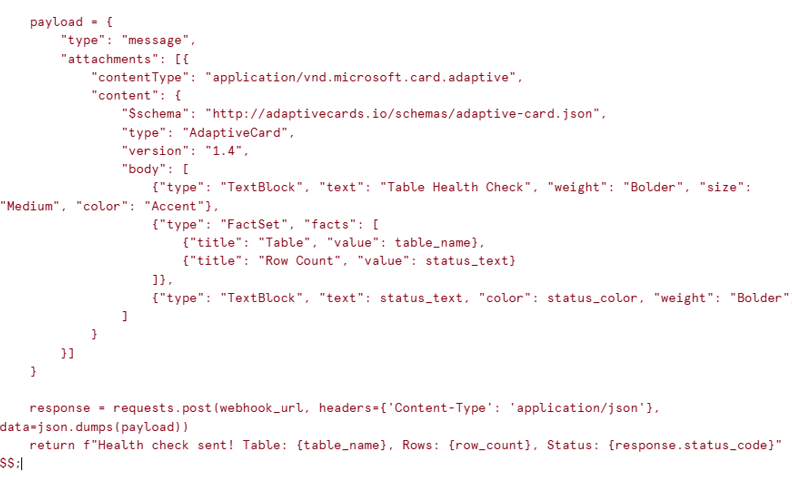
Use Case 2: Table Health Check Monitor
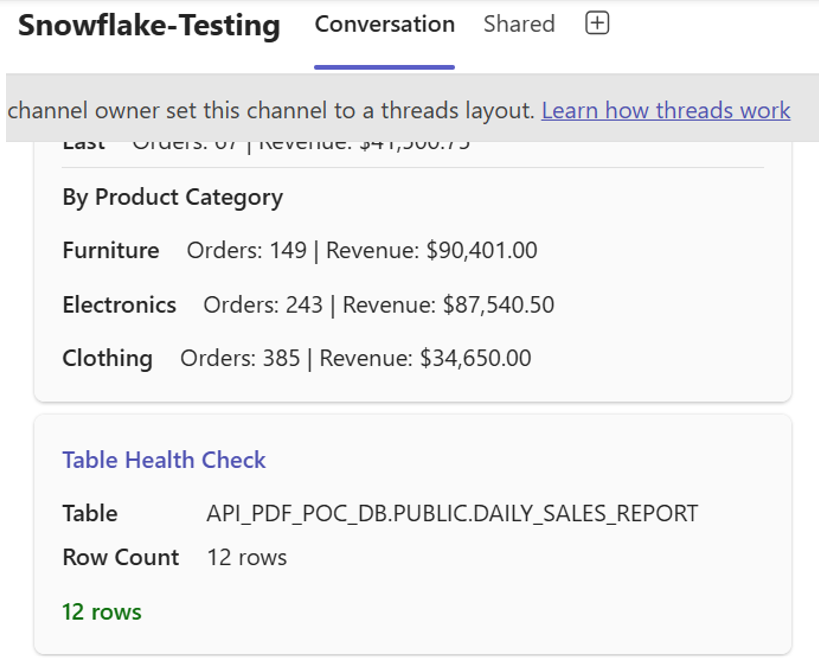
A lightweight procedure that takes any table name, checks if it has data, and sends a green (healthy) or red (empty) status card. Perfect for monitoring staging tables, landing zones, or critical data assets.
CALL API_PDF_POC_DB.PUBLIC.SEND_TABLE_HEALTH_CHECK('API_PDF_POC_DB.PUBLIC.DAILY_SALES_REPORT');
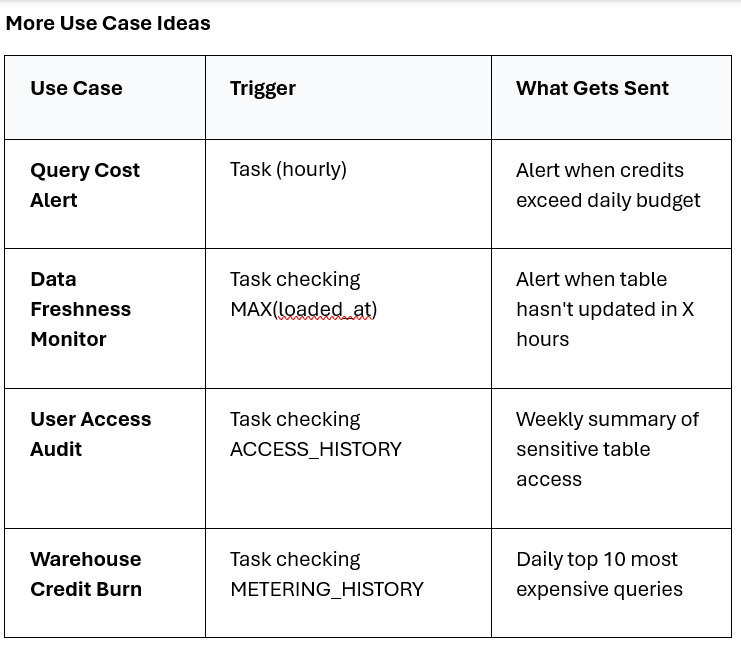
Conclusion: Data Insights Where Your Team Already Works
Snowflake’s External Access Integration eliminates the middleware tax. By combining Network Rules, Secrets, and Python Stored Procedures, you can push real-time insights, alerts, and reports directly into Microsoft Teams channels — no Azure Functions, no Lambda, no external orchestrators.