 2
2
 0
0
DML Error Logging + GenAI: In healthcare and insurance, dirty data is not an exception — it is the norm. Source systems ship claims with NULL patient identifiers, non-numeric amounts like PENDING, and truncated or corrupted ICD-10 diagnosis codes.
Without proper handling, a single bad row can fail the entire batch.
That means:
- Valid claims are delayed
- Revenue processing is blocked
- Operations teams are stuck firefighting
⚠ Classic pain point
⚠ Classic pain point
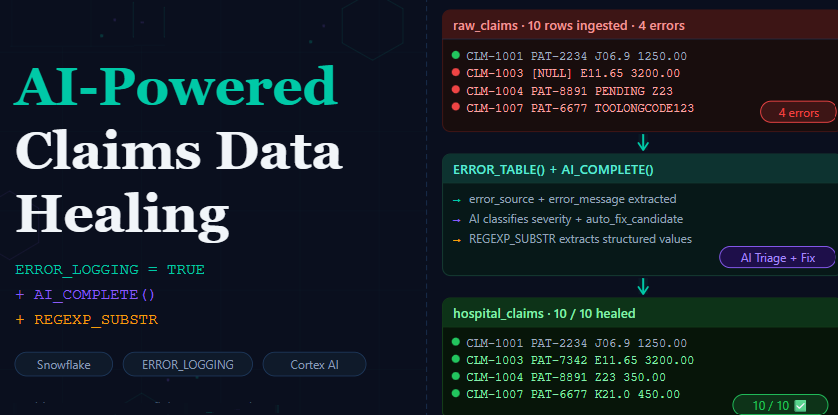
Instead of failing pipelines, we build resilient + intelligent pipelines using:
- ERROR_LOGGING = TRUE — capture bad rows without killing the batch.
- ERROR_TABLE() — inspect exactly which column broke and why.
- AI_COMPLETE (Cortex AI) — triage, classify, and auto-fix each failure intelligently.
Step 1 — Setup: The Magic Flag ERROR_LOGGING = TRUE
Everything starts with one table-level property that Snowflake introduced to solve exactly this problem. When you add ERROR_LOGGING = TRUE to your CREATE TABLE, any row that fails a constraint during an INSERT is automatically captured in a hidden system error table instead of aborting the statement.
Source Table:
CREATE OR REPLACE TABLE raw_claims (

claim_id VARCHAR(20),

patient_id VARCHAR(15),

diagnosis_code VARCHAR(20),

claim_amount VARCHAR(20),

department VARCHAR(30),

claim_date DATE

);
— Production target table with ERROR_LOGGING enabled
CREATE OR REPLACE TABLE hospital_claims (

claim_id        VARCHAR(20)   NOT NULL,

patient_id      VARCHAR(15)   NOT NULL,

diagnosis_code  VARCHAR(7)    NOT NULL,

claim_amount    NUMBER(10,2)  NOT NULL,

department      VARCHAR(30),

claim_date      DATE

)

ERROR_LOGGING = TRUE;
What this does
When a row violates NOT NULL, a type cast, or a column length constraint, it is silently rerouted to a system-managed error table. The rest of the batch continues and valid rows land in production normally. No more all-or-nothing batch failures.
Step 2 — Load: Good Rows In, Bad Rows Captured
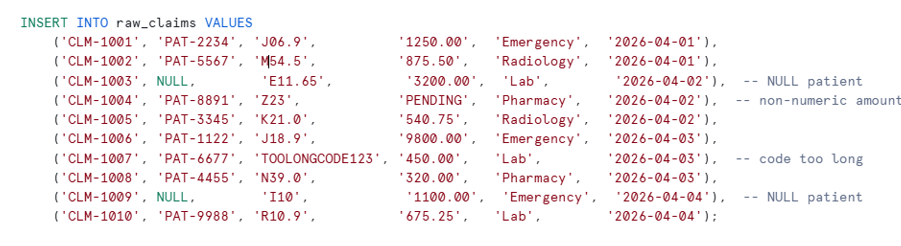
We have 10 claims in raw_claims. Four of them have deliberate defects:
Load claims — good rows go in, bad rows go to error table
INSERT INTO hospital_claims

SELECT

claim_id,

patient_id,

diagnosis_code,

claim_amount::NUMBER(10,2),

department,

claim_date

FROM raw_claims;
Result: 6 clean claims land in production. 4 defective rows are silently route to the error table — the batch does not abort.
STYPES:
Step 3 — Inspect: ERROR_TABLE() Tells You Exactly What Broke
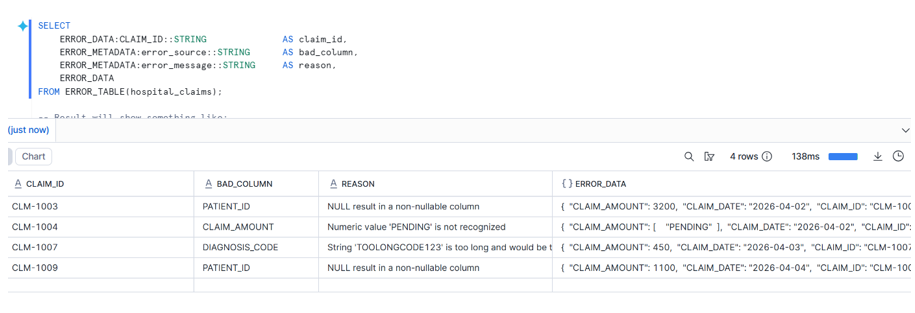
Snowflake provides the ERROR_TABLE() table function to query failures. It returns two key VARIANT columns:
- ERROR_DATA — the full original row as a JSON object.
- ERROR_METADATA — which column failed and the error message.
SELECT

ERROR_DATA:CLAIM_ID::STRING             AS claim_id,

ERROR_METADATA:error_source::STRING    AS bad_column,

ERROR_METADATA:error_message::STRING   AS reason,

ERROR_DATA

FROM ERROR_TABLE(hospital_claims);
Why this matters
You know the exact column and reason without writing any validation logic. The error table is queryable, joinable, and TRUNCATABLE — making it a first-class citizen in your pipeline.
Step 4A — AI Triage: Let Cortex Classify Every Failure
Now is where it gets exciting. Instead of writing CASE WHEN classification logic, we feed each failed row to AI_COMPLETE with a structured JSON schema and let Cortex AI do the triage.
Extract all failed rows into a working table so we can fix them:
CREATE OR REPLACE TABLE claims_to_fix AS

SELECT

ERROR_DATA:CLAIM_ID::STRING AS claim_id,

ERROR_DATA:PATIENT_ID::STRING AS patient_id,

ERROR_DATA:DIAGNOSIS_CODE::STRING AS diagnosis_code,

ERROR_DATA:CLAIM_AMOUNT::STRING AS claim_amount,

ERROR_DATA:DEPARTMENT::STRING AS department,

ERROR_DATA:CLAIM_DATE::DATE AS claim_date,

QUERY_ID,

ERROR_CODE,

ERROR_METADATA:error_source::STRING AS failed_column,

ERROR_METADATA:error_message::STRING AS error_reason

FROM ERROR_TABLE(hospital_claims);
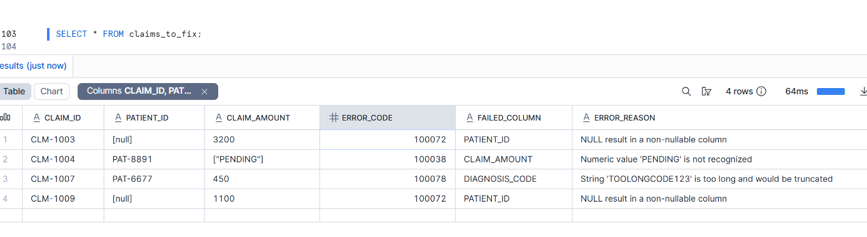
Now run the triage. The key insight is using AI_COMPLETE’s structured output schema — Snowflake enforces the JSON shape, so you get machine-parseable fields every time, not free-form text:
CREATE OR REPLACE TABLE claims_ai_triage (

claim_id VARCHAR,

query_id VARCHAR,

failed_column VARCHAR,

error_code VARCHAR,

issue_category VARCHAR,

severity VARCHAR,

business_explanation VARCHAR,

suggested_action VARCHAR,

target_team VARCHAR,

auto_fix_candidate BOOLEAN,

confidence_score NUMBER(5,2),

triaged_at TIMESTAMP DEFAULT CURRENT_TIMESTAMP()

);

INSERT INTO claims_ai_triage

SELECT

q.claim_id,

q.query_id,

q.failed_column,

q.error_code,

ai_result:issue_category::STRING AS issue_category,

ai_result:severity::STRING AS severity,

ai_result:business_explanation::STRING AS business_explanation,

ai_result:suggested_action::STRING AS suggested_action,

ai_result:target_team::STRING AS target_team,

ai_result:auto_fix_candidate::BOOLEAN AS auto_fix_candidate,

ai_result:confidence_score::NUMBER(5,2)AS confidence_score

FROM (

SELECT

claim_id, query_id, failed_column, error_code, error_reason,

patient_id, diagnosis_code, claim_amount, department,

PARSE_JSON(

AI_COMPLETE(

'llama3.1-70b',

'You are a hospital claims data-quality triage assistant. ' ||

'Analyze this failed row and return JSON only. ' ||

'Claim ID: ' || NVL(claim_id,'[null]') || '. ' ||

'Failed column: ' || NVL(failed_column,'[null]') || '. ' ||

'Error: ' || NVL(error_reason,'[null]') || '. ' ||

'Department: ' || NVL(department,'[null]'),

OBJECT_CONSTRUCT('temperature', 0),

{ /* structured output schema */

'type': 'json',

'schema': {

'type': 'object',

'properties': {

'issue_category': {'type': 'string'},

'severity': {'type': 'string'},

'business_explanation': {'type': 'string'},

'suggested_action': {'type': 'string'},

'target_team': {'type': 'string'},

'auto_fix_candidate': {'type': 'boolean'},

'confidence_score': {'type': 'number'}

}

}

}

)

) AS ai_result

FROM claims_to_fix

) q;
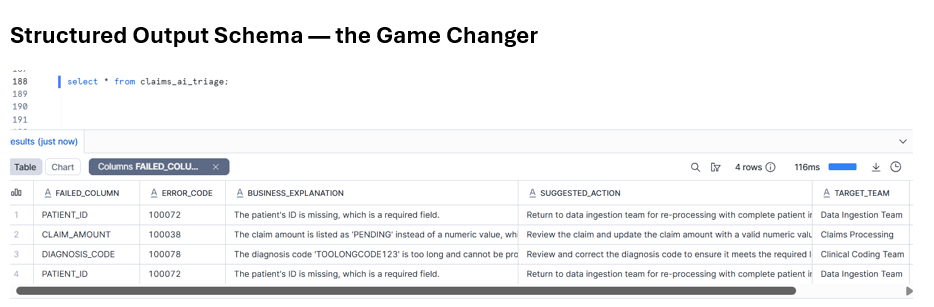
Step 4B — AI Auto-Fix: Repair Only What’s Safe to Touch
The triage step decided which rows are auto_fix_candidate = TRUE. Now we run three targeted UPDATE statements, each calling AI_COMPLETE to generate the corrected value, wrapped in REGEXP_SUBSTR to extract only the structured part.
Fix 1 — NULL Patient IDs
UPDATE claims_to_fix f

SET f.patient_id = REGEXP_SUBSTR(

AI_COMPLETE(

'llama3.1-70b',

'Generate one patient ID in format PAT-XXXX where X is a random digit. Output only the ID. Example: PAT-4821'

),

'PAT-[0-9]{4}'

)

WHERE f.failed_column = 'PATIENT_ID'

AND (f.patient_id IS NULL OR f.patient_id = '[null]')

AND EXISTS (

SELECT 1 FROM claims_ai_triage t

WHERE t.claim_id = f.claim_id

AND t.auto_fix_candidate = TRUE

);
Fix 2 — Invalid Claim Amounts (PENDING → estimated cost)
UPDATE claims_to_fix f

SET f.claim_amount = NVL(

REGEXP_SUBSTR(

AI_COMPLETE(

'llama3.1-70b',

'Estimate the average US hospital cost for a ' ||

NVL(f.department,'general') ||

' department claim with ICD-10 code ' ||

NVL(f.diagnosis_code,'unknown') ||

'. Output only a number with two decimals. Example: 350.00'

),

'[0-9]+\\.?[0-9]*' -- guardrail: numeric token only

),

'0.00' -- NVL fallback in case extraction fails

)

WHERE f.failed_column = 'CLAIM_AMOUNT'

AND TRY_CAST(f.claim_amount AS NUMBER(10,2)) IS NULL

AND EXISTS (

SELECT 1 FROM claims_ai_triage t

WHERE t.claim_id = f.claim_id AND t.auto_fix_candidate = TRUE

);
Step 5 — Re-Insert: Close the Loop
Before re-inserting, truncate the error table so we get a fresh read on the fixes :
TRUNCATE ERROR_TABLE(hospital_claims);
INSERT INTO hospital_claims

SELECT

claim_id,

patient_id,

diagnosis_code,

claim_amount::NUMBER(10,2),

department,

claim_date

FROM claims_to_fix;
— Verify the error table is empty
SELECT

ERROR_DATA:CLAIM_ID::STRING AS claim_id,

ERROR_METADATA:error_source::STRING AS bad_column,

ERROR_METADATA:error_message::STRING AS reason

FROM ERROR_TABLE(hospital_claims);
The Reusable Pattern
The Reusable Pattern
AI_COMPLETE generates · REGEXP_SUBSTR guards · INSERT consumes
- ERROR_LOGGING = TRUE is your first line of defense. It converts a binary pass/fail batch into a selective filter — valid data flows, invalid data is archive for inspection.
- ERROR_TABLE() gives you a structured audit trail with ERROR_DATA (the full row) and ERROR_METADATA (the exact column and reason). No custom error logging tables, no exception handlers.
- AI_COMPLETE with structured output schema replaces fragile CASE WHEN classification logic with contextual, LLM-powered triage. The auto_fix_candidate boolean gives you a programmatic gate.
- TRUNCATE ERROR_TABLE + re-INSERT closes the feedback loop. If a “fixed” row still fails, it reappears in the error table — giving you an iterative remediation cycle without extra infrastructure.
Conclusion
Snowflake’s ERROR_LOGGING = TRUE property is one of the most underutilised features in production pipelines. Combined with ERROR_TABLE() for precise introspection and AI_COMPLETE for intelligent triage and repair, you have a complete self-healing data pipeline that operates entirely within Snowflake — no external orchestration, no Python, no dbt macros required.