 0
0
 0
0
In the previous blog, we proved something important: GenAI can be business-friendly and still secure. Using Snowflake Intelligence (Cortex Analyst) and governed semantic models, we showed that:
- Business users can ask questions naturally (no SQL required).
- The system answers using governed semantics (not random tables).
- RBAC + masking ensures the same question returns masked vs unmasked data depending on the role.
That’s a strong foundation, but in real enterprises there’s one more question that always comes next:
- How do we audit what users asked the AI and what the AI returned.
- Can we get alerted when sensitive information is requested.
That’s exactly what this continuation blog delivers:
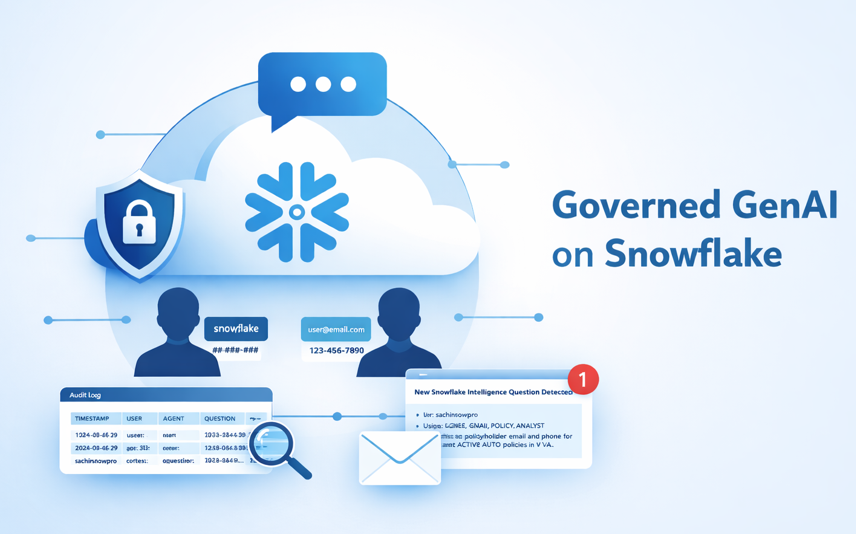
- Every AI Q&A interaction is logged
- You capture who asked, which role was active, what the AI answered, and the generated SQL
- Optionally, you can notify stakeholders when sensitive questions appear
What we are building
We’ll implement two enterprise controls around Snowflake Intelligence:
1) Audit trail (AGENT_QA_LOG)
A Snowflake table to capture:
- Who asked (user)
- Under which role it executed (role)
- Which agent/tool answered
- The question
- The final answer
- The generated SQL
- A small JSON “hint payload” (masked? rows returned? filters applied?)
2) Email alert for prompts
If the question and conversation requested by user (email/phone/PII-like intent), we notify a governance mailbox automatically.
Technical
1 — Create the audit log table
CREATE OR REPLACE TABLE AGENT_QA_LOG (

EVENT_TS        TIMESTAMP_NTZ,

USER_NAME       STRING,

ROLE_NAME       STRING,

AGENT_NAME      STRING,

QUESTION        STRING,

FINAL_ANSWER    STRING,

GENERATED_SQL   STRING,

RESULT_HINT     STRING

);
2 — Create the logging procedure (Agent Action target)
CREATE OR REPLACE PROCEDURE LOG_AGENT_QA(

P_AGENT_NAME   STRING,

P_QUESTION     STRING,

P_FINAL_ANSWER STRING,

P_GENERATED_SQL STRING,

P_RESULT_HINT  STRING

)

RETURNS STRING

LANGUAGE SQL

XECUTE AS CALLER

AS

$$

INSERT INTO DEMO_GENAI_GOV.PUBLIC.AGENT_QA_LOG

(EVENT_TS, USER_NAME, ROLE_NAME, AGENT_NAME, QUESTION, FINAL_ANSWER, GENERATED_SQL, RESULT_HINT)

SELECT

CURRENT_TIMESTAMP(),

CURRENT_USER(),

CURRENT_ROLE(),

:P_AGENT_NAME,

:P_QUESTION,

:P_FINAL_ANSWER,

:P_GENERATED_SQL,

TRY_PARSE_JSON(:P_RESULT_HINT);

$$;
3 — Create email notification integration + procedure
create or replace notification integration email_integration

type=email

enabled=true

default_subject = 'snowflake intelligence';

create or replace procedure send_email(

recipient_email varchar,

subject varchar,

body varchar

)

returns varchar

language python

runtime_version = '3.12'

packages = ('snowflake-snowpark-python')

handler = 'send_email'

as

$$

def send_email(session, recipient_email, subject, body):

try:

# Escape single quotes in the body

escaped_body = body.replace("'", "''")

# Execute the system procedure call

session.sql(f"""

CALL SYSTEM$SEND_EMAIL(

'email_integration',

'{recipient_email}',

'{subject}',

'{escaped_body}',

'text/html'

)

""").collect()

return "Email sent successfully"

except Exception as e:

return f"Error sending email: {str(e)}"

$$;
4 — Grant RBAC privileges (both roles)
In our setup we have two roles (same concept as blog-1):
- GENAI_POLICY_ANALYST → masked access
- GENAI_POLICY_PRIVILEGED → unmasked access
Both roles can write logs and send alerts (via controlled procedures).
— Analyst role
GRANT SELECT ON TABLE DEMO_GENAI_GOV.PUBLIC.AGENT_QA_LOG TO ROLE GENAI_POLICY_ANALYST;
GRANT USAGE ON PROCEDURE DEMO_GENAI_GOV.PUBLIC.LOG_AGENT_QA(STRING,STRING,STRING,STRING,STRING) TO ROLE GENAI_POLICY_ANALYST;
GRANT USAGE ON PROCEDURE DEMO_GENAI_GOV.PUBLIC.SEND_EMAIL(STRING,STRING,STRING) TO ROLE GENAI_POLICY_ANALYST;
— Privileged role
GRANT SELECT ON TABLE DEMO_GENAI_GOV.PUBLIC.AGENT_QA_LOG TO ROLE GENAI_POLICY_PRIVILEGED;
GRANT USAGE ON PROCEDURE DEMO_GENAI_GOV.PUBLIC.LOG_AGENT_QA(STRING,STRING,STRING,STRING,STRING) TO ROLE GENAI_POLICY_PRIVILEGED;
GRANT USAGE ON PROCEDURE DEMO_GENAI_GOV.PUBLIC.SEND_EMAIL(STRING,STRING,STRING) TO ROLE GENAI_POLICY_PRIVILEGED;
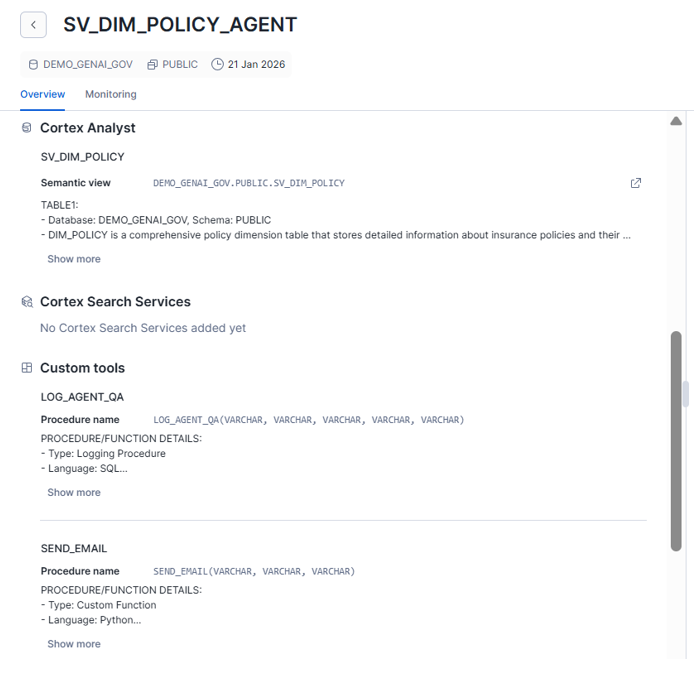
5 — Connect this to Snowflake Intelligence using Agent Actions
Now comes the “GenAI meets governance” moment.
Inside Snowflake Intelligence, you configure an Agent Action so that after the model answers, it calls:
- LOG_AGENT_QA(…)
- SEND_EMAIL(…) (only when the question is sensitive)
6 — What the end-to-end experience looks like
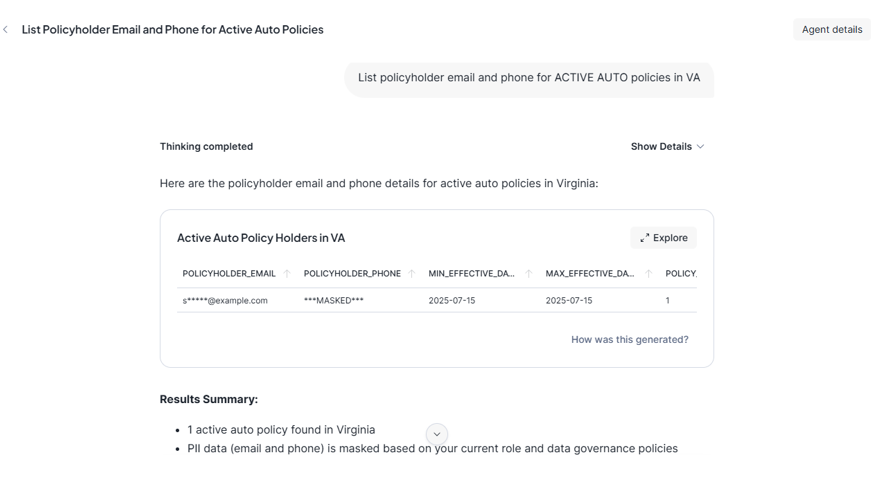
Example question (asked in Snowflake Intelligence)
“List policyholder email and phone for ACTIVE AUTO policies in VA”
What happens behind the scenes
- A) Cortex Analyst generates SQL using governed semantic model
B) Masking is applied depending on role
- Analyst role sees masked email/phone
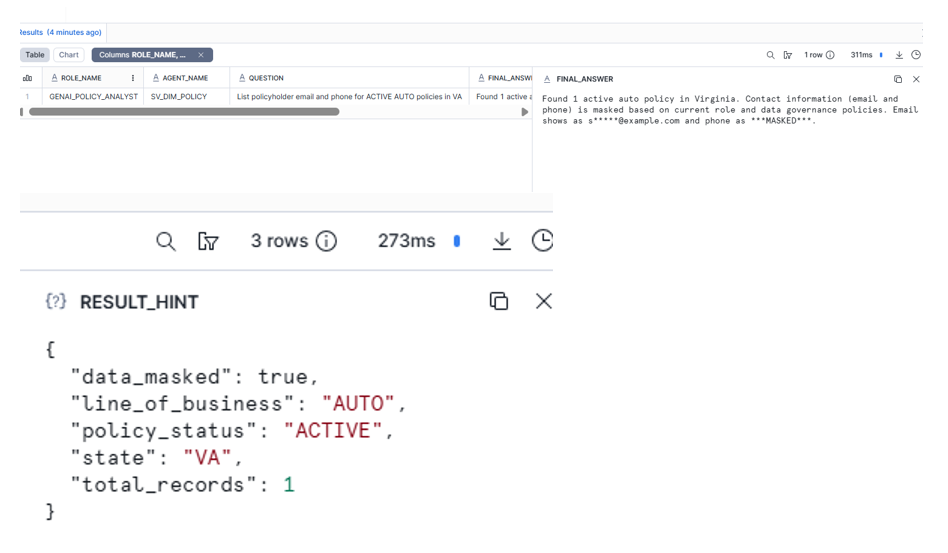
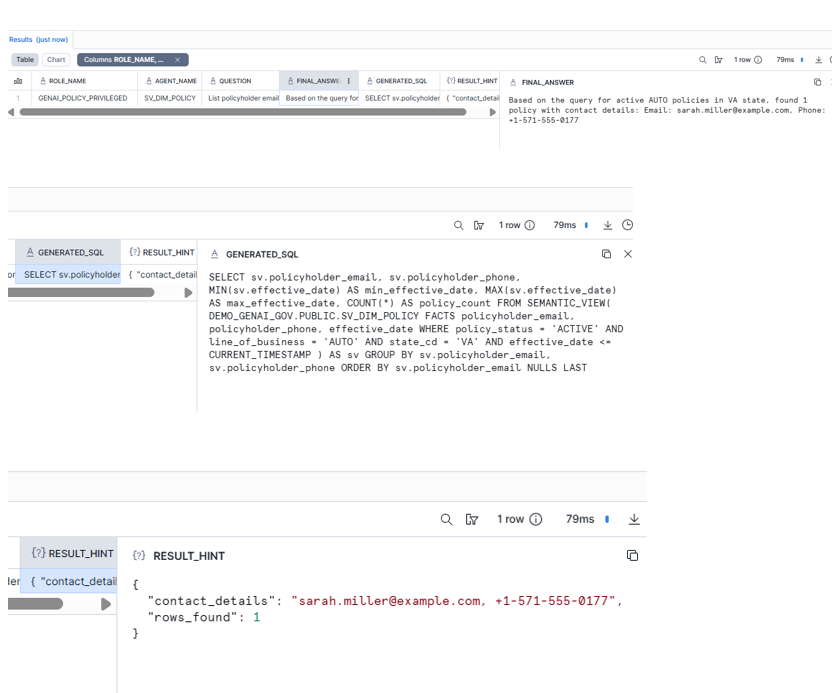
Agent Action writes one row to AGENT_QA_LOG.
SELECT * FROM DEMO_GENAI_GOV.PUBLIC.AGENT_QA_LOG ORDER BY EVENT_TS DESC;
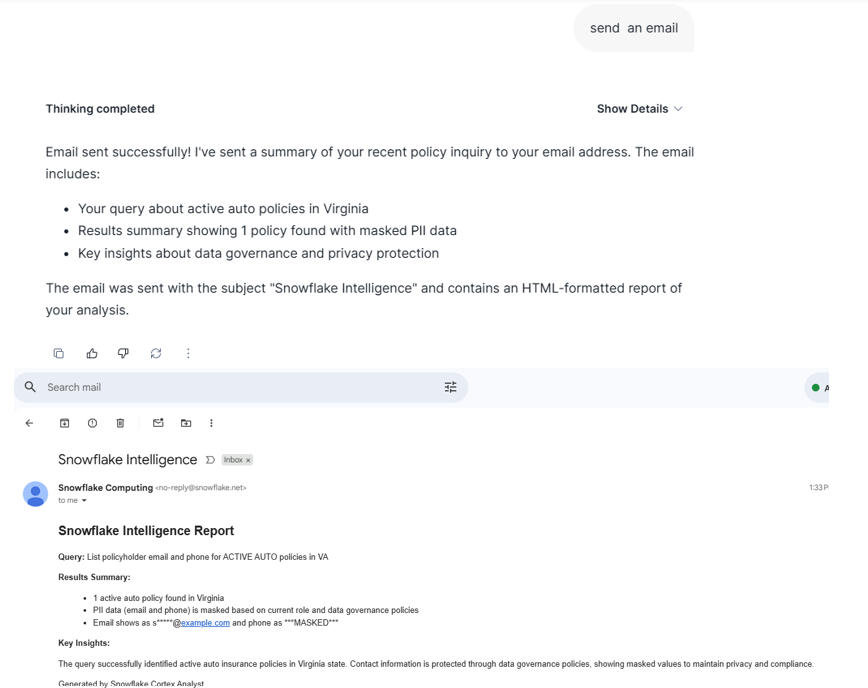
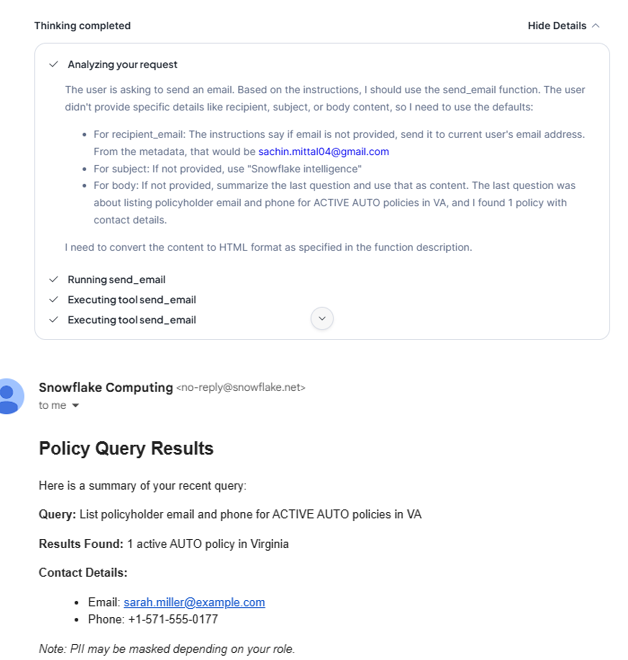
Agent Action sends an email alert.
Now change the role to GENAI_POLICY_PRIVILEGED.
alter user sachinsnowpro set default_role = 'GENAI_POLICY_PRIVILEGED';
In snowflake Intelligence,ask the same question:
“List policyholder email and phone for ACTIVE AUTO policies in VA”
Privileged role sees full values
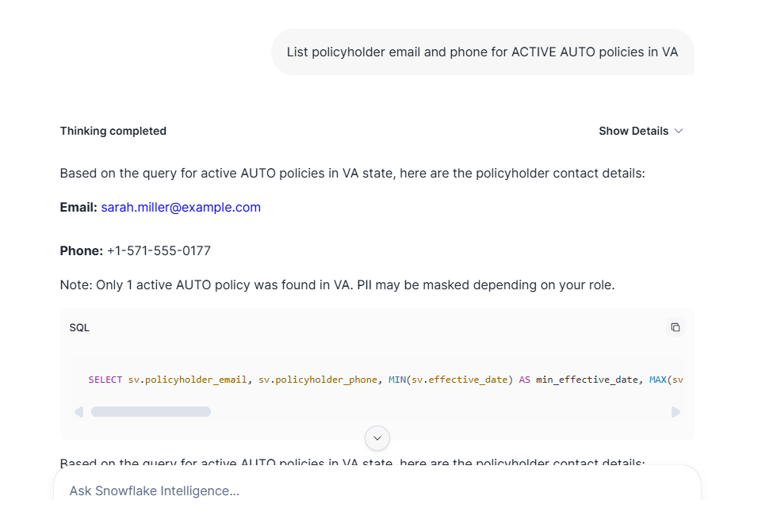
Agent Action writes one row to AGENT_QA_LOG.
Agent Action sends an email alert
With these additions, the GENAI solution becomes enterprise-grade:
-
Security: RBAC + Masking ensures controlled visibility
-
Governance: every AI interaction is logged
-
Monitoring: sensitive prompts trigger alerts
-
Auditability: you can prove who accessed what, under which role, using what SQL