 1
1
 0
0
In my previous article, I built an AI-powered resume screening and job matching solution in Snowflake. That version followed a more structured and deterministic approach:
- resumes were parsed from PDF
- candidate details were extracted
- candidate seniority was classified
- resumes and job descriptions were embedded
- candidates were ranked against jobs using vector similarity
That design worked well for questions like:
“Who are the top candidates for this job?”
But after publishing that solution, A few practical questions came up:
- How do we handle candidate profile updates over time?
- What happens when a candidate uploads a new resume and old skillsets become outdated?
- Can recruiters interact with the system in natural language instead of depending on predefined ranking logic?
- Can we make Cortex Search Service a meaningful part of the solution instead of just creating it and not using it?
Those questions led to this second version.
In this article, I’ll walk through how evolved the first design into a more advanced GenAI-powered hiring assistant built entirely in Snowflake using:
- Streamlit for interaction
- stage, stream, task, and stored procedure for ingestion and lifecycle management
- Cortex Search Service for retrieval
AI_COMPLETEfor recruiter-style reasoning
What is different in this version
The earlier solution was centered on deterministic candidate-job matching.
This solution introduces three major upgrades:
1. Candidate lifecycle management
A candidate can upload a new resume. The system should preserve history but use only the latest active version.
2. Cortex Search Service becomes meaningful
Instead of embedding all resumes and doing only pairwise ranking, we now use Cortex Search to retrieve the most relevant resumes for a recruiter’s question.
3. GenAI-based reasoning
Once relevant resumes are retrieved, AI_COMPLETE is used to generate a recruiter-style answer grounded in the retrieved resumes.
End-to-end architecture
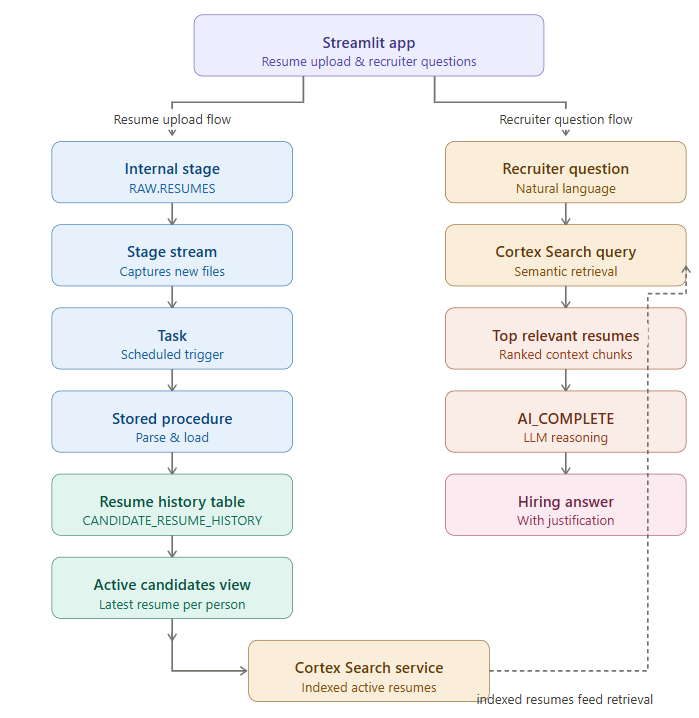
The full design now looks like this:
Step 1 — Use the same database, schemas, and resume stage in previous blog
Step 2 — Introduce candidate lifecycle tables
CREATE OR REPLACE TABLE SMART_HIRE.RAW.CANDIDATE_MASTER (

CANDIDATE_KEY VARCHAR,

EMAIL VARCHAR,

FULL_NAME VARCHAR,

CURRENT_VERSION NUMBER,

CURRENT_FILE_NAME VARCHAR,

IS_ACTIVE BOOLEAN,

CREATED_AT TIMESTAMP_NTZ DEFAULT CURRENT_TIMESTAMP(),

UPDATED_AT TIMESTAMP_NTZ DEFAULT CURRENT_TIMESTAMP()

);
CREATE OR REPLACE TABLE SMART_HIRE.RAW.CANDIDATE_RESUME_HISTORY (

CANDIDATE_KEY VARCHAR,

RESUME_VERSION NUMBER,

FILE_NAME VARCHAR,

FILE_SIZE_BYTES NUMBER,

UPLOAD_TIMESTAMP TIMESTAMP_NTZ,

IS_ACTIVE BOOLEAN,

FULL_NAME VARCHAR,

EMAIL VARCHAR,

PHONE VARCHAR,

LINKEDIN VARCHAR,

CONTACT_INFO VARIANT,

EXTRACTED_PROFILE VARIANT,

SENIORITY_CLASSIFICATION VARIANT,

RESUME_TEXT VARCHAR,

SOURCE_STAGE_PATH VARCHAR,

CREATED_AT TIMESTAMP_NTZ DEFAULT CURRENT_TIMESTAMP()

);
Why this step matters:
CANDIDATE_RESUME_HISTORYpreserves all uploaded resume versions.IS_ACTIVEidentifies the latest one.CANDIDATE_MASTERstores the current snapshot at candidate level.
Step 3 — Create a stream on the resume stage and Dummy table to consume Stream
CREATE OR REPLACE TABLE SMART_HIRE.OPERATIONS.NEW_RESUME_FILES (

FILE_NAME STRING,

ACTION STRING,

LOAD_TS TIMESTAMP_NTZ DEFAULT CURRENT_TIMESTAMP()

);
CREATE OR REPLACE STREAM SMART_HIRE.RAW.RESUMES_DIR_STREAM

ON STAGE SMART_HIRE.RAW.RESUMES;
Why this step matters:
Whenever a new resume PDF lands in the stage, the stream captures that change. This avoids manual monitoring of files and allows downstream automation.
Step 4 — Build the stored procedure to process each resume
This procedure does the real work.
It:
- identifies the uploaded file
- parses the PDF
- extracts contact details
- extracts technical profile details
- classifies seniority
- resolves candidate identity
- deactivates older active resume
- inserts the new active version
- updates the candidate master
CREATE OR REPLACE PROCEDURE SMART_HIRE.OPERATIONS.PROCESS_RESUME_BY_FILE(P_FILE_NAME STRING)

RETURNS STRING

LANGUAGE SQL

AS

$$

DECLARE

V_PARSED_CONTENT VARIANT;V_RESUME_TEXT STRING;V_CONTACT_INFO VARIANT;V_EXTRACTED_PROFILE VARIANT;

V_SENIORITY VARIANT;V_FULL_NAME STRING;

V_EMAIL STRING;

V_PHONE STRING;

V_LINKEDIN STRING;

V_CANDIDATE_KEY STRING;

V_NEXT_VERSION NUMBER;

V_FILE_SIZE_BYTES NUMBER;

V_UPLOAD_TIMESTAMP TIMESTAMP_NTZ;

BEGIN

SELECT

SIZE,

LAST_MODIFIED

INTO :V_FILE_SIZE_BYTES, :V_UPLOAD_TIMESTAMP

FROM DIRECTORY(@SMART_HIRE.RAW.RESUMES)

WHERE RELATIVE_PATH = :P_FILE_NAME;
SELECT AI_PARSE_DOCUMENT(

TO_FILE('@SMART_HIRE.RAW.RESUMES/' || :P_FILE_NAME),

{'mode': 'LAYOUT'}

) INTO :V_PARSED_CONTENT;

V_RESUME_TEXT := V_PARSED_CONTENT:content::STRING;

SELECT AI_EXTRACT(

text => :V_RESUME_TEXT,

responseFormat => {

'full_name': 'Full name of the candidate',

'email': 'Email address',

'phone': 'Phone number if available',

'linkedin': 'LinkedIn URL if available'

}

)

INTO :V_CONTACT_INFO;

V_FULL_NAME := V_CONTACT_INFO:response:full_name::STRING;

V_EMAIL := LOWER(V_CONTACT_INFO:response:email::STRING);

V_PHONE := V_CONTACT_INFO:response:phone::STRING;

V_LINKEDIN := V_CONTACT_INFO:response:linkedin::STRING;

SELECT AI_EXTRACT(

text => :V_RESUME_TEXT,

responseFormat => {

'technical_skills': 'List all technical tools, languages, and frameworks mentioned',

'years_experience': 'Total years of professional experience as a number',

'highest_education': 'Highest degree and university name',

'most_recent_role': 'Most recent job title',

'most_recent_company': 'Most recent employer name',

'key_achievements': 'Top 3 quantifiable achievements with metrics'

}

)::VARIANT

INTO :V_EXTRACTED_PROFILE;

SELECT AI_CLASSIFY(

:V_RESUME_TEXT,

['Entry Level (0-1 years)', 'Junior (1-3 years)', 'Mid-Level (3-5 years)', 'Senior (5-8 years)', 'Staff/Principal (8+ years)']

)

INTO :V_SENIORITY;

V_CANDIDATE_KEY := COALESCE(

V_EMAIL,

MD5(COALESCE(LOWER(V_FULL_NAME), 'UNKNOWN') || '|' || COALESCE(V_PHONE, ''))

);

SELECT COALESCE(MAX(RESUME_VERSION), 0) + 1

INTO :V_NEXT_VERSION

FROM SMART_HIRE.RAW.CANDIDATE_RESUME_HISTORY

WHERE CANDIDATE_KEY = :V_CANDIDATE_KEY;

UPDATE SMART_HIRE.RAW.CANDIDATE_RESUME_HISTORY

SET IS_ACTIVE = FALSE

WHERE CANDIDATE_KEY = :V_CANDIDATE_KEY

AND IS_ACTIVE = TRUE;

INSERT INTO SMART_HIRE.RAW.CANDIDATE_RESUME_HISTORY (

CANDIDATE_KEY,

RESUME_VERSION,

FILE_NAME,

FILE_SIZE_BYTES,

UPLOAD_TIMESTAMP,

IS_ACTIVE,

FULL_NAME,

EMAIL,

PHONE,

LINKEDIN,

CONTACT_INFO,

EXTRACTED_PROFILE,

SENIORITY_CLASSIFICATION,

RESUME_TEXT,

SOURCE_STAGE_PATH

)

SELECT

:V_CANDIDATE_KEY,

:V_NEXT_VERSION,

:P_FILE_NAME,

:V_FILE_SIZE_BYTES,

:V_UPLOAD_TIMESTAMP,

TRUE,

:V_FULL_NAME,

:V_EMAIL,

:V_PHONE,

:V_LINKEDIN,

:V_CONTACT_INFO,

:V_EXTRACTED_PROFILE,

:V_SENIORITY,

:V_RESUME_TEXT,

'@SMART_HIRE.RAW.RESUMES/' || :P_FILE_NAME;

MERGE INTO SMART_HIRE.RAW.CANDIDATE_MASTER T

USING (

SELECT

:V_CANDIDATE_KEY AS CANDIDATE_KEY,

:V_EMAIL AS EMAIL,

:V_FULL_NAME AS FULL_NAME,

:V_NEXT_VERSION AS CURRENT_VERSION,

:P_FILE_NAME AS CURRENT_FILE_NAME

) S

ON T.CANDIDATE_KEY = S.CANDIDATE_KEY

WHEN MATCHED THEN UPDATE SET

EMAIL = S.EMAIL,

FULL_NAME = S.FULL_NAME,

CURRENT_VERSION = S.CURRENT_VERSION,

CURRENT_FILE_NAME = S.CURRENT_FILE_NAME,

IS_ACTIVE = TRUE,

UPDATED_AT = CURRENT_TIMESTAMP()

WHEN NOT MATCHED THEN INSERT (

CANDIDATE_KEY,

EMAIL,

FULL_NAME,

CURRENT_VERSION,

CURRENT_FILE_NAME,

IS_ACTIVE

)

VALUES (

S.CANDIDATE_KEY,

S.EMAIL,

S.FULL_NAME,

S.CURRENT_VERSION,

S.CURRENT_FILE_NAME,

TRUE

);

INSERT INTO SMART_HIRE.OPERATIONS.NEW_RESUME_FILES (FILE_NAME, ACTION)

SELECT RELATIVE_PATH, METADATA$ACTION

FROM SMART_HIRE.RAW.RESUMES_DIR_STREAM

WHERE METADATA$ACTION = 'INSERT';

RETURN 'Processed file: ' || P_FILE_NAME || ' for candidate key: ' || V_CANDIDATE_KEY;

END;

$$;
Why this step matters
This is where the lifecycle logic becomes real.
If a candidate uploads a new resume:
- the old version is not deleted
- the old version becomes inactive
- the new version becomes active
- the latest profile is now available for retrieval and AI
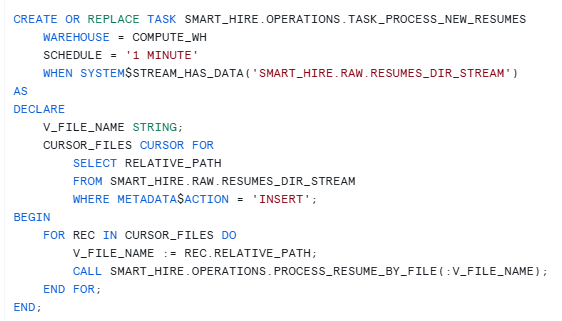
Step 5 — Trigger processing automatically using a task
The stream detects file arrival. The task makes processing automatic.
Tasks
Step 6 — Build the active candidate view
We only want the latest valid profile used in search and reasoning.
CREATE OR REPLACE VIEW SMART_HIRE.ENRICHED.ACTIVE_CANDIDATES AS

SELECT *

FROM SMART_HIRE.RAW.CANDIDATE_RESUME_HISTORY

WHERE IS_ACTIVE = TRUE;With this view:
- search uses only the latest profile
- AI uses only the latest profile
- history remains available for audit
Step 7 — Create Cortex Search Service on active resumes only
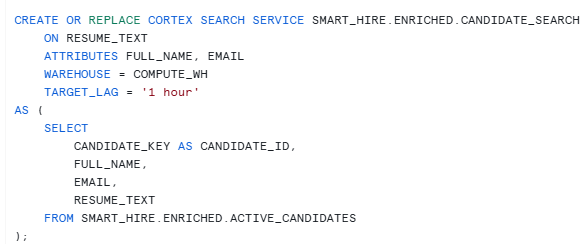
The search service retrieves the most relevant active candidate profiles for a recruiter’s question. That means:
- no outdated resume versions
- no need to scan all resumes manually
- a proper retrieval layer for RAG
Step 8 — Use Streamlit for resume upload and recruiter interaction
The Streamlit app now does two jobs:
- upload/update resume
- ask recruiter questions in natural language

Step 9 — Understand the GenAI layer properly
This is important.
Cortex Search retrieves the top relevant candidates, but it does not make the final hiring decision.
That job belongs to the LLM.
So the design is:
- CSS retrieves
- LLM reasons
This is why the prompt became extremely important during testing.
Final thoughts
In the previous article, I showed how to build a structured candidate-job matching engine in Snowflake.
In this article, I extended that design into a more advanced Gen AI-based assistant that can:
- accept resume updates
- preserve profile history
- keep only the latest profile active
- retrieve relevant candidates using Cortex Search
- answer hiring questions in natural language using
AI_COMPLETE
This makes the solution closer to how recruiters actually work.