 2
2
 0
0
PDF Resumes to AI-Powered Hiring Decisions: Recruitment teams often work with two very different types of data at the same time:
- Unstructured data like resumes in PDF format
- Structured data like job postings, roles, and required skills
Traditionally, this kind of use case would require multiple systems: a document parser, an NLP pipeline, a vector database, an LLM orchestration layer, and then a dashboard on top.But with Snowflake Cortex AI functions, we can design this solution entirely inside Snowflake.
In this blog, We will walk through a working implementation of Smart Hire, an AI-powered resume screening and job matching engine built with:
AI_PARSE_DOCUMENTAI_EXTRACTAI_CLASSIFYAI_EMBEDVECTOR_COSINE_SIMILARITYAI_COMPLETECORTEX SEARCH SERVICEStreamlit in Snowflake
The Problem We Are Solving
A recruiter typically wants answers to questions like:
- Which candidates are the best fit for a specific job?
- Can I automatically extract name, email, experience, and skills from resumes?
- Can I classify candidates by seniority?
- Can I semantically match resumes with job descriptions instead of relying only on keyword matching?
- Can recruiters consume this through a UI instead of writing SQL?
That means we need to solve four technical problems:
- Read and parse resumes in PDF format
- Convert resume text into structured candidate attributes
- Compare candidate profiles against job requirements
- Present results in a recruiter-friendly form
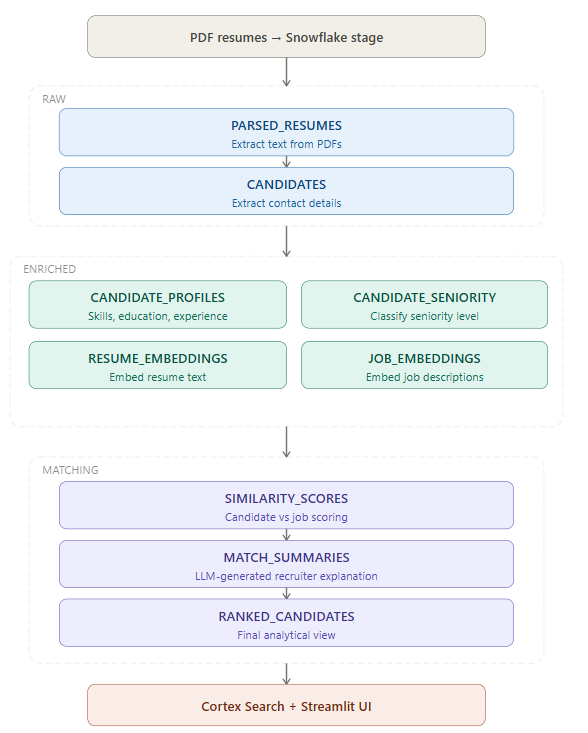
To make this maintainable, I split the design into three logical layers:
RAWENRICHEDMATCHING
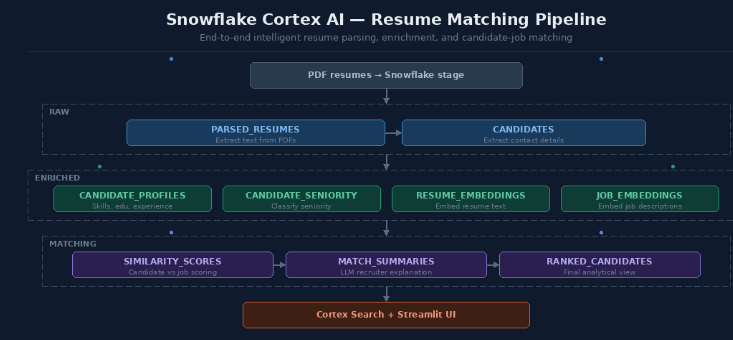
Solution Architecture
The flow looks like this:
Step 0 — Database, Schemas, and Resume Stage
CREATE DATABASE IF NOT EXISTS SMART_HIRE;
CREATE SCHEMA IF NOT EXISTS SMART_HIRE.RAW;
CREATE SCHEMA IF NOT EXISTS SMART_HIRE.ENRICHED;
CREATE SCHEMA IF NOT EXISTS SMART_HIRE.MATCHING;
CREATE OR REPLACE STAGE SMART_HIRE.RAW.RESUMES

DIRECTORY = (ENABLE = TRUE) ENCRYPTION = (TYPE = 'SNOWFLAKE_SSE');
Step 1 — Upload Resume PDFs
Step 2 — Store Job Postings as Structured Input
CREATE OR REPLACE TABLE SMART_HIRE.RAW.JOB_POSTINGS (

JOB_ID VARCHAR PRIMARY KEY,

JOB_TITLE VARCHAR,

DEPARTMENT VARCHAR,

LOCATION VARCHAR,

JOB_TYPE VARCHAR,

EXPERIENCE_REQ VARCHAR,

SALARY_RANGE VARCHAR,

JOB_DESCRIPTION VARCHAR,

REQUIRED_SKILLS VARCHAR,

POSTED_DATE DATE,

STATUS VARCHAR DEFAULT 'OPEN'

);
Why we did this
A matching engine always needs two sides:
- candidate information
- job requirements
Resumes arrive as unstructured PDFs, but job postings are already structured enough to store directly in a relational table.
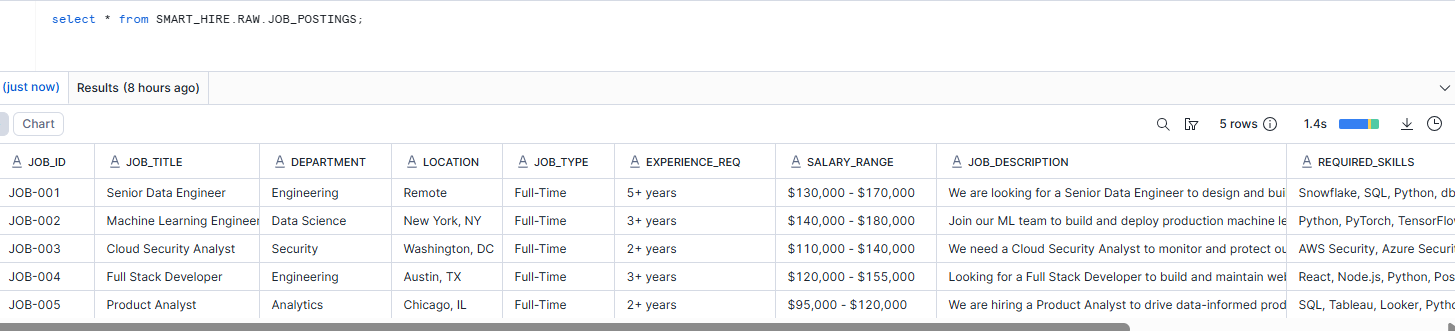
comparison.
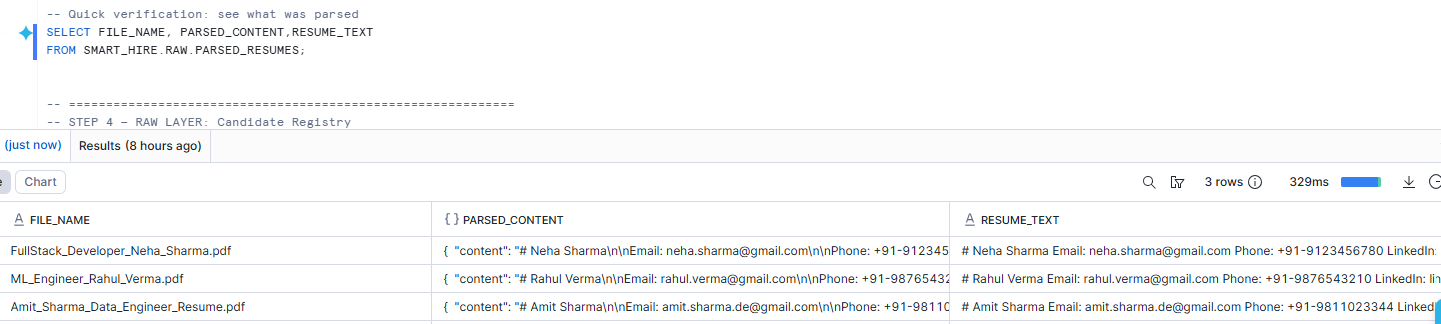
Step 3 — Parse Resume PDFs into Text
CREATE OR REPLACE TABLE SMART_HIRE.RAW.PARSED_RESUMES AS

SELECT

RELATIVE_PATH AS FILE_NAME,

SIZE AS FILE_SIZE_BYTES,

LAST_MODIFIED AS UPLOAD_TIMESTAMP,

AI_PARSE_DOCUMENT(

TO_FILE('@SMART_HIRE.RAW.RESUMES', RELATIVE_PATH),

{'mode': 'LAYOUT'}

) AS PARSED_CONTENT,

PARSED_CONTENT:content::VARCHAR AS RESUME_TEXT

FROM DIRECTORY(@SMART_HIRE.RAW.RESUMES)

WHERE RELATIVE_PATH ILIKE '%.pdf';
Why we did this
This is the first major transformation in the pipeline.
Recruiters do not upload JSON or rows. They upload resumes, and resumes are usually PDFs. So the first challenge is: how do we turn a document into usable text without leaving Snowflake?
That is exactly why AI_PARSE_DOCUMENT is so valuable here.Because it lets us extract the textual content of a PDF inside Snowflake.
Step 4 — Build the Candidate Registry
CREATE OR REPLACE TABLE SMART_HIRE.RAW.CANDIDATES AS

WITH base AS (

SELECT

'CAND-' || LPAD(ROW_NUMBER() OVER (ORDER BY FILE_NAME)::VARCHAR, 4, '0') AS CANDIDATE_ID,

FILE_NAME,

UPLOAD_TIMESTAMP AS APPLIED_DATE,

AI_EXTRACT(

text => RESUME_TEXT,

responseFormat => {

'full_name': 'Full name of the candidate',

'email': 'Email address',

'phone': 'Phone number if available',

'linkedin': 'LinkedIn URL if available'

}

) AS CONTACT_INFO,

RESUME_TEXT

FROM SMART_HIRE.RAW.PARSED_RESUMES

)

SELECT

CANDIDATE_ID,

FILE_NAME,

APPLIED_DATE,

CONTACT_INFO,

CONTACT_INFO:response:full_name::VARCHAR AS FULL_NAME,

CONTACT_INFO:response:email::VARCHAR AS EMAIL,

CONTACT_INFO:response:phone::VARCHAR AS PHONE,

CONTACT_INFO:response:linkedin::VARCHAR AS LINKEDIN,

CONTACT_INFO:error::VARCHAR AS EXTRACT_ERROR,

RESUME_TEXT

FROM base;
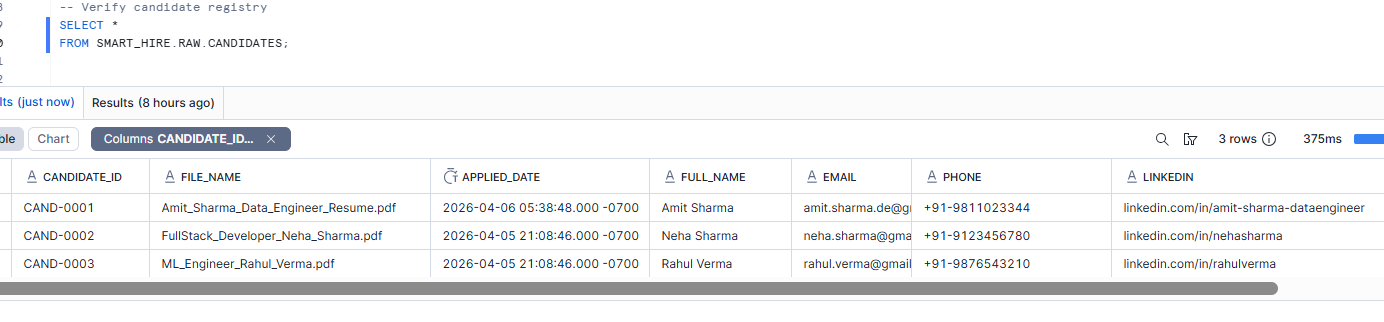
Why we did this
At this stage, the resume is still just text. That is useful, but it is not recruiter-friendly yet.A recruiter wants immediately identifiable fields like:
- name
- phone
This is why I created a separate CANDIDATES table.
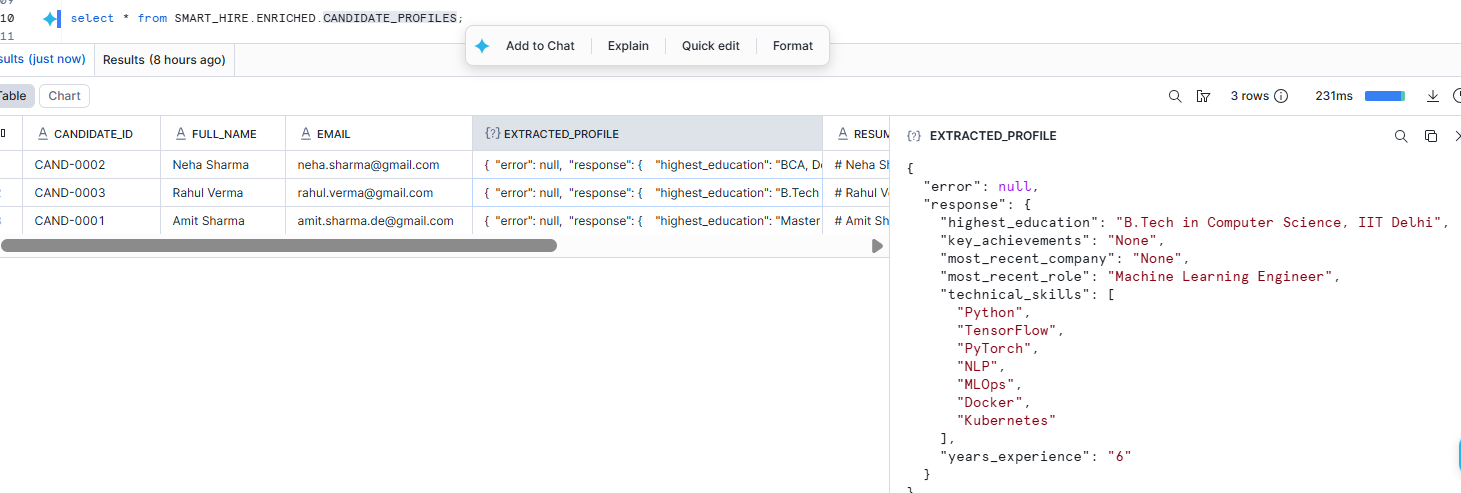
Step 5 — Extract Deeper Candidate Attributes
CREATE OR REPLACE TABLE SMART_HIRE.ENRICHED.CANDIDATE_PROFILES AS

SELECT

c.CANDIDATE_ID,

c.FULL_NAME,

c.EMAIL,

AI_EXTRACT(

text => c.RESUME_TEXT,

responseFormat => {

'technical_skills': 'List all technical tools, languages, and frameworks mentioned',

'years_experience': 'Total years of professional experience as a number',

'highest_education': 'Highest degree and university name',

'most_recent_role': 'Most recent job title',

'most_recent_company': 'Most recent employer name',

'key_achievements': 'Top 3 quantifiable achievements with metrics'

}

)::VARIANT AS EXTRACTED_PROFILE,

c.RESUME_TEXT,

c.APPLIED_DATE

FROM SMART_HIRE.RAW.CANDIDATES c;
Why we did this
Contact information is not enough to rank candidates. We need deeper business attributes that a recruiter would actually care about.
This table enriches each candidate profile with hiring-relevant information.
Step 6 — Classify Candidate Seniority
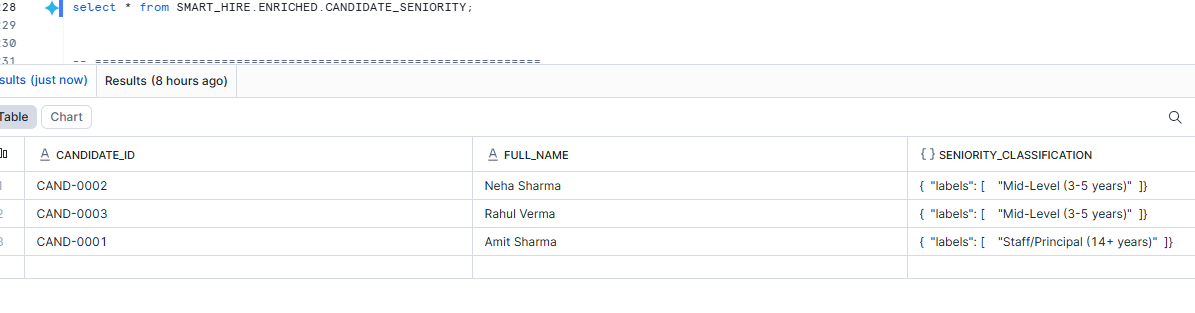
CREATE OR REPLACE TABLE SMART_HIRE.ENRICHED.CANDIDATE_SENIORITY AS

SELECT

c.CANDIDATE_ID,

c.FULL_NAME,

AI_CLASSIFY(

c.RESUME_TEXT,

['Entry Level (0-1 years)', 'Junior (1-3 years)', 'Mid-Level (3-5 years)', 'Senior (5-8 years)', 'Staff/Principal (14+ years)']

) AS SENIORITY_CLASSIFICATION

FROM SMART_HIRE.RAW.CANDIDATES c;
Why we did this
Years of experience as a raw number is useful, but recruiters also think in business labels like:
- Junior
- Mid-Level
- Senior
- Staff/Principal
This step translates raw resume content into one of those categories.
Step 7 — Generate Embeddings for Semantic Matching
CREATE OR REPLACE TABLE SMART_HIRE.ENRICHED.RESUME_EMBEDDINGS AS

SELECT

CANDIDATE_ID,

FULL_NAME,

AI_EMBED('snowflake-arctic-embed-l-v2.0', RESUME_TEXT) AS RESUME_VECTOR

FROM SMART_HIRE.RAW.CANDIDATES;
CREATE OR REPLACE TABLE SMART_HIRE.ENRICHED.JOB_EMBEDDINGS AS

SELECT

JOB_ID,

JOB_TITLE,

AI_EMBED(

'snowflake-arctic-embed-l-v2.0',

JOB_TITLE || ' ' || JOB_DESCRIPTION || ' ' || REQUIRED_SKILLS

) AS JOB_VECTOR FROM SMART_HIRE.RAW.JOB_POSTINGS;
Why embed both sides?
Because matching is a comparison problem. We need both:
- candidate representation
- job representation
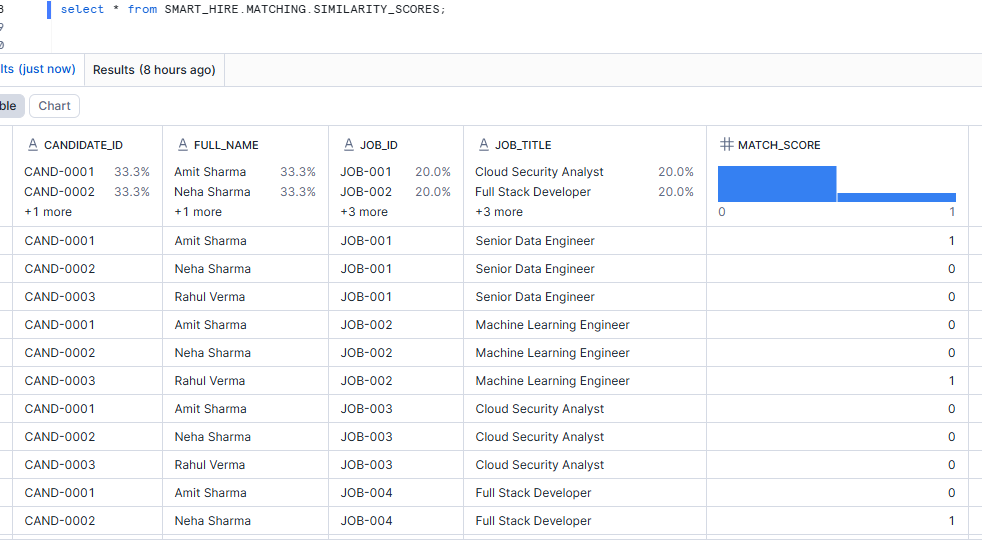
Step 8 — Calculate Candidate-to-Job Similarity
CREATE OR REPLACE TABLE SMART_HIRE.MATCHING.SIMILARITY_SCORES AS

SELECT

r.CANDIDATE_ID,

r.FULL_NAME,

j.JOB_ID,

j.JOB_TITLE,

ROUND(VECTOR_COSINE_SIMILARITY(r.RESUME_VECTOR, j.JOB_VECTOR)::NUMERIC, 4) AS MATCH_SCORE

FROM SMART_HIRE.ENRICHED.RESUME_EMBEDDINGS r

CROSS JOIN SMART_HIRE.ENRICHED.JOB_EMBEDDINGS j;
Now that we have semantic vectors, we need a measurable score between each candidate and each job.
That is what VECTOR_COSINE_SIMILARITY gives us.
Why CROSS JOIN?
Because at this stage, the goal is to compare every candidate against every job. This gives us a full candidate-job scoring matrix.
Step 9 — Generate Recruiter-Friendly Summaries
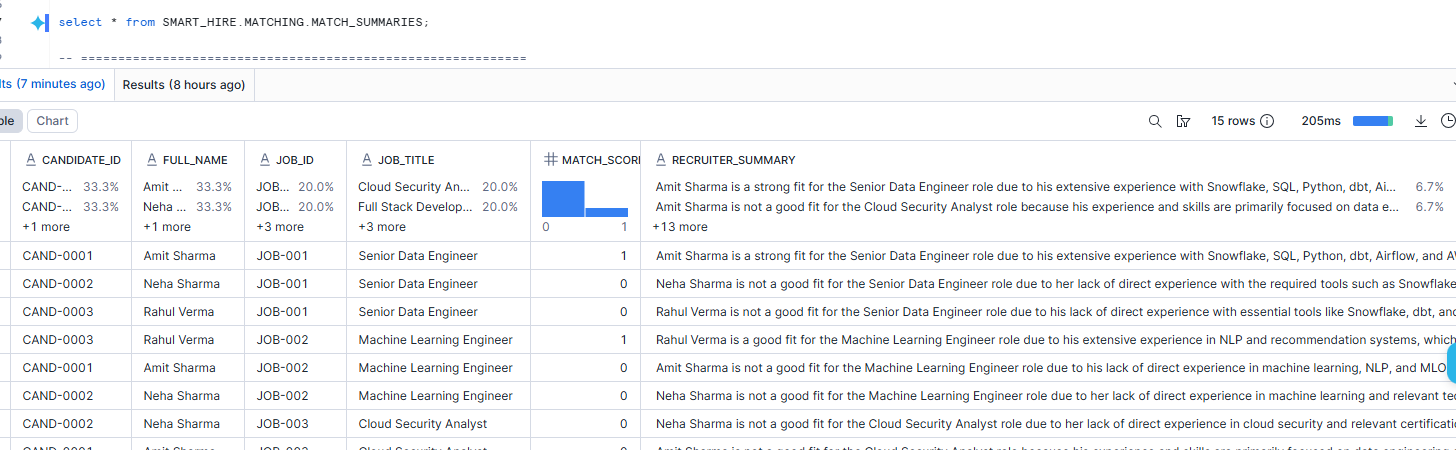
CREATE OR REPLACE TABLE SMART_HIRE.MATCHING.MATCH_SUMMARIES AS

WITH TOP_MATCHES AS (

SELECT *

FROM SMART_HIRE.MATCHING.SIMILARITY_SCORES

QUALIFY ROW_NUMBER() OVER (PARTITION BY JOB_ID ORDER BY MATCH_SCORE DESC) <= 3

)

SELECT

tm.CANDIDATE_ID,

tm.FULL_NAME,

tm.JOB_ID,

tm.JOB_TITLE,

tm.MATCH_SCORE,

AI_COMPLETE(

'mistral-large2',

'You are an expert HR recruiter. Given the job description and candidate resume below, write a concise 3-sentence assessment explaining:

1) Why this candidate is or is not a good fit

2) Their strongest relevant qualification

3) Any gap or concern
JOB: ' || jp.JOB_TITLE || ' — ' || jp.JOB_DESCRIPTION || '

REQUIRED SKILLS: ' || jp.REQUIRED_SKILLS || '
CANDIDATE RESUME: ' || c.RESUME_TEXT

)::VARCHAR AS RECRUITER_SUMMARY

FROM TOP_MATCHES tm

JOIN SMART_HIRE.RAW.JOB_POSTINGS jp ON tm.JOB_ID = jp.JOB_ID

JOIN SMART_HIRE.RAW.CANDIDATES c ON tm.CANDIDATE_ID = c.CANDIDATE_ID;
Why we did this
A match score is useful to engineers, but not enough for recruiters.Recruiters want explanation, not just numbers.
This step converts raw scoring into a short business narrative.
Step 10 — Create the Final Recruiter-Facing View
This view is where the pipeline becomes consumable.
Instead of making downstream users join multiple tables, we expose one consolidated recruiter-facing view.
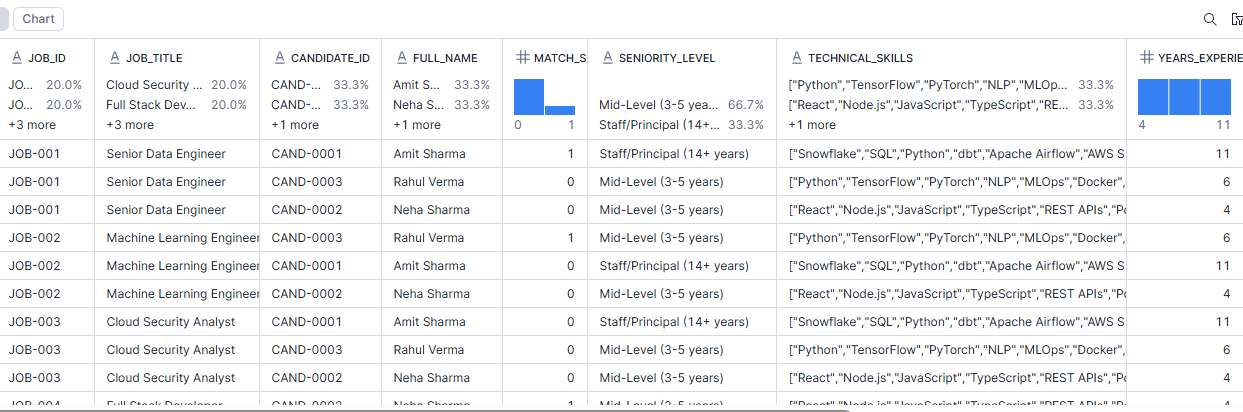
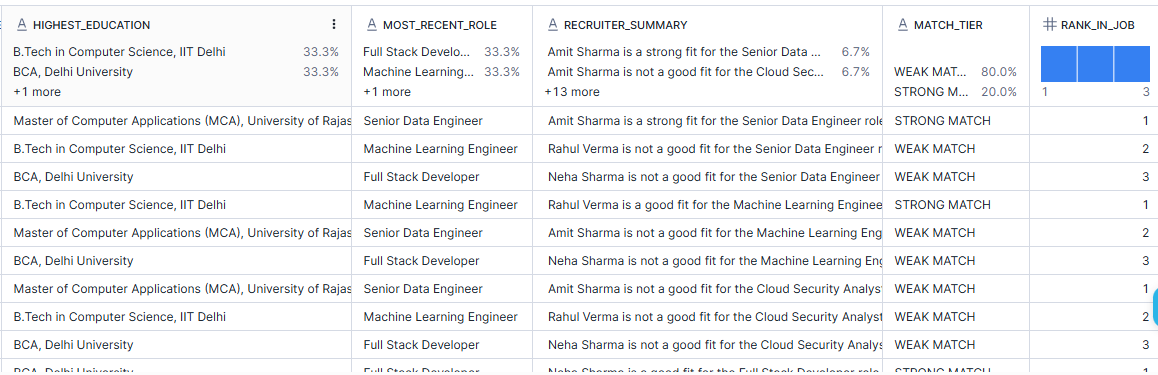
Best candidate per job
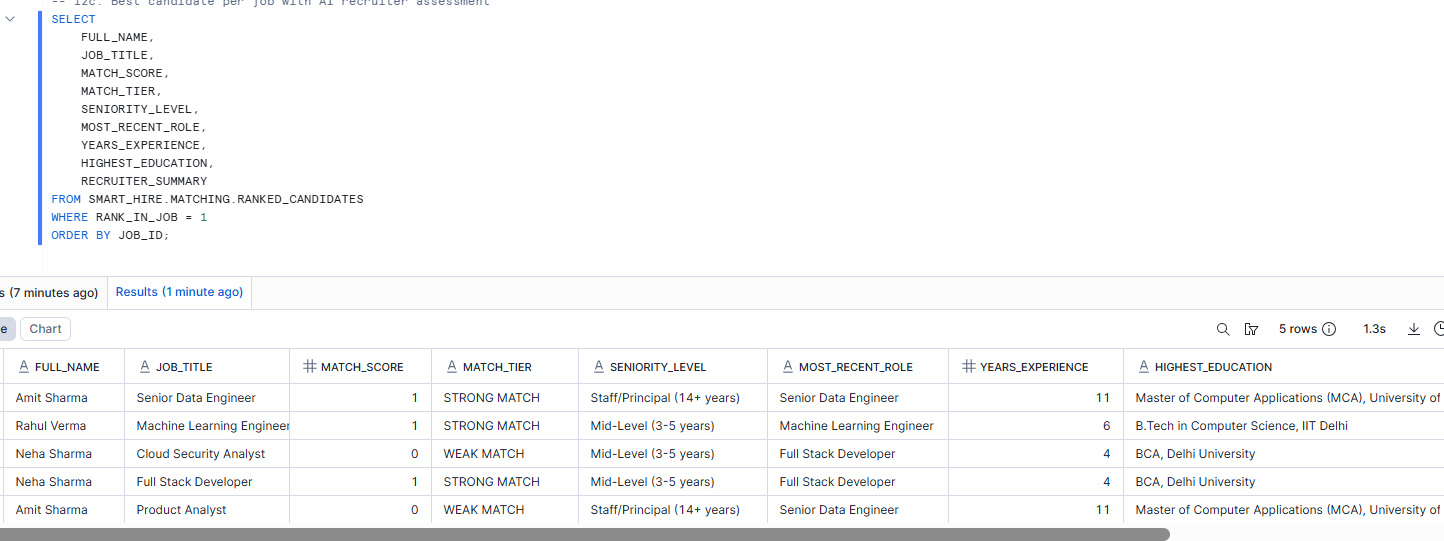
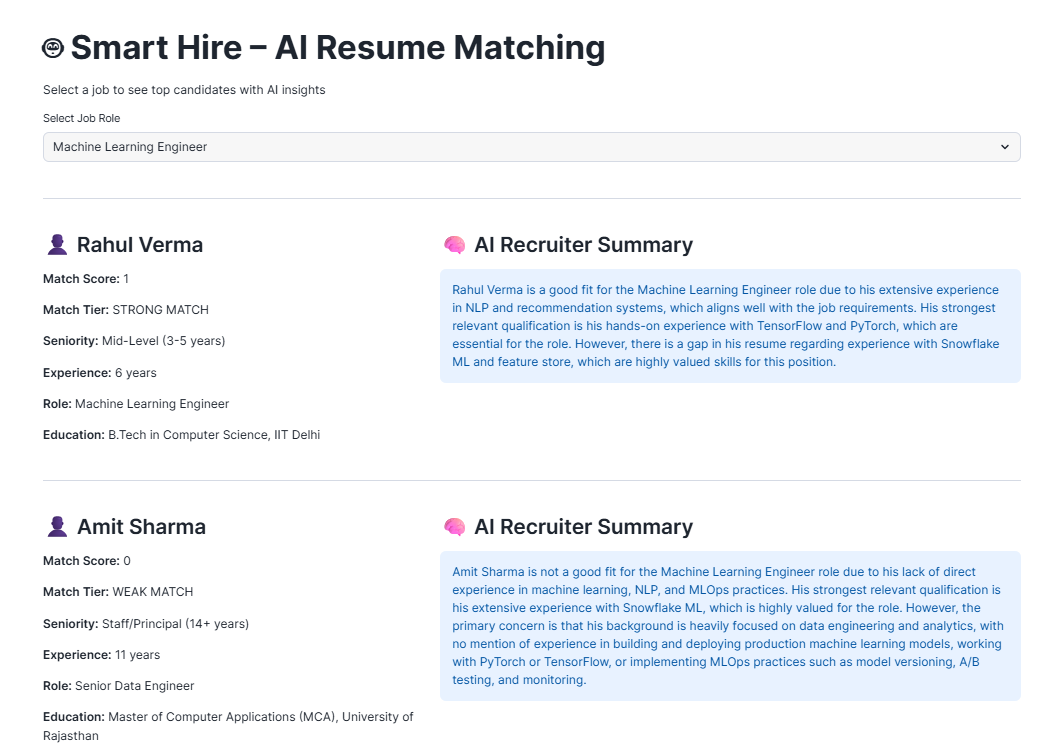
Step 11 — Add a Streamlit Recruiter UI
Your Streamlit layer is the final step that turns the solution from a technical demo into an actual business-facing application.
Why we did this
Most recruiters are not going to run SQL queries.
A simple Streamlit app allows them to:
- select a job
- see top candidates
- review scores and seniority
- read AI-generated summaries